[2026] Guide to Grim Dawn Builds & Custom 3D Asset Creation
2026年3月15日
If you’re searching for the absolute best Grim Dawn builds to survive the fractured world of Cairn, you’re in the right place, but we are going much deeper than a standard stat sheet. We are going to analyze the core mechanics using real community data, and crucially, deconstruct the 3D visual aesthetics that make these top-tier builds look as incredible as they perform.

Furthermore, we know many of you searching for these builds are actually modders, technical artists, or indie developers inspired by Crate Entertainment's ARPG masterpiece. You don't just want to play; you want to create. By the end of this guide, you won't just know the meta—you will learn how the aesthetics of these builds can inspire your own game development, and how an AI 3D model generator like Triverse AI can help you generate custom, engine-ready 3D weapons and armor in minutes.
Decoding the Meta: 3 Specific Top Community Builds Analysed
The core of Grim Dawn’s depth is its Dual-Mastery system. When players talk about Grim Dawn builds, they are really talking about how your masteries, gear, and Devotion tree work together to push the limits of the Shattered Realm (SR) or the Crucible.
If you are looking for a comprehensive ranking of the absolute bleeding-edge meta, the community-curated Top 20 Softcore Builds (End of Forgotten Gods Edition - 1.2.1.6) on the official Crate Entertainment forums—featuring input from hardcore legends like RektbyProtoss—is mandatory reading.
However, for this guide, we are looking at the meta through a different lens. We have selected three specific, highly optimized setups from across the community to analyze not just for their raw stats via Grim Dawn Tool, but for their incredible 3D visual aesthetics.
However, for this guide, we are looking at the meta through a different lens. We have selected three specific, highly-optimized setups from across the community to analyze their skill synergies, devotion pathing, leveling viability, and crucially, their incredible 3D visual aesthetics. Let's break down their mechanics and look at why their visual design makes them so satisfying to play—and so challenging to mod.
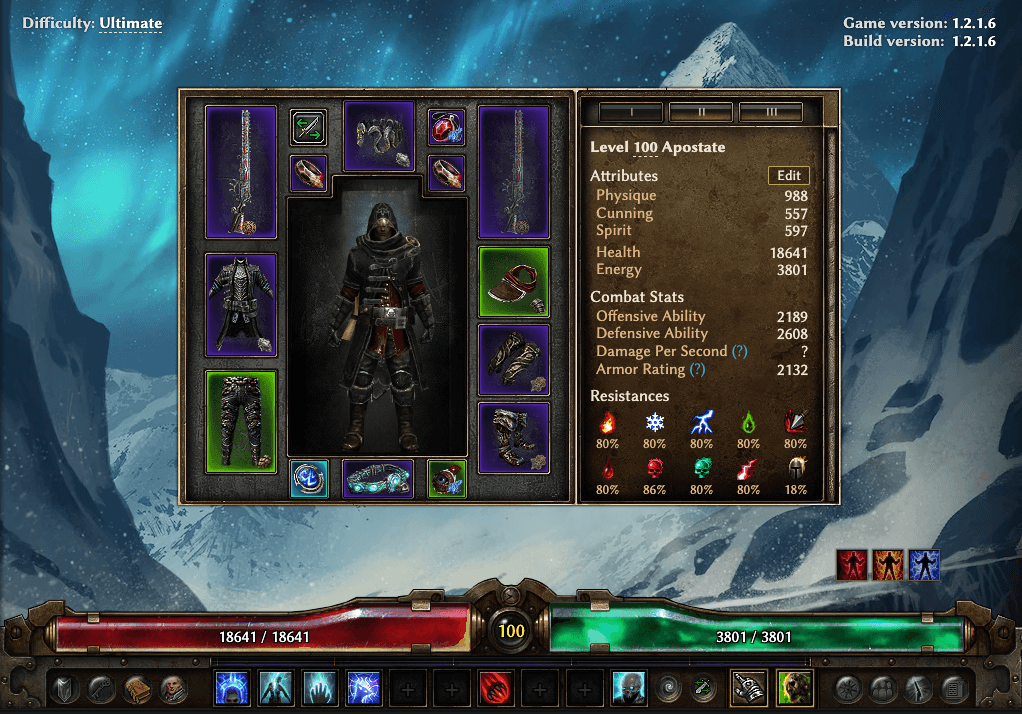
1. The Chaos Pet Apostate (Inquisitor + Necromancer)
- The Build: https://www.grimtools.com/calc/2GW3JWl2 (Credit: AutomatorMC)
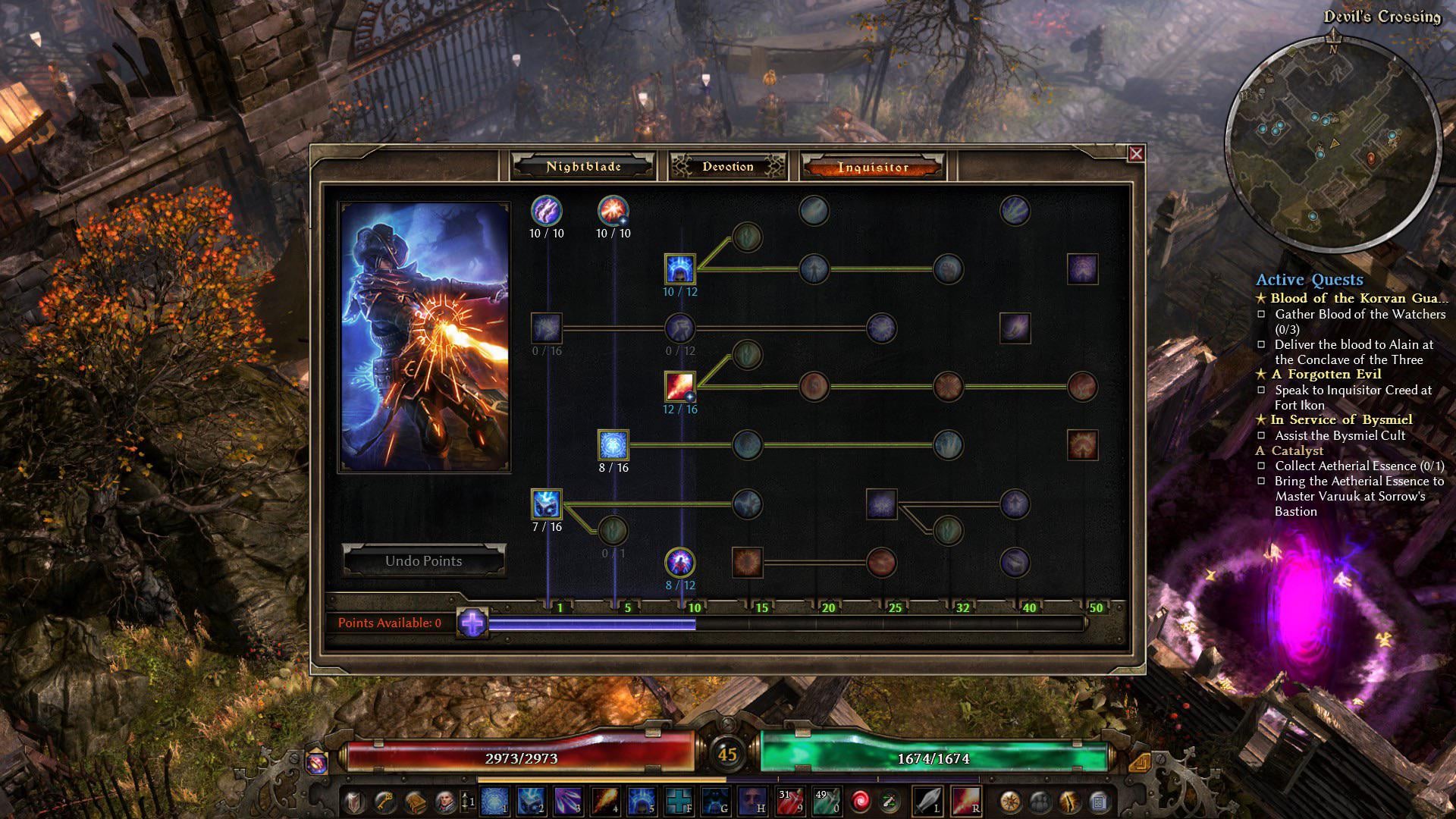
- Skill Tree & Devotion Synergies: The backbone of this build is the Necromancer's Raise Skeletons and Summon Blight Fiend, supported by the Inquisitor's Word of Renewal for massive group healing. In the Devotion tree, this build makes a beeline for Dying God and Fiend. By binding Flame Torrent (from Fiend) to the skeletons, every pet becomes a spinning vortex of Chaos and Fire damage.

- Leveling Strategy & Beginner Viability: Pet builds are inherently beginner-friendly because your minions draw aggro. You can level smoothly by simply maxing out Raise Skeletons early on. However, transitioning this specific build into the endgame is not for beginners, as it relies on specific damage-conversion gear to change standard pet damage into Chaos.
- Decoding the Stats & Gear: To survive SR pushes, this character boasts a massive 18,641 Health. This is achieved through perfectly rolled "Double Rare" Monster Infrequents (MIs) like the "Dominator's Bysmiel-Sect Legguards of the Wild," which injects up to +736 Health while granting massive "Bonus to All Pets" (+82% All Damage).
- The 3D Aesthetic & The Modding Challenge: Visually, this character is a striking patchwork of cultist and undead aristocracy. The grim, layered leather duster is contrasted by the bone-and-cloth aesthetic of the Zantarin shoulders. For a 3D artist or modder, the ultimate challenge is material blending—accurately simulating how hard, organic surfaces (bone) connect to soft dynamics (tattered robes) in a game engine.
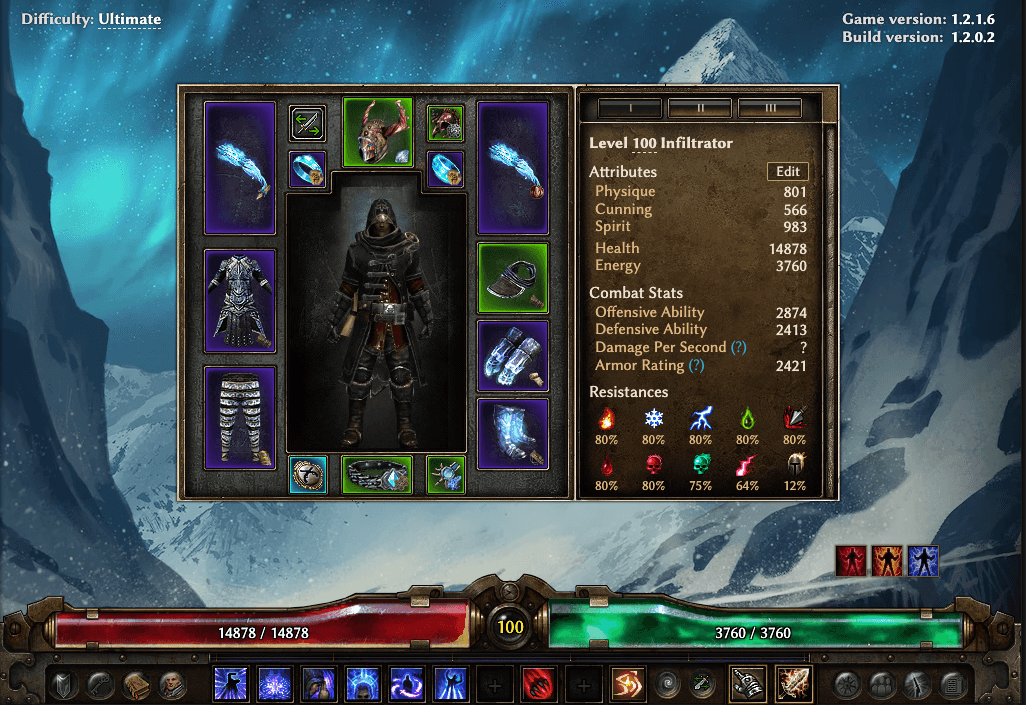
2. The Cold Gunslinger (Infiltrator)
- The Build: https://www.grimtools.com/calc/YZerk9pN
- Skill Tree & Devotion Synergies: This dual-wielding Infiltrator (Nightblade + Inquisitor) relies on Inquisitor Weapon Pool Skills (WPS) like Chilling Rounds to trigger massive burst damage. The Devotion setup is strictly focused on Cold Resistance Reduction (RR). You must path towards Murmur, Mistress of Rumors (for Rumor) and Amatok the Spirit of Winter to freeze crowds and shatter bosses.

- Leveling Strategy & Beginner Viability: This is not recommended for absolute beginners. Leveling a dual-wield ranged character requires constant kiting and positioning. It is highly gear-dependent and incredibly squishy until you secure endgame lifesteal (Attack Damage Converted to Health - ADCtH) and defensive devotions like Ghoul.
- Decoding the Stats & Mechanics: This build is a masterclass in Damage Conversion, achieving a lethal 2,874 Offensive Ability (OA). The specific helm, "Overseer's Namadea's Horns of Frostbite", uses built-in skill modifiers to convert 100% of Vindictive Flame's Fire and Physical damage directly into Cold damage, creating a hyper-optimized engine of frost destruction.
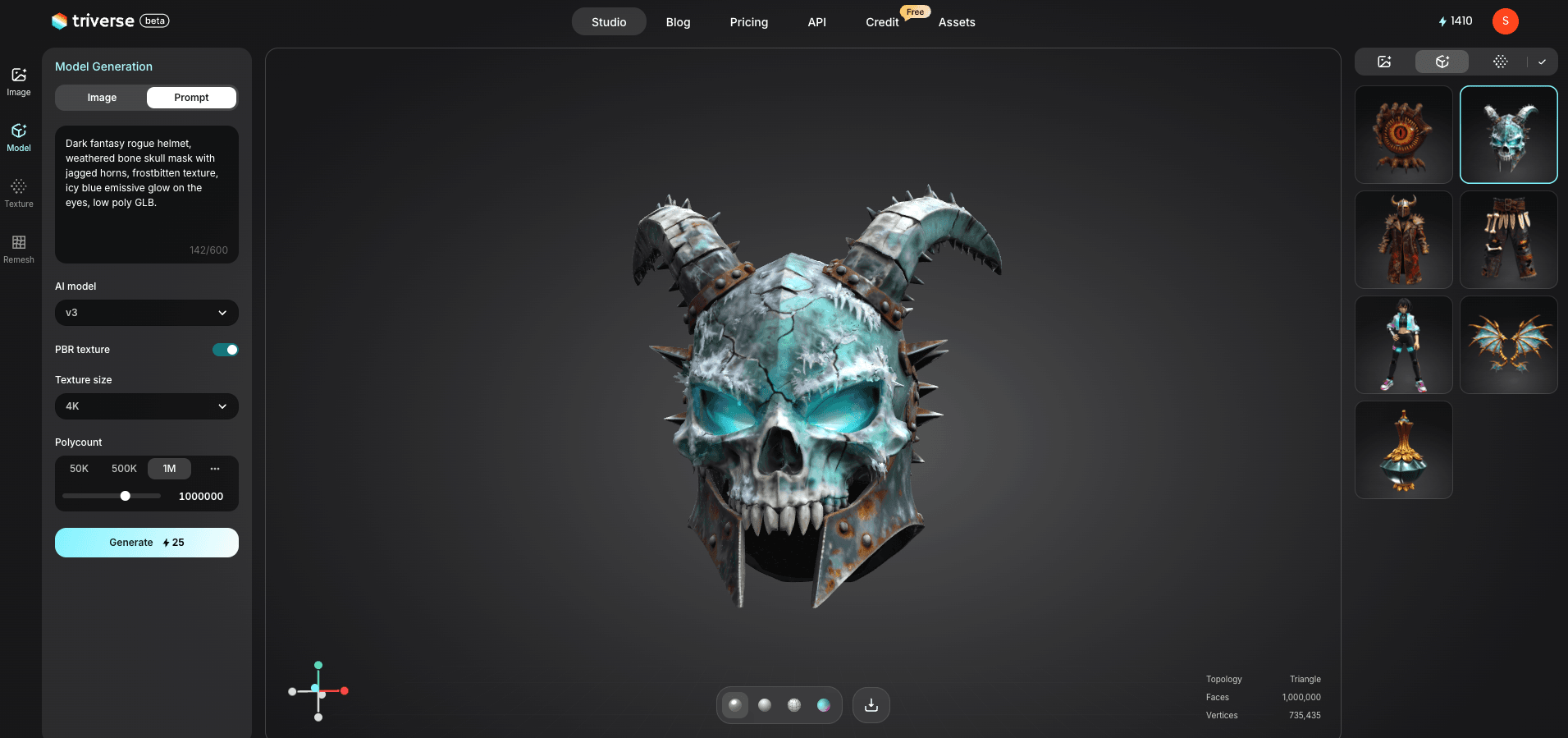
- The 3D Aesthetic & The Modding Challenge: The visual identity here is the "Arctic Assassin." The character combines standard rogue-like leather armor with incredibly distinct, brutalist headgear—the Namadea's Horns, a literal bone helm with protruding horns—while dual-wielding firearms that glow with icy particle effects. Creating organic, weathered bone textures alongside glowing emissives usually takes hours of manual high-poly sculpting.
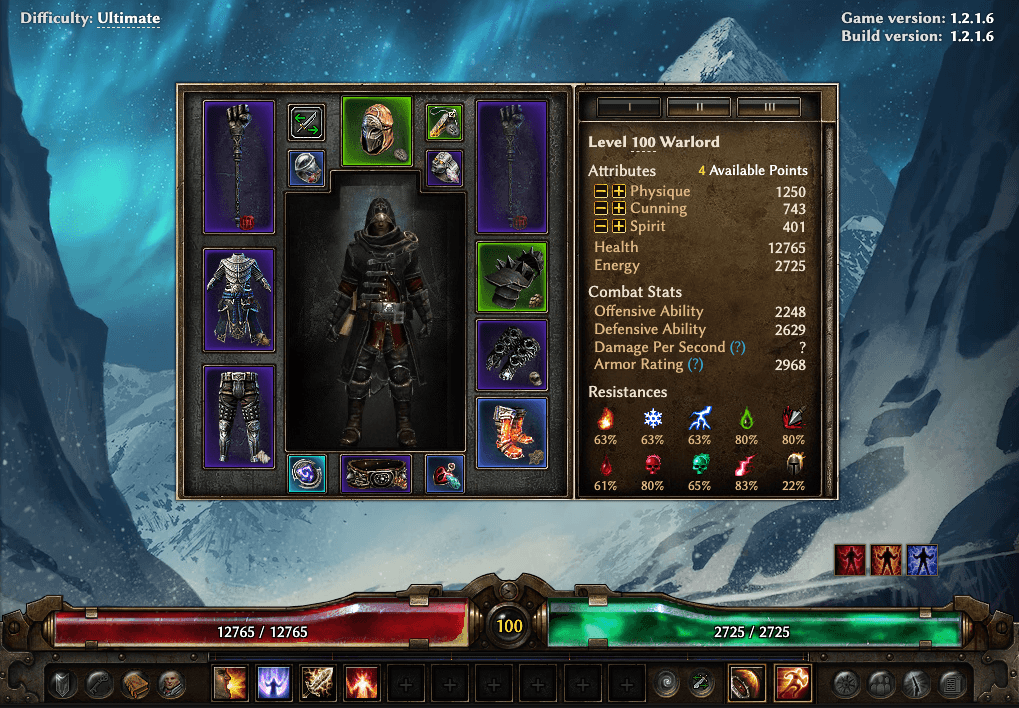
3. The Physical Forcewave Juggernaut (Warlord)
- The Build: https://www.grimtools.com/calc/62aepa32
- Leveling Strategy & Beginner Viability (The Ultimate Starter): If you are a beginner, this is your build. The strategy is beautifully simple: equip the biggest two-handed weapon you can find, put one point into the Tremor transmuter to remove the cooldown on Forcewave, and spam it. It clears entire screens of enemies from Level 1 to Level 100 with almost zero gear dependency.

- Skill Tree & Devotion Synergies: The Soldier's Forcewave is your only attack. You support it with the Oathkeeper's Presence of Virtue for energy regeneration and offensive stats. Devotion-wise, you rush Assassin's Blade immediately for Physical Resistance Reduction, then grab Kraken (the ultimate devotion for two-handed weapons) to massively spike your DPS.
- Decoding the Stats & Gear: Look at the headpiece: the "Ordered Chosen Gaze of Ruin" (a Rare MI). This helm grants +3 to Forcewave, but more importantly, it directly injects 110 flat Physical Damage into the skill. Combined with a massive 1250 point investment in Physique, this pushes the character to 12,765 Health and a 2968 Armor Rating. It is a mobile artillery unit.
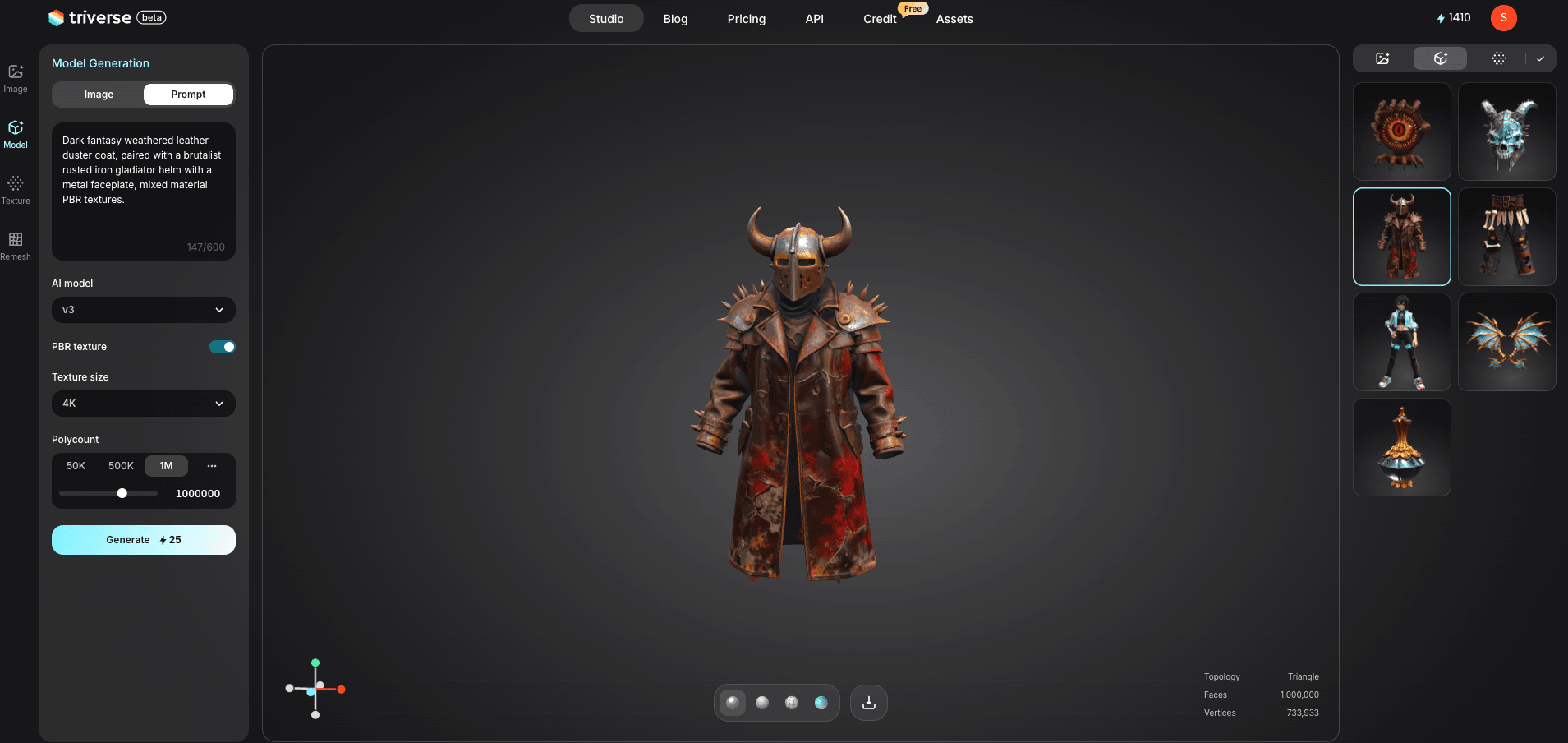
- The 3D Aesthetic & The Modding Challenge: The visual reality of this build completely breaks the "walking metal box" stereotype. The character wears a dark, worn leather duster coat, contrasted sharply by brutalist, spiked hard-surface metal pieces like the Chosen Gaze faceplate helm. Balancing the roughness of worn leather with the metallic sheen of rusted iron requires complex, multi-layered PBR texture setups.
The Modder's Dilemma: The Bottleneck of Custom ARPG Assets
You’ve played these meta builds. You've studied the Grimtools links. You’ve probably thought, "It would be amazing to create a custom, glowing green Aether sword for my Deathknight mod, or a completely new bone-armor set for my Necromancer."
Crate Entertainment provides powerful modding tools, allowing players to create new masteries, items, and entire campaigns. However, the modding community and face a massive, often insurmountable barrier: 3D Asset Creation.
Creating a single, high-quality, game-ready weapon or armor piece using a traditional workflow is a grueling marathon:
- Concept & Blockout: Sketching the idea.
- High-poly sculpt: Detailing bone, leather, and metal in ZBrush (hours or days).
- Retopology: Manually drawing a low-poly mesh over the high-poly sculpt so the game engine doesn't crash (hours).
- UV Mapping: Unwrapping the 3D model into a flat 2D plane (hours of frustration).
- Baking and Texturing: Applying PBR materials in Substance Painter (hours).
For a solo developer or a modder working in their free time, this bottleneck is the number one reason custom ARPG projects lose momentum.
Bonus: Generating ARPG 3D Model Assets with Triverse AI
This is where the paradigm shifts from analysis to creation.
For dark fantasy ARPG assets—the kind that need to look gritty, heavy, and battle-worn, Triverse AI is a helpful solution for developers today. It excels at interpreting complex prompts and generating models with optimized topology and automatic PBR texturing, cutting that "sculpt-to-engine" workflow down to mere minutes.
Here is a practical workflow demonstrating how to generate custom assets inspired by the exact Grim Dawn builds we just analyzed.
Step 1: Ideation and Prompting
Your first step is defining the visual characteristics. Instead of struggling for hours with ZBrush to model the complex mixed materials we saw in the top meta builds, you can simply translate those aesthetics into descriptive prompts for Triverse AI.
Here is how you would prompt Triverse to instantly generate the complex aesthetics of the builds we analyzed earlier:
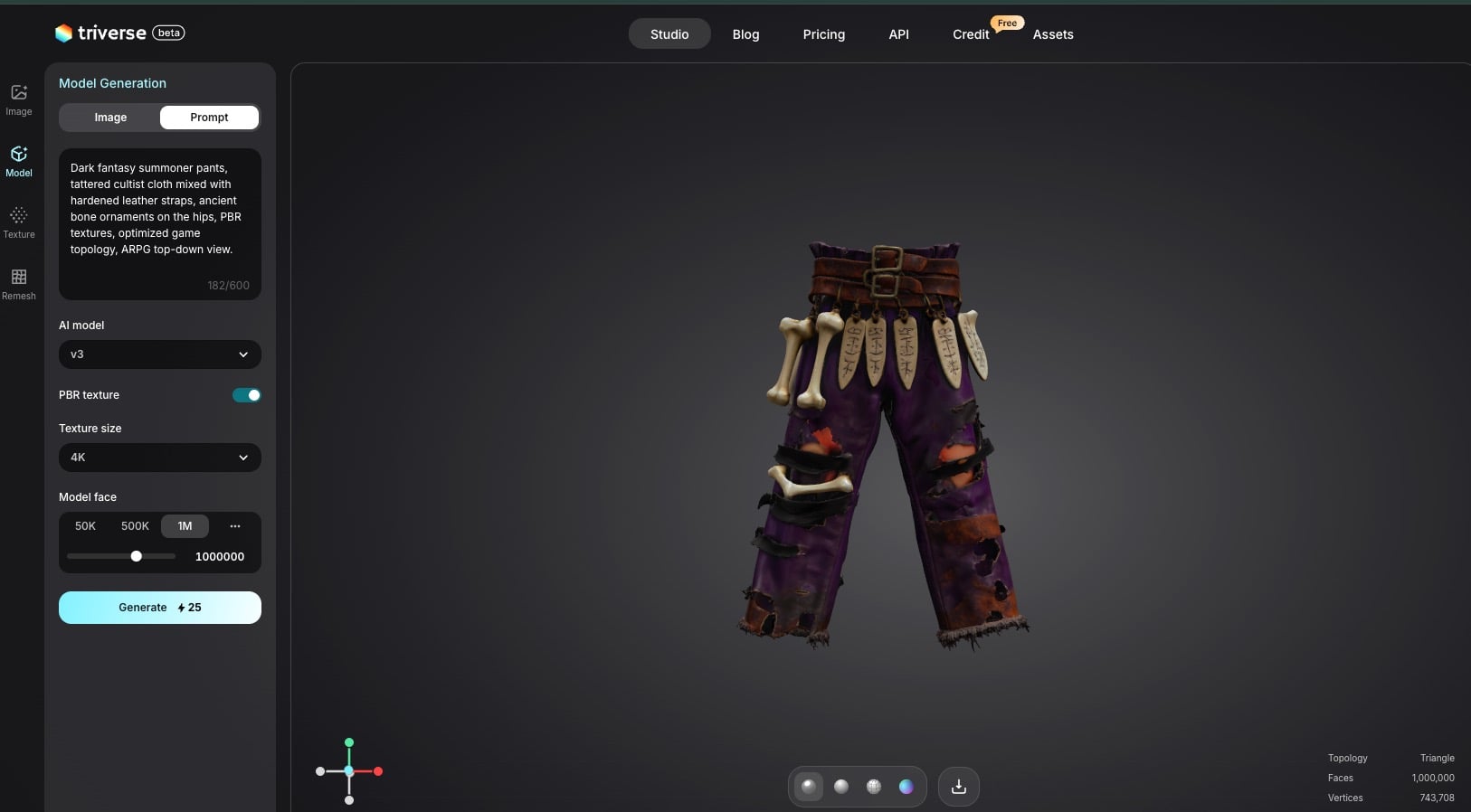
- For the Chaos Pet Apostate (Bone & Cloth Mix):
Dark fantasy summoner pants, tattered cultist cloth mixed with hardened leather straps, ancient bone ornaments on the hips, PBR textures, optimized game topology, ARPG top-down view.
- For the Cold Gunslinger (Organic Skull & Emissive Ice):
Dark fantasy rogue helmet, weathered bone skull mask with jagged horns, frostbitten texture, icy blue emissive glow on the eyes, low poly GLB.
- For the Forcewave Warlord (Leather & Rusted Iron):
Dark fantasy weathered leather duster coat, paired with a brutalist rusted iron gladiator helm with a metal faceplate, mixed material PBR textures.
Step 2: Refining and Texturing
Once Triverse generates the initial model, you aren't just stuck with a flat image. You get a full 3D model with separated texture maps. You can use its built-in texturing tools to refine the PBR channels. For dark fantasy games, increasing the Metallic and Roughness values creates realistic, weathered iron, while boosting the Emissive channel makes those Aetherial or Chaos glows really pop on screen.
Step 3: Engine Integration via GLB
This is the most critical step for game developers. Triverse AI exports your generated model exclusively in the .GLB format.
GLB (GL Transmission Format Binary) is a highly efficient, modern 3D file format that packs the mesh, UVs, and PBR textures into a single, lightweight file.
- For Unity/Unreal/Godot: Modern engines natively support dragging and dropping
.GLBfiles directly into your asset browser. The textures and materials will auto-populate instantly. - For Grim Dawn / Legacy Modding: If your specific modding tool (like the older Crate Asset Manager) requires an
.FBXfile, the workflow is still incredibly fast. Simply import the Triverse.GLBinto a free program like Blender, and immediately clickFile -> Export -> .FBX. You then compile it in the Asset Manager to attach it to your custom loot tables.
FAQs about Grim Dawn Builds
1. Can I really use Triverse AI to add custom 3D models to Grim Dawn?
Yes. Triverse AI generates .GLB files, a standard 3D format containing both the mesh and textures. While you will need to quickly convert the .GLB to .FBX using Blender for Crate's Asset Manager, using AI completely bypasses the grueling manual modeling and UV mapping process, saving modders countless hours.
2. What is the single best Grim Dawn build for beginners?
While it changes with balance patches, the Physical Deathknight (Soldier + Necromancer) using the Krieg’s Grip set, or a Physical Forcewave Warlord (Soldier + Oathkeeper), is widely considered the most accessible. They are incredibly durable, have a simple and forgiving gameplay loop, and are easy to gear early on.
3. Is modding Grim Dawn considered cheating?
Crate Entertainment explicitly supports and encourages modding. If you use mods, your characters are separated onto a "Custom Game" server, meaning you cannot take modded characters into standard multiplayer sessions with vanilla players. Single-player and custom multiplayer modding is your own domain to enjoy Cairn however you wish.
4. Where can I find the best Grimtools links and discussion?
The official Crate Entertainment forums (specifically the "Classes, Skills and Builds" section) is where top players share their setups. The Grim Dawn build calculator tool is the universal calculator used by the community to share these configurations, test devotion pathing, and check resistance caps.
5. Are the AI-generated 3D models from Triverse optimized for game engines?
Absolutely. Triverse AI is engineered to produce clean game topology rather than dense, unusable point clouds. The resulting .GLB files are relatively low-poly and utilize baked normal maps, making them incredibly efficient for top-down ARPGs where hundreds of enemies, projectiles, and items might be on screen at once.
6. What file format does Triverse export?
Triverse AI currently exports exclusively in .GLB. This is a modern, highly efficient format that bundles the 3D model, node hierarchy, materials, and PBR textures into one single file, making engine import incredibly smooth for Unity, Unreal, and Godot.
7. How does Triverse AI compare to traditional 3D workflows for indie developers?
A traditional asset pipeline can take 20–40 hours for a single complex prop or armor piece. Triverse AI compresses this into 5–15 minutes for the base generation, plus minor manual polish. This is a massive cost and time reduction, allowing solo devs to populate massive, diverse loot pools for their games.
8. Does Triverse AI handle complex animations or rigging?
Currently, Triverse AI is exceptional at generating static meshes (weapons, armor pieces, helmets, environmental props). For complex characters or creatures requiring advanced skeletal rigging and animation, the generated .GLB mesh provides an excellent base, but manual rigging and skinning in a tool like Blender is still required.
Conclusion
Cairn is a world defined by its brutal mechanics, its deep lore, and its incredible loot. Understanding the nuances of top Grim Dawn builds—from the Chaos conversions of the Apostate to the brute force of the Warlord—is your key to conquering the endgame.
But the real power lies in transitioning from player to creator. The barrier of 3D asset creation has collapsed. Whether you want to build that custom bone helmet for your cold Infiltrator mod, or create an entirely new indie ARPG from scratch, the tools are finally here to keep up with your imagination.
Start your 3D asset generation journey today. Try Triverse AI and bring your custom loot to life!