FDM ou impression 3D par résine : laquelle des technologies est faite pour vous ?
Impression FDM ou résine ? Comparez la qualité d'impression, le coût, la vitesse, la sécurité et les scénarios d'utilisation pour ces deux technologies. Découvrez également comment préparer les modèles Triverse AI pour chaque type d'imprimante.
12 juin 2026
Les imprimantes FDM et à résine se situent dans la même gamme de prix, apparaissent dans les mêmes résultats de recherche et se revendiquent toutes deux comme des imprimantes 3D. Mais elles diffèrent sur presque tous les plans — ce qu'elles produisent, leur mode de fonctionnement et leur coût d'utilisation.
Ce guide aborde tout ce qui importe : qualité d'impression, coût des matières, sécurité et les cas d'utilisation les mieux adaptés à chaque technologie.
FDM vs Résine – Réponse rapide
Tableau récapitulatif et recommandation rapide
FDM | Résine | |
Idéal pour | Pièces fonctionnelles, impressions de grande taille et débutants | Miniatures, joaillerie, accessoires de grande précision |
Qualité d'impression | Lignes de couche bien visibles et nettes | D'excellentes surfaces lisses |
Coût des matériaux | Bas (PLA à partir de 15 $/kg) | Supérieur (résine à partir de 30$/L) |
Prix de l’imprimante | 150 $ à 800 $ | 150 $ à 600 $ |
Post-traitement | Minimaliste | Requis (lavage et polymérisation) |
Sûreté | Risque faible | Requiert une aération et le port de gants |
Volume d'impression | L | Petite et moyenne |
Courbe d'apprentissage | Adapté aux débutants | Modéré |
Recommandation rapide :
Si vous souhaitez des pièces fonctionnelles pour un usage quotidien — équerres, organisateurs, pièces de rechange — optez pour une imprimante FDM. Elle est plus facile à prendre en main et nécessite moins d'intervention manuelle.
Si vous souhaitez imprimer de petits objets très détaillés — miniatures, bijoux ou objets de vitrine — une imprimante à résine est plus adaptée. Vous consacrerez plus de temps au post-traitement, mais la qualité de surface et la finesse des détails sont d'un tout autre niveau.
Comment fonctionne l'impression 3D FDM
Le processus FDM expliqué
Les imprimantes FDM (Modélisation par dépôt de fil fondu) fonctionnent en faisant fondre un filament thermoplastique et en le déposant couche par couche sur un plateau d'impression. Une buse chauffante se déplace selon des trajectoires précises, construisant l'objet de bas en haut. Chaque couche fusionne avec celle du dessous en refroidissant. Le résultat est un objet solide et durable, présentant des lignes de couches visibles à la surface.
Matériaux FDM les plus courants
- PLA (acide polylactique)Le PLA est le filament le plus adapté aux débutants. Il fonctionne bien dans diverses conditions de température et ne nécessite pas de boîtier spécial. Ce qui le rend fiable pour une utilisation sur toute imprimante FDM. Il est idéal pour les impressions décoratives, les prototypes et les objets ménagers, mais ramollit sous l'effet de la chaleur au-delà de 60°C.
- ABS est plus rigide et plus résistant à la chaleur que le PLA, mais a tendance à se déformer sans enceinte et produit des émanations pendant l'impression. Il convient aux pièces fonctionnelles qui doivent résister à des températures plus élevées.
- PETG combine la facilité d'utilisation du PLA avec une meilleure résistance à la chaleur et une résistance aux impacts. Lorsque vous avez besoin de fabriquer quelque chose qui sera utilisé à l'extérieur ou qui sera soumis à des chocs, le PETG est le matériau à choisir.
- TPU Ce est un filament flexible utilisé pour les coques de téléphone, les joints, les protège-câbles et tout ce qui nécessite de se plier sans se casser.
Comment fonctionne l'impression 3D par résine
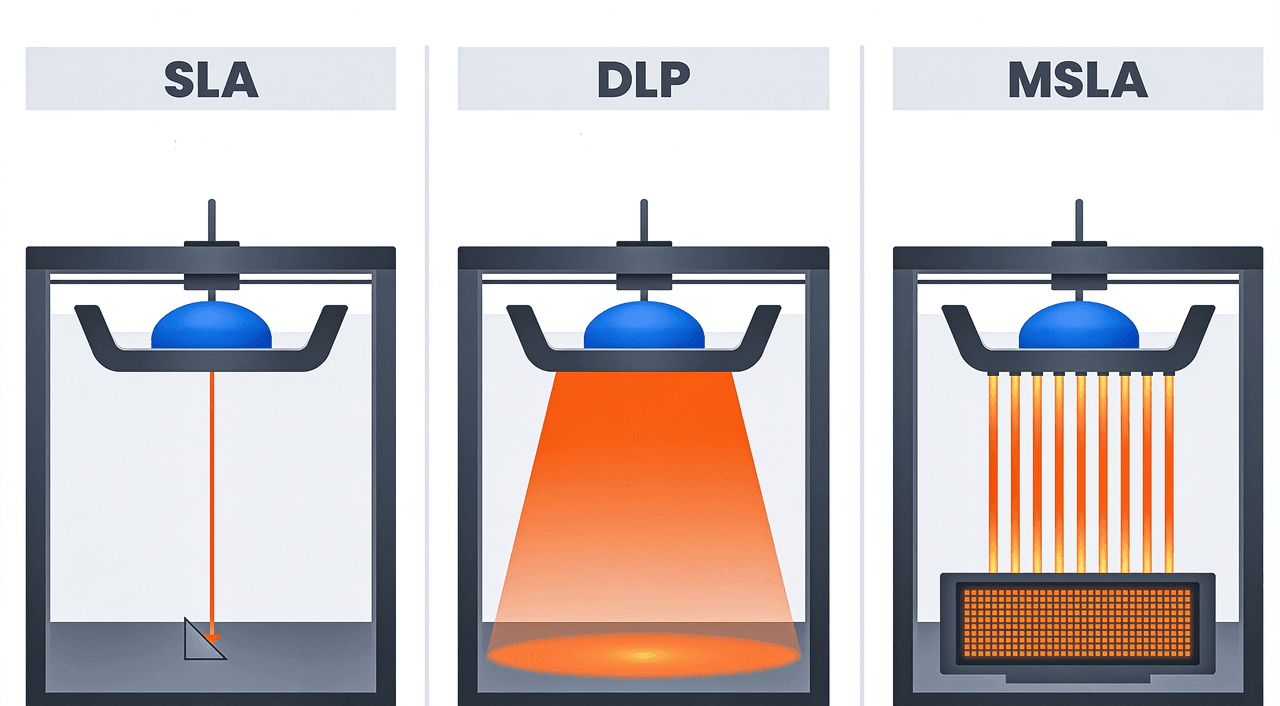
SLA vs DLP vs MSLA : Quelle est la différence ?
Toutes les imprimantes à résine fonctionnent en durcissant une résine photopolymère liquide par exposition à la lumière UV, mais la source lumineuse varie selon les technologies.
- Accord de Niveau de Service (SLA)La stéréolithographie utilise un laser pour solidifier chaque couche point par point. Elle offre la plus haute résolution, mais elle imprime lentement et coûte plus cher.
- DLP (Prévention de la perte de données) (Digital Light Processing) utilise un projecteur pour afficher une couche entière en une seule fois. Ce procédé est plus rapide que la SLA et particulièrement adapté à la production en petites séries.
- MSLA (MSLA) utilise un écran LCD pour masquer la lumière UV, exposant ainsi une couche complète en une seule fois. La plupart des imprimantes à résine pour le grand public en 2026 utilisent la MSLA. Elle offre un bon équilibre entre vitesse, précision et coût.
Types de résines courantes
La résine standard est abordable et facile à travailler, adaptée aux modèles de présentation et aux accessoires. La résine de type ABS améliore la tenue aux chocs pour les pièces qui nécessitent une certaine résistance aux impacts. La résine lavable à l'eau simplifie le nettoyage en évitant l'alcool isopropylique. La résine flexible produit des pièces semblables au caoutchouc. La résine pour moulage brûle complètement et sans résidus lors de la coulée à modèle perdu, ce qui en fait le choix idéal pour la fabrication de bijoux.
FDM vs résine : qualité, vitesse, coût et bien plus
Qualité d'impression et résolution des détails
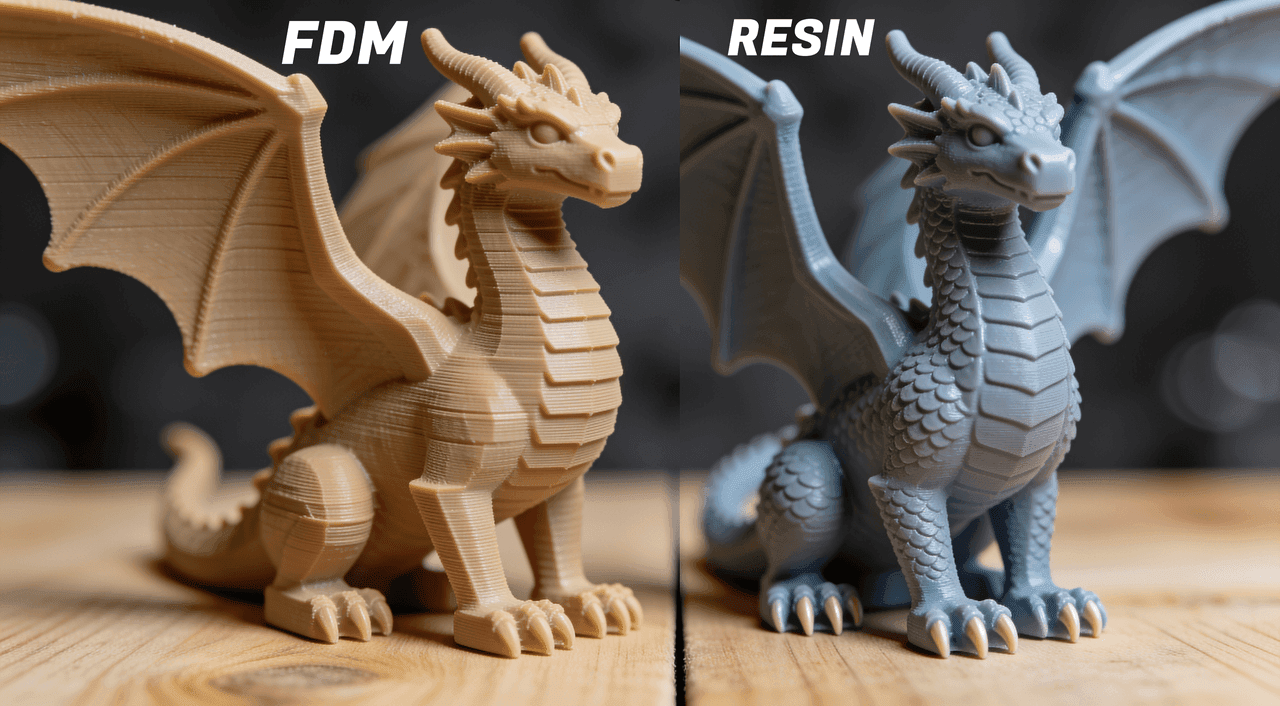
La résine excelle dans les détails. Les imprimantes MSLA grand public atteignent des résolutions XY de 0,05 mm ou plus fin, produisant des surfaces lisses et des détails fins et précis directement après impression. Les imprimantes FDM sont limitées par le diamètre de la buse, généralement de 0,4 mm, ce qui signifie des lignes de couche visibles et des bords arrondis sur les détails fins. Pour tout ce qui mesure moins de 50 mm avec des détails de surface complexes, la résine produit des résultats nettement supérieurs.
Vitesse d'impression
La FDM est généralement plus rapide pour les objets de grande taille. Un vase de 100 mm de hauteur s'imprimera plus rapidement en FDM qu'en résine, où chaque couche nécessite un temps d'exposition fixe quelle que soit la taille de la pièce. Les imprimantes à résine (DLP/MSLA) sont plus rapides pour les petites pièces plates, car la couche entière est polymérisée en une seule fois.
Coût matière par tirage
Le filament PLA est vendu entre 15 et 25 dollars le kilogramme. La résine standard s'élève à 30 à 60 dollars le litre. Un kilogramme de PLA et un litre de résine produisent à peu près la même quantité de matière imprimée en volume, mais les déchets de résine provenant des échecs d'impression et du nettoyage sont plus difficiles à recycler. Pour la plupart des utilisateurs, l'impression FDM (dépôt de fil fondu) est moins coûteuse sur le long terme.
La Fourchette de Prix des Imprimantes (2026)
Les imprimantes FDM d'entrée de gamme démarrent à partir de 150 à 200 dollars. Des machines réputées comme le Bambu Lab A1 Mini ou la Prusa MK4 coûtent entre 350 et 800 dollars. Les imprimantes résine d'entrée de gamme telles que les séries Elegoo Saturn et Anycubic Photon sont disponibles à partir de 150 à 250 dollars, tandis que les modèles grand format peuvent atteindre 400 à 600 dollars.
Prise en main et courbe d'apprentissage
L'impression FDM est plus adaptée aux débutants. Les imprimantes FDM modernes sont en grande partie pré-calibrées et dotées de l'autonivellement. L'impression résine nécessite davantage de préparation : entretien du film FEP, mélange de la résine, calibration de l'exposition et étapes de post-traitement obligatoires. Les débutants trouvent généralement l'impression FDM moins intimidante comme point de départ.
Exigences de post-traitement
Les impressions FDM nécessitent un post-traitement minimal. Retirez les supports, poncez si nécessaire, et la pièce est prête. Les impressions en résine doivent être lavées dans de l'alcool isopropylique ou une solution de lavage dédiée pour éliminer la résine non durcie, puis durcies sous lumière UV. Omettre l'une ou l'autre étape rend la surface collante et fragile. Le processus de lavage et durcissement allonge chaque impression de 20 à 40 minutes.
Sécurité et ventilation
La résine non durcie est toxique et un irritant cutané. L'impression en résine nécessite des gants, une protection oculaire et une bonne ventilation. Les vapeurs de résine ne doivent pas être inhalées dans un espace confiné. L'impression FDM est différente. Le PLA produit des émissions nocives minimes aux températures de fonctionnement normales. L'ABS gagne à être utilisé avec une enceinte et une ventilation, mais le niveau de risque est nettement inférieur.
Volume d'impression
Les imprimantes FDM offrent généralement des volumes d'impression plus importants. Une machine FDM de milieu de gamme comme la Bambu Lab P1S propose un volume de 256 x 256 x 256 mm. La plupart des imprimantes à résine grand public atteignent au maximum environ 200 x 125 mm en XY, avec une grande hauteur d'impression (axe Z). Il existe des imprimantes à résine grand format, mais elles coûtent significativement plus cher.
Résistance mécanique et durabilité
Les pièces FDM en PETG ou ABS résistent mieux aux chocs, à la flexion et à la chaleur que la résine standard. Les pièces en résine, bien que détaillées, peuvent être fragiles sous charges d'impact. Les résines techniques réduisent cet écart mais coûtent plus cher. Pour tout ce qui doit résister à des contraintes mécaniques, la FDM avec le matériau approprié est le choix offrant la meilleure durabilité.
Cas d'usage privilégiés pour l'impression 3D FDM
Prototypes fonctionnels et pièces mécaniques
Équerres, gabarits de montage, porte-outils, boutons de rechange et tout ce qui doit résister à la force ou à la chaleur. Le PETG et l'ABS conviennent bien à ces applications. La précision dimensionnelle sur une imprimante FDM bien calibrée est suffisante pour la plupart des conceptions à encliquetage et à filetage.
Modèles et boîtiers de grande taille
Casques, accessoires, boîtiers et maquettes architecturales. Les capacités d'impression FDM permettent la fabrication pratique de ces éléments. Les imprimantes à résine nécessiteraient de diviser les grands modèles en plusieurs dizaines de pièces distinctes.
Articles ménagers et utilitaires du quotidien
Clips pour câbles, range-tiroirs, pots pour plantes et organisateurs de cuisine. Le PLA convient pour la plupart de ces objets. La vitesse d'impression FDM et le faible coût des matériaux permettent d'itérer rapidement et à moindre coût sur les designs.
Projets Éducatifs et Jeunesse
Les imprimantes FDM sont plus sûres et plus simples à utiliser dans les environnements scolaires et domestiques. Aucun produit chimique toxique n'est nécessaire, pas de station de post-traitement (lavage et durcissement), et les erreurs d'impression sont faciles à nettoyer.
Meilleures applications de l'impression 3D par résineImpression 3D
Miniatures et figurines pour jeux sur table
Miniatures de 28 mm, tuiles de terrain et figurines de personnages. La résine capture les fins détails de surface que le FDM ne peut pas reproduire de manière fiable à cette échelle. Les lignes de couches sur une figurine de 30 mm sont visibles avec le FDM ; les surfaces en résine apparaissent lisses sans ponçage.
Bijoux et modèles dentaires
Les résines coulables permettent la coulée directe par modèle perdu pour les bijoux en métal. Les résines dentaires permettent de créer des modèles précis pour les aligneurs, les couronnes et les guides chirurgicaux. Ces applications nécessitent la résolution et l'état de surface que seule la résine peut offrir.
Accessoires et Pièces de Cosplay Extrêmement Détaillés
Petits éléments de props, masques de visage, sections d'armures décoratives et accessoires où le lissage de surface est important. La résine élimine les étapes de ponçage requises par la technologie FDM pour obtenir une finition prête à peindre.
Fabrication en petites séries
L'exposition par couches complètes de la résine signifie qu'imprimer dix petites pièces prend à peu près le même temps qu'en imprimer une. Pour les petites séries de bijoux, les jetons personnalisés ou la production de miniatures identiques, la résine est plus rapide que l'impression FDM (Fused Deposition Modeling).
Comment imprimer des modèles d'IA Triverse sur les imprimantes FDM et à résine
Dans Triverse AI, créez votre Modèle avec du texte ou à partir d'une image
Que vous ayez besoin d'un bracket fonctionnel pour le FDM ou d'une figurine détaillée pour la résine (impression SLA/DLP), Triverse AI génère un maillage prêt à imprimer en quelques minutes sans connaissances en CAO. Ouvrez Triverse Studio et utilisez soit l'onglet Prompt pour décrire votre modèle, soit l'onglet Image pour importer une image de référence.
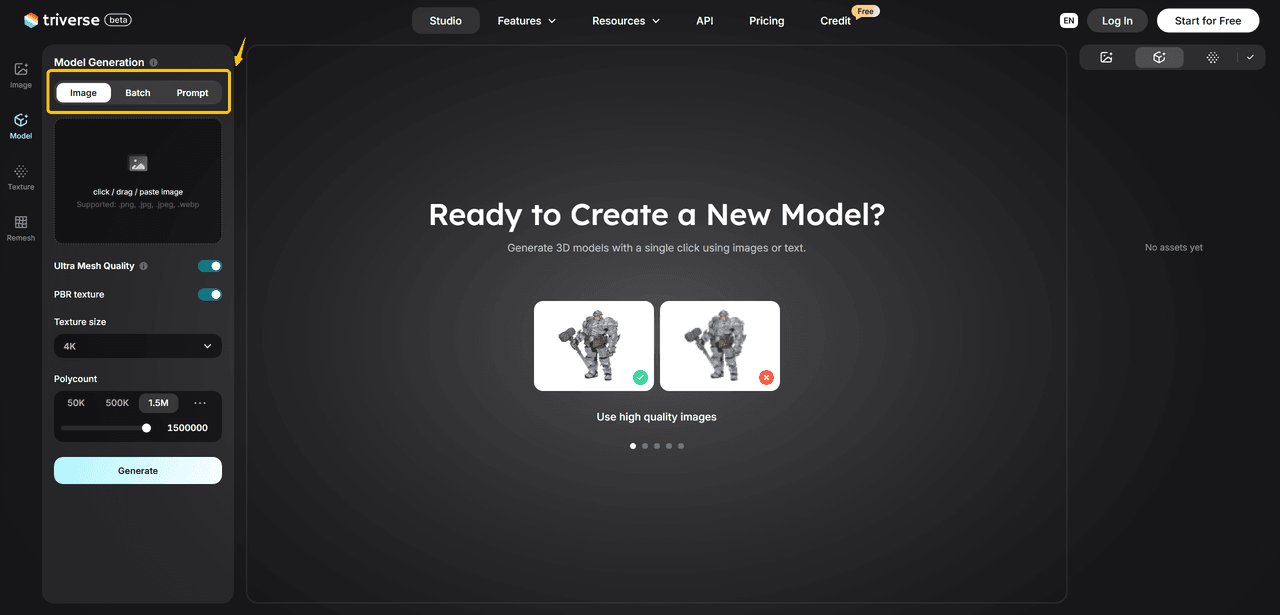
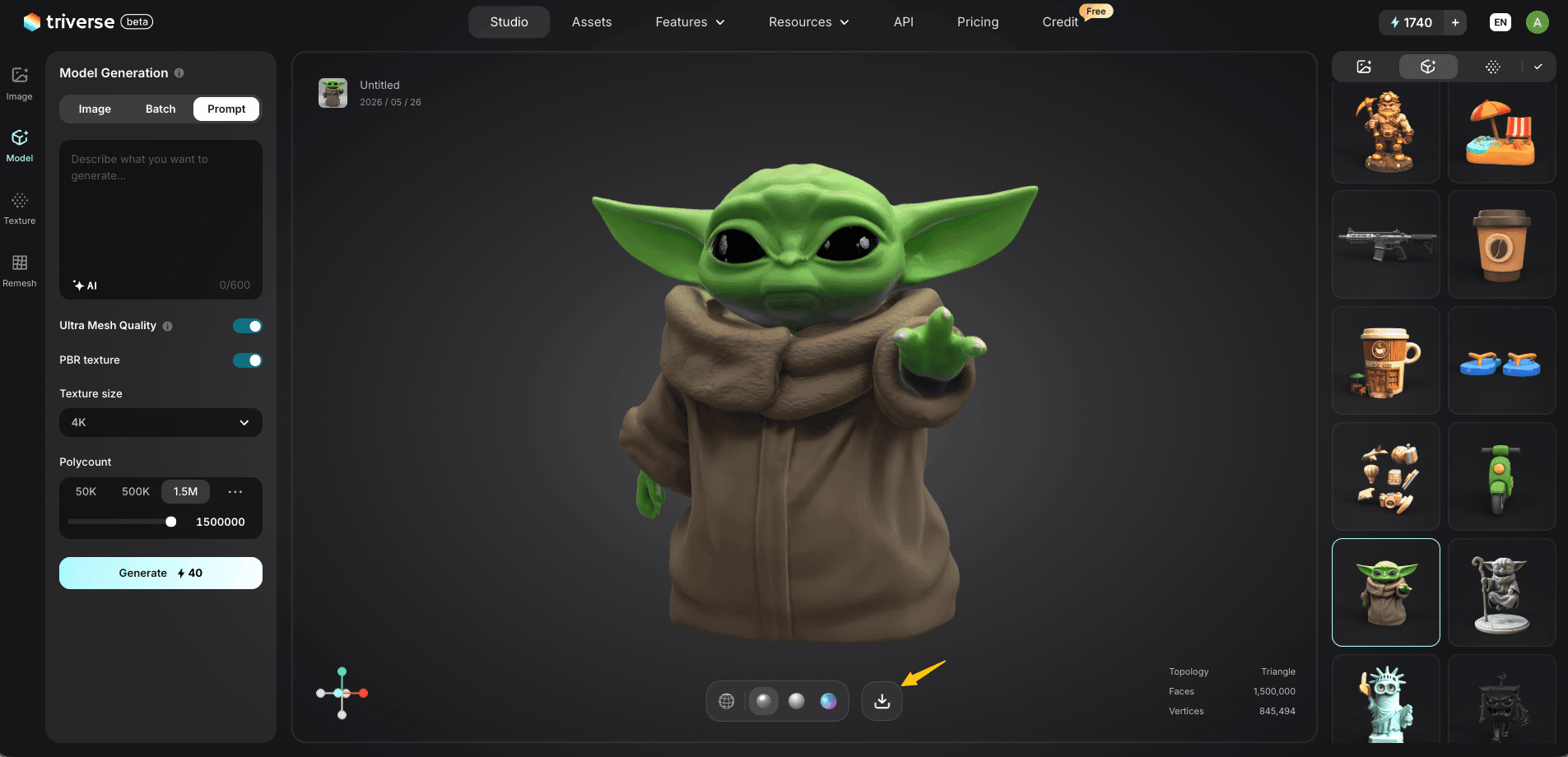
Une fois prêt, cliquez sur l'icône Télécharger et exportez le fichier en STL. Pour les impressions FDM, réglez le nombre de polygones à 500 K ou moins. Pour la résine, utilisez 1 M à 1,5 M pour préserver les détails de surface.
Préparation FDM : Exporter stl, Vérifier l'épaisseur des parois, Ajouter des supports
- Ouvrez le fichier STL dans votre slicer (logiciel de découpe)Cura, PrusaSlicer ou Bambu Studio).
- Vérifiez l'épaisseur des parois dans l'aperçu. Les parois inférieures à 1,2 mm s'imprimeront mal ou ne tiendront pas. Trois périmètres avec une largeur de buse de 0,4 mm sont le minimum sûr.
- Activer la prise en charge des porte-à-faux dépassant 45°.
- Orientez le modèle de manière à ce que la plus grande surface plane soit face au plateau de construction afin d'améliorer l'adhérence au plateau de construction et de réduire l'utilisation de supports.
Préparation pour Impression Résine : Exporter le Modèle STL, Créer une Cavité, Ajouter des Trous d'Évacuation de la Résine
- Ouvrez le fichier STL dans Chitubox ou Lychee Slicer.
- Pour les modèles de plus de 40 mm, utilisez le support appropriéCreux outil permettant de définir l'épaisseur de paroi à 2 mm. Les modèles de moins de 40 mm n'ont pas besoin d'être creusés car le coût de la résine est minime et les parois fines créent des points de rupture.
- Ajoutez au moins un orifice d'évacuation près du fond pour permettre à la résine non durcie de s'échapper pendant le lavage.
- Orientez le modèle entre 30 et 45 degrés sur le plateau de construction afin de réduire l'effet de ventouse sur les grandes surfaces planes.
- Lancez une vérification du maillage avant la tranche. Si des erreurs apparaissent, utilisez-le Guide de réparation STL avant de continuer,
Problèmes courants des modèles d'intelligence artificielle à résoudre avant impression 3D
Les parois fines inférieures à 0,8 mm posent problème en FDM et produisent des pièces en résine fragiles. La géométrie non-variété provoque des erreurs de trancheage dans les deux technologies. La géométrie flottante (parties non connectées au maillage principal) tomberont lors d'une impression en résine. Utilisez l'outil Remesh de Triverse pour corriger la topologie avant l'exportation, ou exécutez une vérification de maillage dans Meshmixer.
FDM vs résine pour débutants : laquelle choisir en premier ?
Commencez par une imprimante FDM. Les raisons sont pratiques plutôt que techniques. Les imprimantes FDM tolèrent davantage les erreurs de l'utilisateur, coûtent moins cher à exploiter, ne nécessitent aucune substance toxique et produisent des objets utiles dans un éventail plus large d'applications. Une imprimante FDM bien calibrée répond à 80 % des besoins de la plupart des créateurs.
Passez à l'impression résine plus tard lorsque vous avez des besoins spécifiques nécessitant la résine : figurines de 28 mm, bijoux ou très petites pièces avec de fins détails de surface. À ce stade, vous comprendrez suffisamment bien l'impression 3D pour gérer la complexité supplémentaire qu'exige la résine. Si vous devez personnaliser votre propre modèle 3D, essayez Triverse AI gratuitement dès maintenant !
FAQ sur la comparaison entre l'impression 3D FDM et résine
L'impression par résine offre-t-elle une meilleure qualité que la FDM ?
Pour les petits objets détaillés, oui. La résine produit des surfaces plus lisses et des détails plus fins que la FDM à des prix comparables. Pour les grandes pièces fonctionnelles, la qualité FDM est suffisante et plus pratique.
La résine est-elle moins chère que le filament sur le long terme ?
Non. La résine coûte plus cher par volume de matériau imprimé, nécessite des consommables comme le film FEP et la solution de lavage, et génère plus de déchets provenant des impressions ratées et du nettoyage. La FDM est moins chère à exploiter sur le long terme pour la plupart des utilisateurs.
Peut-on utiliser une imprimante à résine en intérieur en toute sécurité ?
Oui, avec les précautions appropriées. Utilisez une enceinte dédiée ou imprimez dans un espace ventilé, portez des gants en nitrile lors de la manipulation de la résine liquide, et éliminez les déchets de résine de manière responsable. Ne versez jamais de résine non durcie dans les égouts.
Quelle est la meilleure option pour les miniatures, la FDM ou la résine ?
C'est la résine, sans aucun doute. La résolution des détails des imprimantes MSLA à 0,05 mm en XY produit des résultats que la FDM avec une buse de 0,4 mm ne peut pas égaler à l'échelle de 28 mm.
Le même modèle Triverse AI peut-il fonctionner sur des imprimantes FDM et résine ?
La résine est généralement préférée pour les miniatures. Exportez au format STL depuis Triverse AI et ouvrez-le dans un logiciel de tranchage FDM ou résine. Les étapes de préparation diffèrent : la FDM nécessite des structures de support et des vérifications d'épaisseur de paroi ; la résine nécessite le vidage et des trous de drainage.
Les modèles générés par IA nécessitent-ils une préparation différente pour la FDM par rapport à la résine ?
Oui. Pour la FDM, concentrez-vous sur l'épaisseur des parois et le placement des supports. Pour la résine, privilégiez le vidage, les trous de drainage et l'intégrité du maillage. L'outil Remesh de Triverse AI aide à nettoyer la géométrie pour les deux flux de travail avant l'exportation.