Image to 3D VS. Text to 3D: When to Use?
2026年3月10日
Let’s be real: spending three days modeling a basic background prop is a massive drag. You got into this to build epic worlds and test out cool concepts—not to lose your mind pushing vertices around all day.
That’s exactly why AI 3D model generators are everywhere in 2026. But here’s the catch: platforms like Triverse AI give you both Image-to-3D and Text-to-3D options. So... which one are you actually supposed to use?

Pick the wrong one, and you’re just burning through your daily credits. Pick the right one, and your workflow basically runs on autopilot. Let’s cut through the noise and figure out exactly when to use an image, when to type a prompt, and how to combine them to save yourself hours of manual work.
Understanding Text-to-3D: The Engine of Imagination
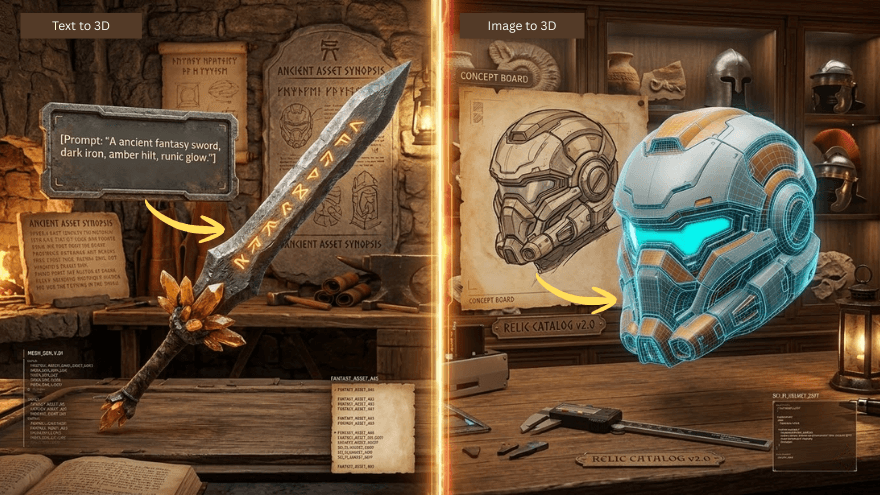
Text-to-3D is your ultimate brainstorming buddy. It starts with nothing but words. By describing what you want, an AI 3D generation tool like Triverse AI interprets your intent and generates a 3D model from scratch, transforming abstract ideas directly into tangible digital assets without requiring visual references.
When to Choose Text-to-3D
Text-to-3D is perfect when you are starting with a blank canvas. This is your go-to workflow for:
- Starting from Pure Imagination: Brainstorming sessions where concepts evolve rapidly, or when creating fantasy objects that don't exist in reality.
- Rapid Iteration: When you need to A/B test different design approaches or meet tight deadlines. Text prompts can be modified in seconds, letting you compare numerous options instantly.
- Lacking Visual References: When creating conceptual objects that defy easy visualization, or innovative products without existing concept art.
- Accessibility: Perfect for non-designers or collaborative teams where written descriptions are easier to share and tweak.
The Challenges & Solutions:
- Challenge: Less predictable outcomes based on prompt phrasing, AI is always guessing.
- Solution: Iterate your text prompts. Start broad (e.g., "a sci-fi crate"), then add specific descriptors (e.g., "a rusty, metallic sci-fi crate with glowing neon blue panels").
Understanding Image-to-3D: The Precision Tool
While text is great for brainstorming, Image-to-3D is built for pinpoint accuracy. You upload a 2D image like a photo, illustration, or sketch, and the AI analyzes shapes, textures, and perspective to construct a reality-grade 3D representation that closely matches the source.
When to Choose Image-to-3D
If you have strict brand guidelines or a specific vision, you need this tool. It excels at:
- When Accuracy Matters Most: Creating digital twins of real-world products, preserving exact proportions, or maintaining brand consistency for established visual identities.
- Capitalizing on Quality References: If you already have professional photography, detailed concept art, or technical drawings, leverage that work to save hours of manual modeling.
- Iterating on Established Designs: Updating legacy products or creating feature variants while preserving the core aesthetic language.
The Challenges & Solutions:
- Challenge: The AI tool may be limited to what is visible in a single 2D image, sometimes struggling with hidden angles.
- Solution: Ensure your reference image has a clear, well-lit silhouette. Triverse AI's depth-perception algorithm is designed to intelligently "fill in" blind spots based on logical geometry.
The Best of Both Worlds: The Hybrid Workflow using Triverse AI
You don't always have to pick a side. The smartest creators use a hybrid approach to get things done fast. Here is how you can use both tools to crush your workflow:
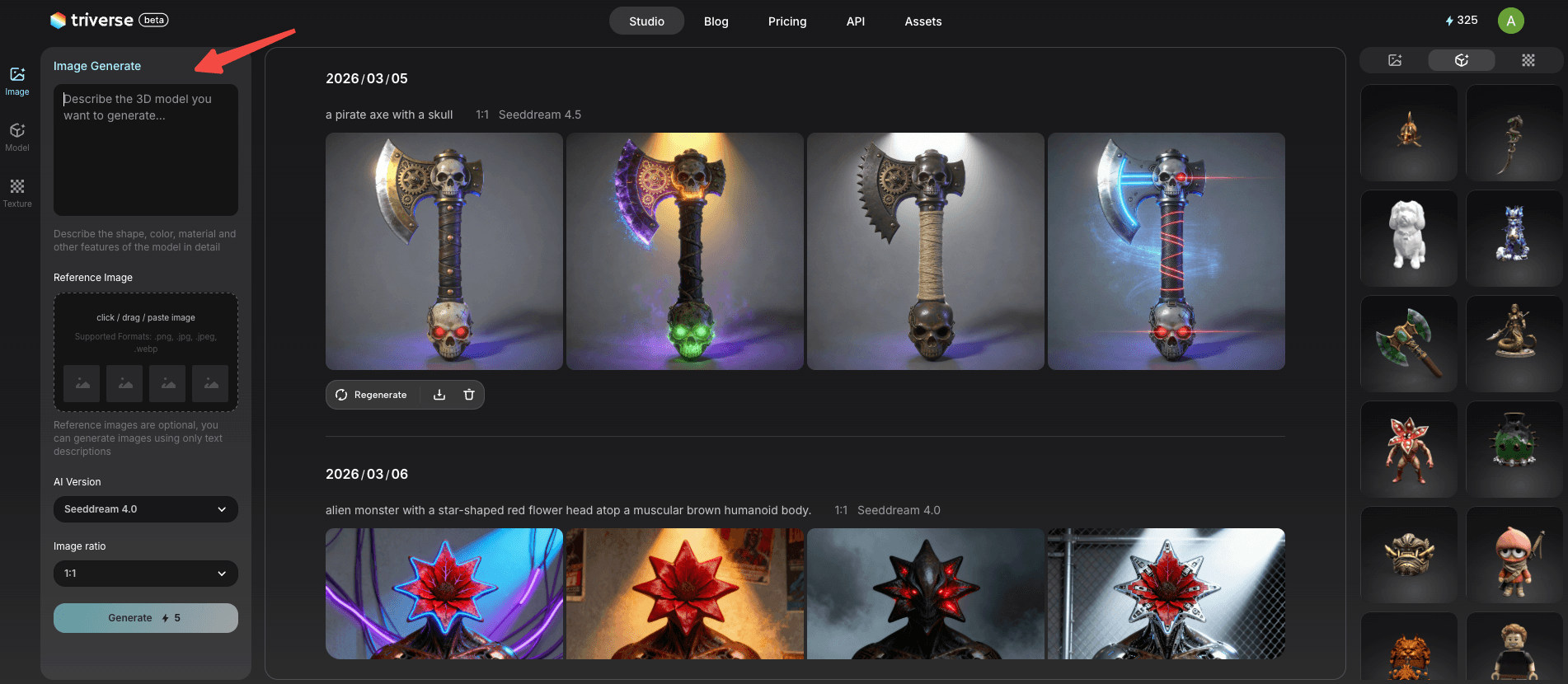
- Start in the Triverse AI's Studio: Use text prompts to generate 2D images of the model you want to create.

- Refine Your Image: Iterate on your 2D design until you're happy with the result.
- Convert to 3D: Once you have the perfect 2D image, use our image-to-3D model tool to generate your 3D model.
- Auto-Texture: Triverse's AI texturing applies high-quality colors and materials automatically, making plain models look production-ready effortlessly.
The 3D Gold Ring Test: Which Methods Win?
I ran a real test using Triverse AI so you could see the difference firsthand. Goal: generate a fancy gold ring with a ruby gemstone using both methods.
Round 1: The Text-to-3D Route
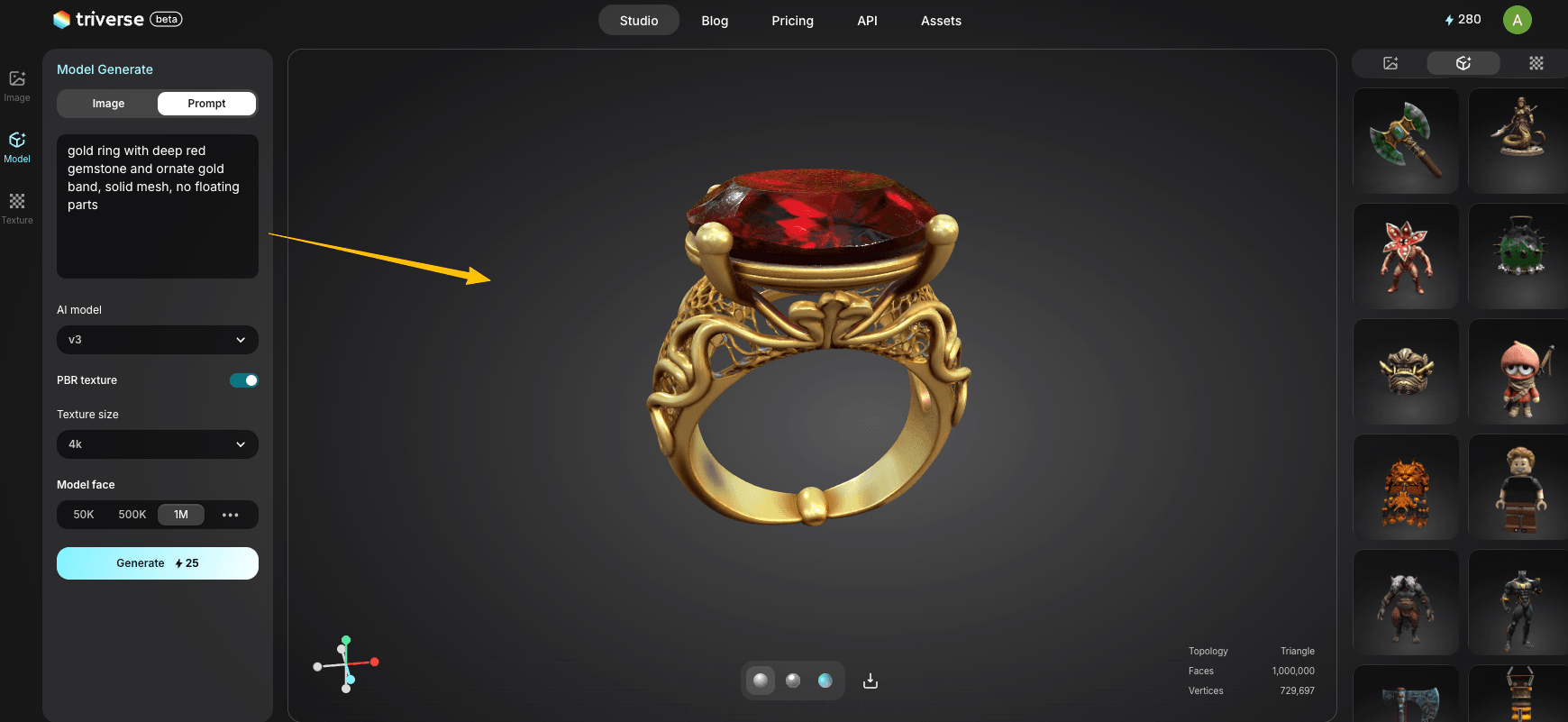
I use the Text to 3D feature and typed in my prompt:
gold ring with deep red gemstone and ornate gold band, solid mesh, no floating parts.Here’s something most people don’t realize: under the hood, Text-to-3D actually generates a 2D image first, then builds the 3D mesh from that. So you’re relying on AI to “guess” what your description looks like in three dimensions.

The result was impressive—detailed, visually striking, and definitely usable. But it’s not an exact replica of what I pictured in my head. Text-to-3D traded precision for creative freedom.
Round 2: The Image-to-3D Route
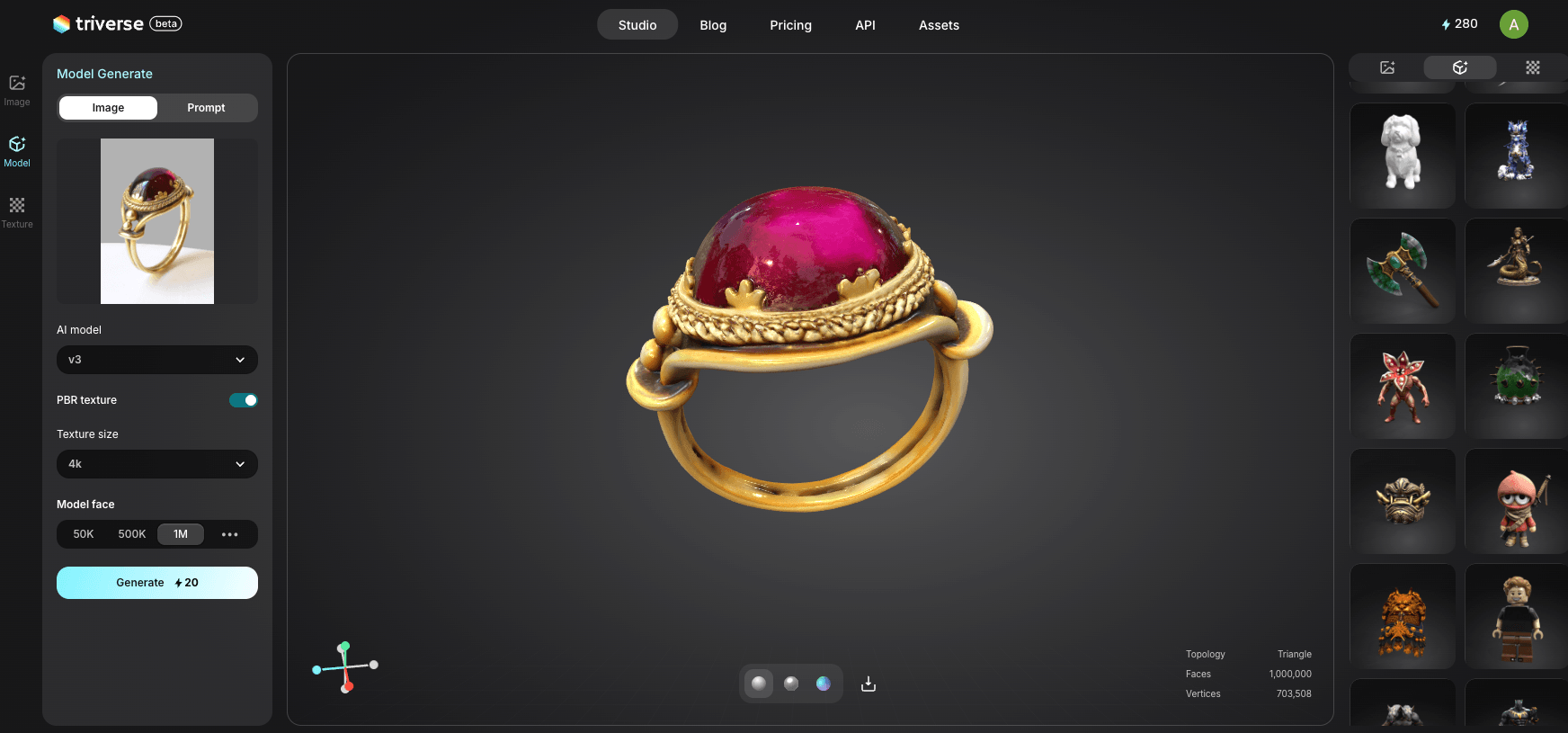
Next, I switched over to the Image to 3D workflow. This time, I uploaded an actual reference photo of a ring I already knew I wanted.
The result? Triverse AI absolutely nailed it. The 3D model and the AI-generated PBR textures matched the front of my reference photo beautifully.

However, there is a slight catch here, too. Because the AI only has one 2D photo to work with, it has a "blind spot". It has to logically guess what the back and hidden angles of the ring look like. It handles these blind spots incredibly well, but the unseen angles might not be a 100% identical clone of the real-life object.
The Verdict
If you just need a cool-looking gold ring for a treasure chest prop, Text-to-3D gets you there instantly. But if your art director hands you a specific concept sketch of a ring that must look a certain way, Image-to-3D is your weapon of choice.
Neither is universally “better”. They’re different tools for different jobs.
Industry Use Cases: How This Fits Your Work
How does this actually help you? Let's break it down by industry:
1. Indie Game Dev & VFX
- Text-to-3D: Use this to rapid-prototype characters so you can test ideas right away.
- Image-to-3D/Hybrid: Generate massive amounts of props. Marcus generated 20 variations of a sci-fi crate in 10 minutes.
2. 3D Printing & Tabletop Hobbyists
- Text-to-3D: Describe a highly specific monster (e.g., "female barbarian warrior with a flaming sword") to generate a custom D&D miniature. Triverse AI ensures a .
- Image-to-3D: Upload a photo of a broken household part or a specific geometric shape to print a replacement.
3. Product Design & Visualization
- Text-to-3D: Early-stage ideation for abstract shapes or futuristic product concepts.
- Image-to-3D: Uploading actual product photos to generate 3D assets for e-commerce websites or marketing materials.
Image to 3D VS. Text to 3D: The Quick Decision Comparison
Feature | Image-to-3D | Text-to-3D |
Input Required | A 2D image (PNG, JPG, WebP) | A descriptive text prompt |
Primary Strength | Precision, fidelity, utilizing existing art | Speed, imagination, accessibility |
Best Use Case | Digital twins, concept art conversion, brand consistency | Rapid ideation, prototyping, and brainstorming |
Output Speed | Under a minute from a 2D visual | Instant creation from ideas |
Use Triverse AI to Generate Your 3D Assets
No matter which workflow you choose, Triverse AI brings massive upgrades to your pipeline:
- AI-Powered PBR Texturing: Skip the UV unwrapping. Triverse turns grey meshes into high-fidelity PBR textures automatically, generating Diffuse, Roughness, Metallic, and Normal maps.
- 100% Cloud-Based: No RTX 4090 required. All heavy rendering happens on our servers.
- Engine-Ready Exports: Download fully optimized
.GLBfiles ready for seamless integration into Unity, Unreal Engine, Blender, and WebGL. - Pricing & Free Credits: You don't need a massive budget to get started. Triverse AI offers a Free plan for everyone. You can get 1000 free credits to generate text-to-3D and image-to-3D models at no cost after you signing up. No credit card is required!
Frequently Asked Questions
Is Triverse AI a free AI 3D model generator?
Yes! Triverse AI now offers a Free plan. You can get free credits to generate both text-to-3D and image-to-3D models at no cost.
Can I use the generated AI 3D models for commercial projects?
Yes, commercial rights are included. All generated assets are yours to use for , product visualization, and marketing materials.
What image formats work best for the Image-to-3D converter?
Triverse AI supports PNG, JPG, JPEG, and WebP. We recommend uploading clear, high-resolution images with well-defined subjects.
Do I need a powerful PC or GPU to use Triverse AI?
No. Triverse AI is 100% cloud-based. You can generate high-fidelity 3D models from a standard computer, laptop, or tablet.
What 3D file formats can I export?
You can export in industry-standard .GLB formats, fully optimized for Unity, Unreal, Blender, and 3D printers.
Can I generate PBR textures automatically?
Absolutely. Triverse AI applies high-quality colors and materials automatically, generating full PBR maps (Diffuse, Roughness, Metallic, Normal).
Are the models suitable for 3D printing?
Yes, our geometry generation algorithm prioritizes creating watertight (manifold) meshes, perfect for resin or FDM 3D printing.
Ready to Build Your 3D Universe Today?
Both Image-to-3D and Text-to-3D offer incredible value. Choose Image-to-3D when accuracy and fidelity are paramount; choose Text-to-3D when you need rapid iteration and pure creativity.
Join the revolution of AI-driven 3D modeling with worldwide creators. Start Triverse AI for free today!