Unity VS. Godot in 2026: Which Engine Is Better for Your Game?
Unity or Godot? Let's compare performance, ease of use, 2D vs 3D, pricing, and real use cases to choose the right game engine for you.
April 15, 2026
Unity and Godot might seem similar; both are powerful game engines for building 2D and 3D games. But in practice, they are different in many ways.
The engine you pick can shape how you learn. Some are easier to jump into, while others demand more energy but give you greater flexibility. Each one comes with its own quirks, workflows, and design philosophy.
So instead of asking which engine is “better”, it's better to shed light on which one fits the way you want to build games.
In this guide, we’ll break down the strengths and weaknesses of both Unity and Godot to help you make that decision.
Key features of Godot
Godot is an open-source, lightweight game engine which highly accessible for all-level developers. One of its core design philosophies is its node-based architecture, where scenes are built by combining modular nodes, making it intuitive to structure game logic and objects.
Godot primarily uses its own scripting language, GDScript, which is comparatively easy to learn. It also supports other languages like C# and C++.
PROS:
lightweight and fast
Godot is extremely lightweight compared to engines like Unity. Even opening a blank project is noticeably faster, while Unity can feel heavier and may consume more system resources.
This lightweight design translates into a smoother development experience. Its workflow is strong and simple; animations, time maps, and collision detections are straightforward. As a result, developers can prototype ideas quickly without juggling complex 3D settings.
Excellent for 2D Game Development
Godot truly stands out in 2D development. It features a dedicated 2D engine and viewport, which largely increases the convenience for 2D workflows. This is especially important if you are interested in creating 2D pixel art games
By contrast, Unity’s 2D system is essentially built on top of its 3D engine, often relying on locking the Z-axis rather than providing a fully separate 2D pipeline.
Open Source and Cost-Effective
Godot is free and open source under the MIT license. This gives developers full control over the engine, even including the ability to modify its source code if needed. For indie developers or small teams, this can significantly reduce costs and increase flexibility compared to commercial engines.
Rapid Development and Frequent Updates
Godot has a very active development community, thus new versions are released quite soon. Each update brings many meaningful improvements to the table.
CONS
Weaker 3D Capabilities and Visual Fidelity
While Godot has improved significantly in recent versions, it still lags behind Unity in terms of advanced 3D rendering, visual fidelity, and performance.
For large-scale or highly detailed 3D projects, especially cinematic scenes or AAA-level games, Godot may feel limiting.
Limited Platform and Hardware Support
Godot does not have the same level of day-one support from hardware manufacturers as engines like Unity or Unreal.
This is particularly noticeable when targeting consoles or newer devices, where official support, documentation, and tooling may be less robust or require additional workarounds.
Key features of Unity
Unity is one of the most widely used game engines in the world, known for its strong support for both 2D and 3D game development. It is built around a component-based architecture, where game objects are constructed by attaching reusable components such as scripts, physics, and rendering modules.
Unity primarily uses C# as its scripting language, and has a quite mature ecosystem for support and guidance.
PROS
Strong Ecosystem and Community Support
One of Unity’s biggest advantages is its well-established ecosystem. There are countless tutorials and learning resources available online, making it significantly easier for beginners to get started.
In addition, the Unity Asset Store is a big shining point. Developers can access a vast library of pre-built assets, including models, animations, scripts, and tools. If you don’t want to build everything from scratch, there’s a high chance you can find what you need and integrate it quickly into your project.
C# as a Practical and Transferable Programming Language
Unity uses C#, a widely used and industry-relevant programming language. It is often considered easier to understand in a structured way and is useful beyond game development.
For learners who want to develop both programming skills and game design skills simultaneously, Unity provides a strong foundation.
Flexible 2D and 3D Workflow
Although Unity is primarily known for its 3D capabilities, it also provides a solid 2D development pipeline. Core features such as sprites, animation systems, collision detection, and 2D physics are all well supported.
This allows developers to handle both 2D and 3D projects within the same environment.
Broad Platform and Hardware Support
Unity supports a wide range of platforms, including PC, mobile, consoles, AR/VR devices, and more.
Because of its large user base, hardware manufacturers and platform providers often prioritize Unity with early or “day-one” support. This makes Unity a strong choice for developers targeting multiple platforms or planning to scale their projects.
CONS
Heavy and Resource-Intensive
Unity is often considered a relatively heavy engine. Installation sizes can be large (often multiple gigabytes), and even simple projects may consume significant system resources.
In some cases, developers are required to update frequently, which can introduce compatibility issues or disrupt ongoing projects. Additionally, many built-in features may be unnecessary for smaller projects, making the engine feel bloated.
Lack of Clear Conventions
Unity offers multiple “official” ways to achieve the same goal, which can be confusing, especially for beginners.
For example, there are different rendering pipelines (Built-in, URP, HDRP) and multiple input systems. While this flexibility can be powerful, it often leads to inconsistency and a steeper learning curve when trying to choose the “right” approach.
High System Coupling and Complexity
Unity’s component-based architecture can sometimes lead to tightly coupled systems, where changes in one part of a project may unintentionally affect other parts.
This increases the complexity of debugging and maintaining larger projects, especially if the project structure is not carefully managed from the beginning.
Licensing and Cost Considerations
Unlike open-source engines, Unity operates under a licensing model. While it offers free tiers, commercial use may involve subscription fees depending on revenue and usage.
For indie developers or small teams, this can become a consideration compared to fully free and open-source alternatives like Godot.
How to Choose Between Godot and Unity?
Unity vs Godot: Quick Comparison
Factor | Unity | Godot |
Price | Free tier + revenue-based pricing | Completely free (MIT license) |
Starting time | 3-5 minutes | Under 3 seconds |
Project size (blank) | ~200MB+ | ~20MB |
2D workflow | Good | Excellent (dedicated engine) |
3D workflow | Strong | Improving (Godot 4+) |
GDScript / C# | C# | GDScript (feels like Python) + C# |
Backend services | First-party (Unity Gaming Services) | DIY or third-party |
Console support | Day-one | Requires extra setup |
Asset Store | Massive | Growing but smaller |
Community size | Massive | Large and growing |
Open source | No | Yes (MIT) |
Best for | Commercial, 3D, multi-platform | 2D, hobby, fast prototyping, open source preference |
Unity is ideal for learning programming, understanding game design fundamentals, and developing both 2D and 3D games. Godot stands out for its simplicity, low hardware requirements, and open-source nature.
In the majority of cases, Unity has a clear advantage in 3D, while Godot is stronger for 2D development.
When it comes to UI design, Godot can often feel more intuitive and efficient.
However, you can also switch between engines. For instance, many developers start with Unity to learn the basics, then move to Godot for lightweight prototyping.
Your past experience still matters and won’t be wasted, even if you switch engines.
What Real Developers Say: Unity vs Godot
Based on discussions from platforms like Reddit and developer communities, many users highlight that:
In Unity
- The programming language is more familiar to those who have used Python before
- There are more learning resources in Unity
In Godot
- It's easier to make a quick edit in Godot
Ultimately, the best engine depends on your goals and requirements. Most importantly, try both and see what works best for you.
Need 3D Assets? Try Triverse AI
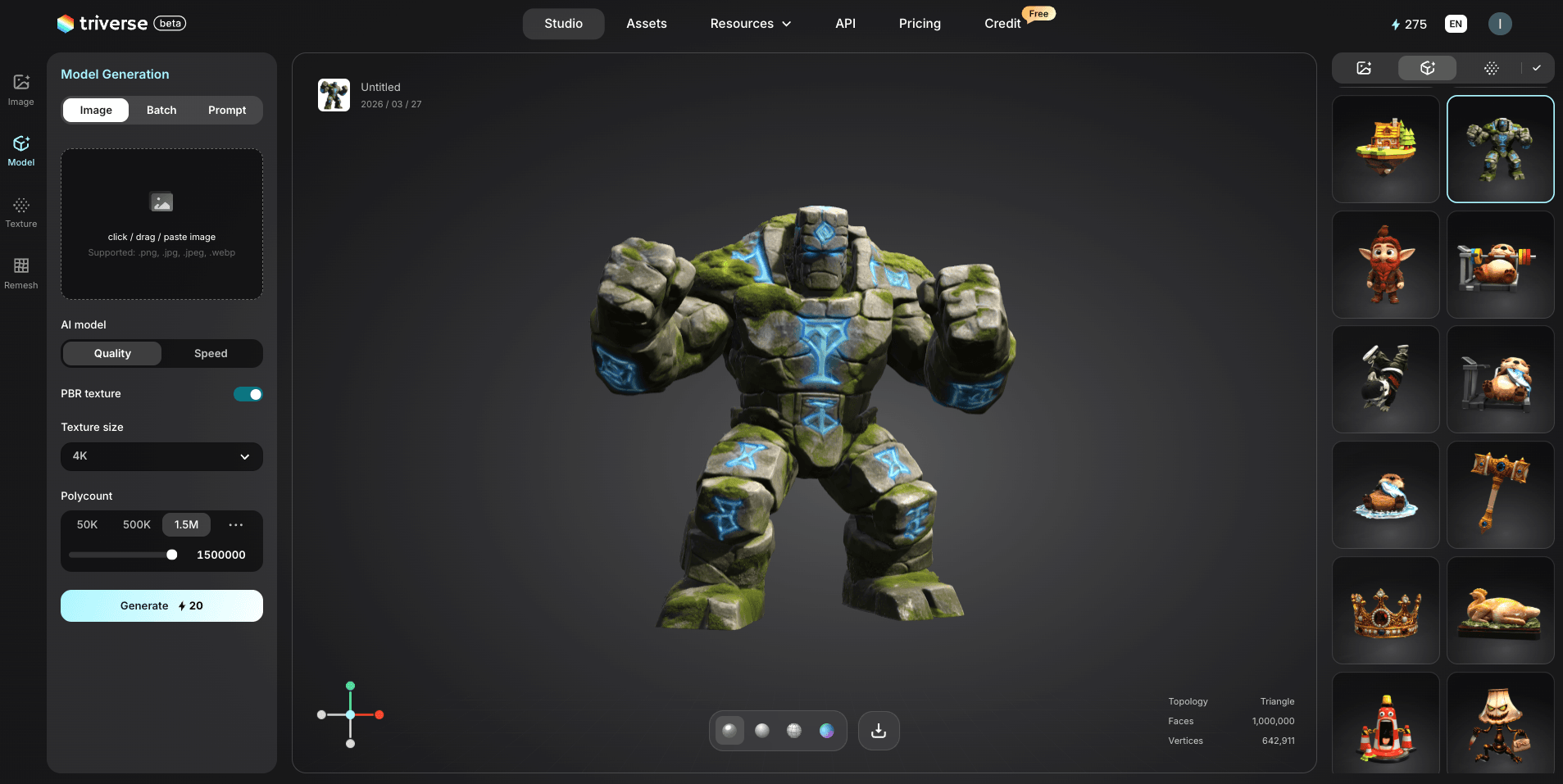
No matter whether you’re using Unity or Godot, at some point you’ll need 3D assets. Models, textures, and animations are a core part of almost any game project.
There are a few common ways to get them. You can buy assets from the Unity Asset Store or find free models on platforms like Sketchfab. You can also create everything yourself. The only problem is that, on platforms like Blender, it often takes a long time and requires technical skills.
Another option becoming more popular is AI-generated 3D assets.
Triverse AI is an AI-powered 3D generation tool that lets you create models just by describing what you need. The output can be exported and used in Unity, Godot, or any engine that supports formats like OBJ or GLTF.
For indie developers without a dedicated 3D artist, this can be a huge time saver. You can generate placeholder assets in minutes, test your gameplay, and then either keep them or replace them later with custom art.
It’s not a replacement for professional 3D workflows, but for rapid prototyping and solo development, it’s a very practical tool to have.
Conclusion
Choosing between Unity and Godot ultimately comes down to your goals, experience level, and the type of game you want to build.
There’s no single “best” engine. The right one is the one that fits how you work and what you want to create. The best way to decide is simple: try both, build something small, and see which one feels right.
FAQs about Unity VS. Godot
Which one is more popular, Godot or Unity?
Unity is currently more popular, especially in commercial and large-scale projects. Godot is growing quickly, particularly among indie developers.
Can Godot be used for 3D games?
Yes, Godot supports 3D development, but its capabilities are still catching up. It works well for smaller or stylized 3D projects.
Is Unity better than Godot?
Not necessarily. Unity is stronger for complex 3D and large projects, while Godot is better for simplicity, 2D, and fast prototyping.
Which engine should I choose as a solo developer?
If you want simplicity and speed, Godot is a great choice. If you plan to scale or work on more complex systems, Unity may be better.
Can Godot handle AAA games?
In theory, yes, but in practice, it’s rarely used for AAA development. Most AAA studios rely on more mature engines like Unity or Unreal.
Is Godot better for beginners than Unity?
Generally, yes. Godot’s simpler workflow and lightweight design make it easier to learn, especially for first-time developers.
Which engine should I choose as a solo developer?
It depends on your goals. Godot is ideal for small, fast projects, while Unity is better if you want long-term scalability.
Is Godot completely free to use?
Yes, Godot is fully free and open source under the MIT license. There are no fees, royalties, or usage restrictions. Unity also has a free tier that covers most small indie projects. You only move to paid tiers when you exceed revenue thresholds.
Can I switch engines mid-project?
It's painful but possible. Most of your game logic (C# in Unity, GDScript in Godot) won't transfer directly. Assets, 3D models, and textures usually transfer fine. The higher cost is time and momentum. Pick wisely at the start.
Does knowing Python make Godot easier to learn?
Significantly. GDScript is syntactically similar to Python. If you've written any Python, you'll read GDScript immediately. This is one of Godot's most underappreciated advantages for the Python developer community.
Which engine should I choose as a hobbyist?
Many people recommend starting with Godot if you want a free and easy way to get into game development. It has a low barrier to entry and allows for fast iteration. That said, Unity is also a great option if you’re aiming for more advanced features or have higher requirements for graphics and scalability.