Low Poly против High Poly: какое количество полигонов подходит для вашей игры?
Узнайте, когда использовать низкополигональные и высокополигональные 3D-модели в играх. Материал включает таблицы лимитов полигонов для различных платформ, рабочий процесс запекания в Blender, настройку LOD, ограничения Nanite и оптимизацию вызовов отрисовки для мобильных устройств и десктопов.
29 июля 2026 г.
Вы скачиваете модель персонажа, позиционируемую как готовую к использованию в игре. Перетаскиваете её в сцену, запускаете игру, и частота кадров падает с 60 до 12. Сетка содержит 1,2 миллиона треугольников. Это весь полигональный бюджет консольной игры, израсходованный на одного персонажа.
Это происходит потому, что «game-ready» для разных продавцов означает разное. Модель, которая нормально работает в офлайн-рендере, отображается с ошибками в движке реального времени. Решение заключается не в покупке более мощного компьютера, а в понимании требований к количеству полигонов до того, как вы что-либо создадите или купите.
В этой статье вы узнаете, сколько именно полигонов на самом деле нужно вашей игре, почему низкополигональные и высокополигональные модели не являются противоположностями и как они работают вместе в едином производственном процессе.
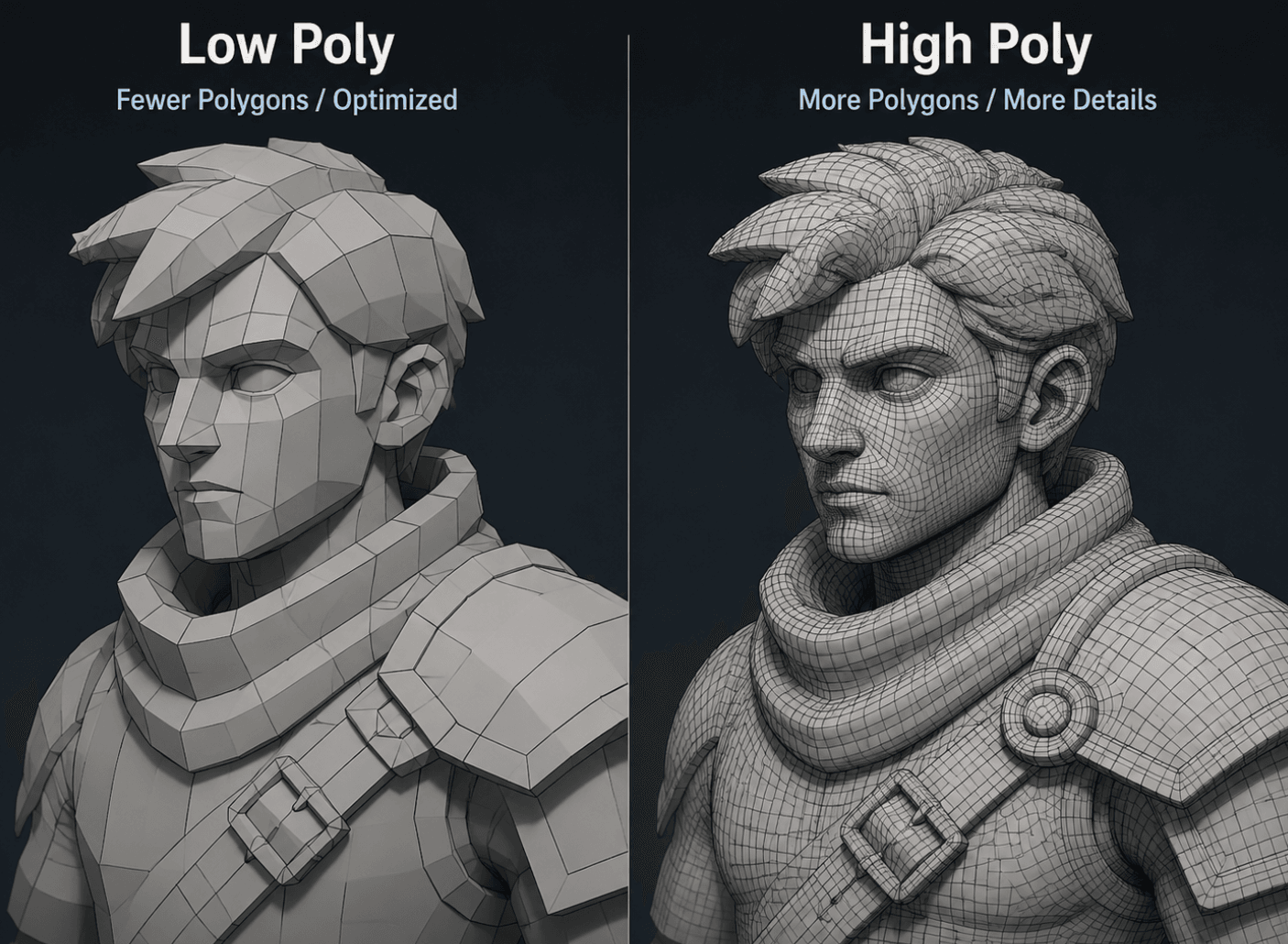
Что такое лоуполи в разработке игр?
Лоу-поли подход — это не фиксированное число. Это подход к работе, при котором количество треугольников сохраняется достаточно малым для отрисовки тысяч объектов со скоростью 60 кадров в секунду (60 FPS). Конечный результат мы называем игровой 3D-моделью, когда она корректно импортируется в движок. Конкретный предел зависит от вашей целевой платформы.
Сколько там полигонов?
Низкополигональный объект обычно содержит от 100 до 10 000 треугольников. Низкополигональный персонаж для мобильной игры или игры со стилизованной графикой содержит примерно от 5 000 до 50 000 треугольников. Это не строгие правила. Это диапазоны, используемые в реальных продуктах.
Стилизованная графика часто задумывается как низкополигональная, но это не одно и то же. Куб с плоским затенением (flat shading) — это низкополигональная модель. Стилизованное дерево, созданное вручную с 8 000 треугольников, — тоже низкополигональная. Категорию определяет количество полигонов (poly count), а не художественный стиль.
Почему инди-разработчики выбирают низкополигональную графику
Лоу-поли — это стандартный выбор для инди-разработчиков по трем причинам. Он быстро отрисовывается на телефонах и ноутбуках. Быстро собирается, когда у вас нет отдельного 3D-художника. Хорошо читается на небольших экранах, характерных для мобильных и браузерных игр.
У этого стиля графики есть настоящие поклонники. Такие игры, как «Monument Valley» и «Journey», доказали, что низкополигональный стиль может обладать серьёзной эмоциональной глубиной. Выбор в пользу низкополигональной графики часто является творческим решением, а не попыткой сэкономить. «Vampire Survivors» и «Brotato» демонстрируют этот же подход с другой стороны: плоская 2D-графика без какого-либо 3D-бюджета всё равно расходится миллионными тиражами. Суть в том, что игроки откликаются на чёткое художественное направление, а не на количество полигонов.
Когда лоу-поли ограничивает обзор
Низкополигональные модели плохо справляются с мелкими деталями поверхности. Поры кожи, структура ткани и сколотые края бетона исчезают, когда у вас всего несколько тысяч треугольников. На близком расстоянии камеры гранёный силуэт становится очевидным. Низкополигональный камень выглядит приемлемо с десяти метров. С двух метров плоское затенение на каждой грани — это первое, что бросается в глаза.
Если вашей игре нужны фотореалистичные герои или реквизит героев, которые видны вблизи, чистый лоу-поли будет мешать. Именно здесь на помощь приходит хай-поли рабочий процесс — не как замена, а как источник деталей. Хай-поли скульптинг добавляет поры и сколы, а затем карта нормалей переносит их на лоу-поли сетку, чтобы игрок видел детали без нагрузки на движок.
Треугольники против вызовов рисования: истинное узкое место, снижающее частоту кадров
Большинство новичков смотрят на счётчик треугольников и игнорируют показатель, который имеет реальное значение. Сцена с 1000 одинаковыми ящиками по 500 треугольников каждый содержит 500 000 треугольников, что современный GPU обрабатывает легко. Но если каждый ящик требует отдельного вызова отрисовки, CPU отправляет 1000 команд за кадр, и именно эти накладные расходы приводят к падению производительности до 20 кадров в секунду.
Решение редко заключается в уменьшении количества треугольников. Решение заключается в пакетной обработке или инстансировании на GPU, указывая GPU отрисовывать все 1000 ящиков за один или несколько вызовов отрисовки. Статическое пакетирование Unity объединяет совместно расположенную статическую геометрию в объединенные меши. Инстансированные статические меши Unreal Engine делают то же самое для повторяющихся пропов.
Практический бюджет планирования: поддерживайте общее количество треугольников в кадре около 100 000–300 000 на мобильных устройствах и несколько миллионов на настольных компьютерах, но ограничьте количество вызовов отрисовки до 100 на мобильных и нескольких сотен на настольных компьютерах. Бюджет треугольников — это легкая часть. Бюджет вызовов отрисовки — это то, где игры действительно испытывают подтормаживания, и низкополигональная графика здесь тоже помогает, поскольку меньшие меши более эффективно группируются в батчи.
Разбор примера: 500 фоновых объектов
Допустим, ваш уровень содержит 500 деревянных ящиков. При 800 треугольниках каждый это 400 000 треугольников в сумме, что вполне укладывается в бюджет. Без инстансинга 500 вызовов отрисовки (draw calls) сильно нагружают мобильные процессоры. С GPU-инстансингом эти 500 ящиков превращаются в один вызов отрисовки при том же количестве треугольников. Геометрия не изменилась. Изменился только способ передачи данных. Вот почему низкополигональный пайплайн и инстансинг идут рука об руку: маленькие повторяющиеся меши — это именно то, что любит батчинг.
Что такое высокополигональная модель (High Poly) в разработке игр?
Высокополигональная модель означает миллионы треугольников. Её используют, когда детализация поверхности важнее бюджета кадровой частоты, что в играх означает, что она используется на этапе производства, а не как финальный актив.
Сколько полигонов подразумевает «высокополигональная модель» на самом деле?
Высокополигональный скульпт одного персонажа может достигать от 2 до 10 миллионов треугольников. Детализированный геройский проп окружения часто находится в диапазоне от 500 000 до 2 миллионов. Такое количество полигонов имеет смысл только при офлайн-рендере или в качестве источника для запекания. Ни один движок реального времени не способен рендерить персонажа с миллионом треугольников при 60 FPS одновременно с сотнями других объектов.
Высокополигональный воркфлоу: настройка bake в Blender
Современный конвейер разделяет детализированную модель и финальную модель для поставки.
Шаг 1: Скульптинг высокого полигонажа. Создайте или импортируйте детализированную геометрию. Целевой диапазон полигонов: от 500 000 до 5 миллионов в зависимости от требуемого уровня шума поверхности.
Шаг 2: Low-poly ретопология. Создайте чистую низкополигональную сетку поверх high-poly модели, следуя правилам чистой топологии, чтобы ребра хорошо деформировались при анимации. Целевое количество треугольников — от 1 000 до 50 000.
Шаг 3: UV-развертка лоуполи. Отметьте швы, выполните развертку и упакуйте айленды с минимальным растяжением. Плотность текселей определяет четкость текстуры: 512px–2K подходит для мобильных пропсов, 2K–4K — для главных объектов на ПК. Если хотите вспомнить, как UV-развертка влияет на текстуры, обратитесь к нашему руководству по исправлению отсутствующих текстур в Blender.
Шаг 4: Запекание карты нормалей. В Blender настройте связь между высокополигональной и низкополигональной моделями, следуя инструкциям по запеканию из официальной документации. В качестве типа запекания выберите Normal в касательном пространстве (Tangent Space), так как это стандарт для Unity и Unreal. Хотя нормали в объектном пространстве и существуют, они практически никогда не используются в игровых движках.
Шаг 5: Экспорт FBX и текстур. Экспортируйте low-poly меш в формате FBX или OBJ с UV-развёрткой. Экспортируйте запечённую карту нормалей в формате PNG для стандартного использования или в формате EXR для 16-битного float.
Распространенные проблемы при выпечке и как их избежать
Три проблемы приводят к большинству неудачных запеканий. UV-швы проявляются как тёмные линии на карте нормалей, если настройки зазоров слишком малы. У зеркально-симметричных моделей по центру возникает искажение нормалей, если не разделить шов или не снять с него фаску. Разные группы сглаживания между высокополигональной и низкополигональной моделью вызывают сильные цветовые сдвиги, которые выглядят как ошибки освещения.
Ни одну из них не сложно исправить, если знать причину. Именно в этом разница между выпечкой за 20 минут и той, что готовится два дня.
Когда не удаётся избежать высокой полигональности
Некоторые ассеты заслуживают своих треугольников. Архитектурная визуализация, реквизит для кинематографических заставок и главные персонажи, показанные крупным планом, — всё это оправдывает использование высокополигональных мешей. Благодаря технологии Nanite в Unreal Engine 5 статические меши могут содержать значительно больше геометрии, чем раньше, о чём мы расскажем ниже.
Ориентировочно, модель главного героя, к которой можно подойти вплотную, может использовать от 100 000 до 500 000 треугольников при использовании Nanite, по сравнению с 30 000–80 000 для того же персонажа в десктопной сборке без Nanite. Высокая детализация требует ресурсов. Она достигается за счёт увеличенного бюджета полигонов, обеспечиваемого Nanite, в сочетании с полным набором PBR-текстур, чтобы поверхность выглядела реалистично вблизи.
Как работают бюджеты Polygon в зависимости от платформы и типа игры
Самое полезное, что можно изучить, — это конкретная справочная таблица. Эти цифры отражают данные по отгруженным играм разных жанров.
Таблица эталонного количества полигонов
Тип игры | Предмет переднего плана | Фоновый ресурс | Персонаж |
Мобильный или 2D-гибридный | менее 1 000 треугольников | менее 200 треугольников | менее 5 000 трис. |
Инди для ПК, стилизованная | от 1 000 до 10 000 трис | от 200 до 2 000 трисов | от 5 000 до 50 000 полигонов |
Инди-игра для ПК и реалистичность | от 10 000 до 50 000 трис | От 2000 до 10 000 трисов | 50 000–150 000 треугольников |
AAA | 100 000 до 1 млн+ трис. | От 10 000 до 100 000 треугольников | 500 000+ трисов |
Это ориентиры, а не строгие правила. Камень на заднем плане в AAA-игре может состоять из 100 000 треугольников, потому что камера никогда не приближается к нему вплотную, и ресурсы движка рассчитаны на это. Тот же камень в мобильной игре должен содержать менее 500 треугольников, иначе возникнет накопление вызовов отрисовки.
Почему для мобильных игр и игр AAA-класса нужны разные подходы
Мобильные GPU используют общую память для CPU и GPU, и её общий объём ограничен примерно 512 МБ – 1 ГБ. Одна текстура в разрешении 4K занимает 22 МБ. Двадцать таких текстур — и лимит исчерпан. Низкое количество полигонов и маленькие текстуры на мобильных устройствах — это не стилистический выбор. Это единственный способ обеспечить работу игры. Информацию о рабочем процессе для мобильных устройств см. в нашем гайде по созданию низкополигональных моделей для мобильных игр.
AAA-игры на консолях используют от 8 до 16 ГБ видеопамяти. Они тратят её на проработку главного героя и компенсируют агрессивными системами LOD (уровней детализации). Оба подхода допустимы. Просто они ориентированы на разное железо.
LOD: Создание нескольких уровней детализации на основе одной модели
Технология LOD (Level of Detail) заменяет меш на более простую версию по мере удаления камеры. Дерево может состоять из 50 000 треугольников вблизи, 8 000 на среднем расстоянии и 1 500 вдали. Игрок никогда не замечает замену, но видеокарта (GPU) значительно снижает нагрузку.
В Blender вы создаете LOD, дублируя меш (сетку) и применяя модификатор Decimate (Упрощение) с возрастающими значениями. Unity осуществляет переключение через LOD Groups. Unreal Engine 5 использует пороговые значения размера на экране для каждого уровня LOD. Один высокополигональный исходник может служить источником для всей цепочки, если это предусмотрено.
Мост запекания: как Low Poly переносит детали High Poly
Это то, что упускает большинство новичков. Низкополигональная модель не означает низкую детализацию. Это означает малое количество полигонов. Детализация достигается за счёт текстур.
Простое объяснение нормальных карт
Карта нормалей хранит направление поверхности в виде цвета RGB. Чистый синий означает, что поверхность направлена прямо наружу. Красный и зелёный передают наклон по двум осям. Когда движок читает карту, он рассчитывает освещение каждого пикселя так, будто геометрия неровная, хотя треугольник остаётся плоским. Именно так персонаж, состоящий из 5000 треугольников, показывает поры, швы и переплетение ткани.
Когда нормальных карт недостаточно
Нормали имитируют освещение, а не форму. Они ломаются на контурах, где всё ещё видны границы треугольников. Для глубокого рельефа необходимы смещение или настоящая геометрия. Отражения и контактные тени требуют карт шероховатости и карт AO (ambient occlusion), которые нормальные карты не предоставляют. Создание полного набора PBR, а не только карты нормалей — вот что придаёт низкополигональной модели завершённый вид.
Низкополигональные и высокополигональные модели для Unity и Unreal Engine
Движок меняет алгоритмы. Знание того, какие возможности поддерживает ваш движок, определяет, насколько агрессивной может быть ваша стратегия.
Nanite: меняет ли UE5 расчёт полигонов?
Nanite — это система виртуализированной геометрии Unreal Engine 5. Она потоково передает и отсекает треугольники для каждого пикселя, благодаря чему сетка кинематографического качества с миллионами треугольников может рендериться в реальном времени как статический объект. Вам больше не нужно вручную создавать уровни детализации (LOD) для мешей Nanite.
Nanite имеет жёсткие ограничения. Он работает только со статическими мешами. Листва, прозрачные материалы и деформируемые скелетные меша обрабатываются с помощью традиционного рендеринга. На мобильных устройствах Nanite вообще недоступен. Поэтому даже в UE5 низкополигональные модели и уровни детализации (LOD) по-прежнему важны для большей части вашей сцены.
Unity HDRP и Built-in: Текущая реальность полигонов
Unity не предоставляет аналога Nanite во встроенном конвейере или URP. LOD-группы и GPU-инстансинг остаются стандартным путём оптимизации. High Definition Render Pipeline обеспечивает высокое качество изображения, но имеет те же ограничения по количеству треугольников, что и любой движок реального времени. Если ваша игра на Unity ориентирована на мобильные устройства, планируйте низкополигональную графику с самого начала.
Создавайте игровые 3D-модели с помощью Triverse AI
Когда в команде нет 3D-художника, работа с нуля — это основное препятствие. Triverse AI предлагает два режима, которые подходят для этого пайплайна.
Как использовать Triverse AI Artist Mesh
Шаг 1. Загрузите референсное изображение. Откройте Triverse AI Studio и выберите Artist Mesh. Перетащите файл или вставьте изображение в формате PNG, JPG, JPEG или WebP. Лучше всего подходят чистые силуэтные фотографии или эскизы концепт-арта. Избегайте изображений с резкими тенями или загромождённым фоном.
Шаг 2. Выберите топологию и количество вершин. Выберите Quad или Triangle в зависимости от целевого использования. Triangle используется по умолчанию в игровых движках. Выберите предустановку количества вершин, соответствующую вашей платформе: 1K для фоновых объектов, 2K для стандартных объектов, 4K для важных объектов или детализированных персонажей. Если 4K недостаточно, настраиваемый слайдер позволяет установить значение до 4096 вершин.
Шаг 3. Генерация и ожидание. Нажмите «Сгенерировать». Генерация стоимостью 25 кредитов обычно выполняется менее чем за минуту. Результат — чистая сетка с корректной топологией треугольников.
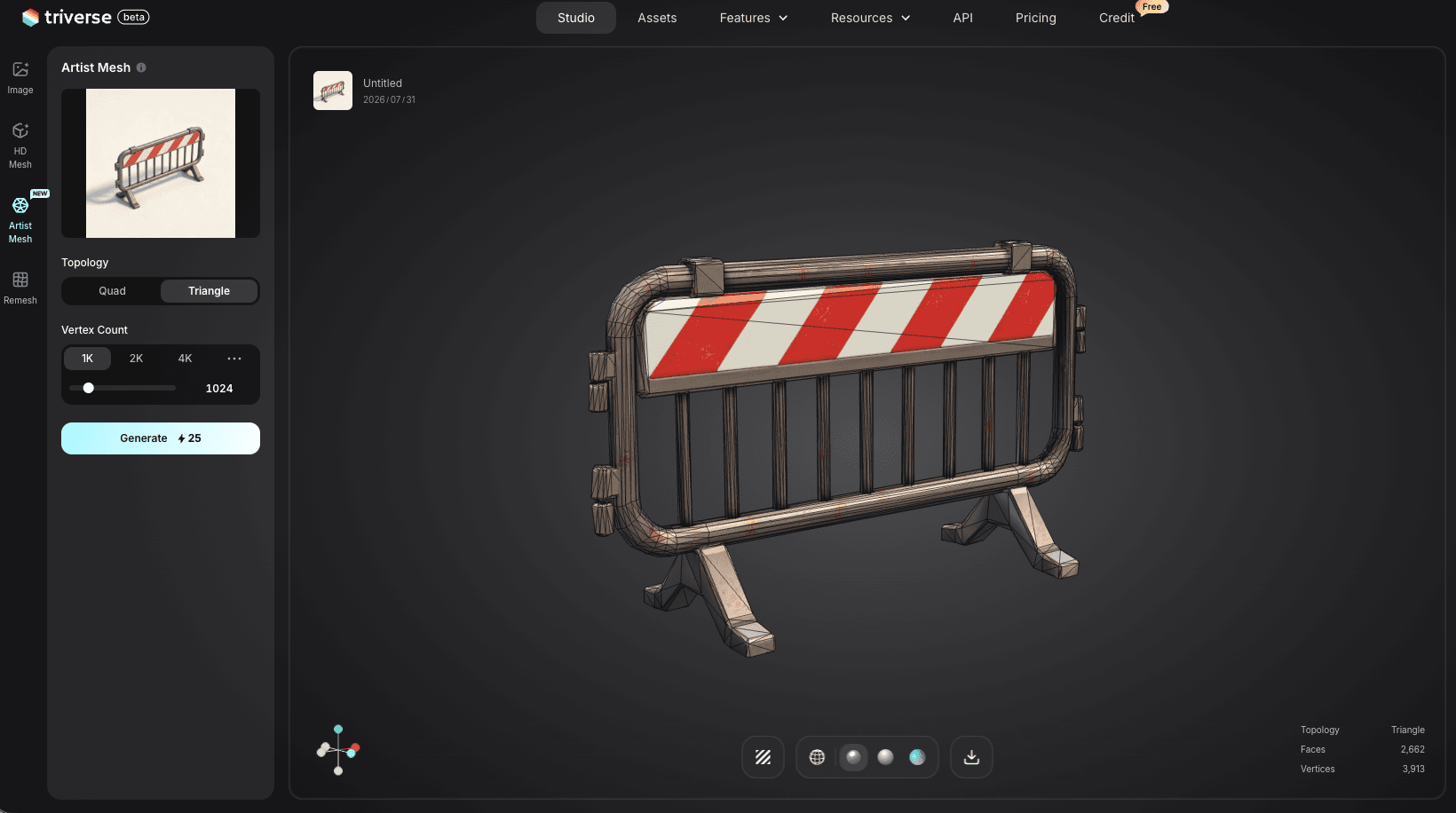
Шаг 4. Экспорт в ваш игровой движок. Нажмите кнопку «Экспорт» и выберите GLB или OBJ. Формат GLB объединяет геометрию и материалы в одном файле, что является самым быстрым путем импорта в Unity или Unreal Engine. Формат OBJ лучше подходит, если вам нужно сначала отредактировать сетку в Blender.
Как работать с Triverse AI HD Mesh
Шаг 1. Выберите способ ввода. HD Mesh поддерживает как текстовый запрос, так и изображение. Введите описание, например "детализированный средневековый меч с кожаной рукоятью и металлическим навершием", или загрузите эскиз для генерации сетки из изображения.
Шаг 2. Создайте исходную высокополигональную модель. Нажмите Сгенерировать. Результатом будет высокополигональная сетка с большей детализацией поверхности, чем игровой движок может поддерживать в реальном времени, что идеально подходит для запекания (текстур/карт нормалей).
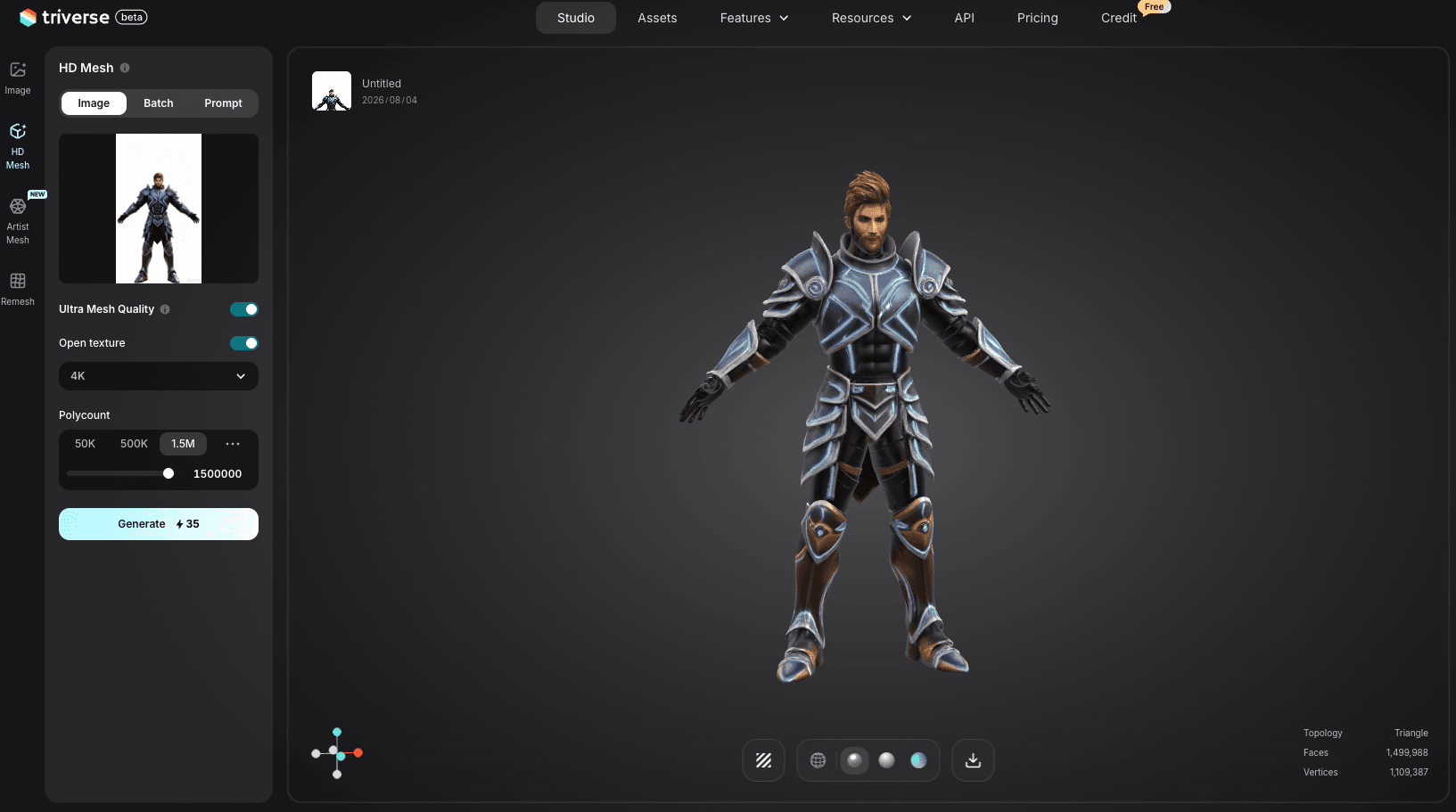
Шаг 3. Экспортируйте сетку. Загрузите в формате OBJ. Импортируйте её в Blender вместе с вашей низкополигональной ретопологией.
Шаг 4. Запекание в Blender. Выполните описанные выше шаги по запеканию: выполните ретопологию высокополигональной сетки в низкополигональную, сделайте UV-развёртку, а затем запеките карту нормалей с исходной HD-сетки на полученную низкополигональную сетку. Triverse выполняет основную часть работы, поэтому вам остаётся только заняться UV-развёрткой и запеканием.
Для инди-разработчика Artist Mesh создаёт низкополигональную сетку за минуты. HD Mesh предоставляет высокополигональную модель в качестве референса. Вам всё равно нужно выполнить UV-развёртку и запекание текстур в Blender, но базовые сетки уже готовы.
Низкополигональные vs высокополигональные модели: Краткое сравнение
Сравнение бок о бок помогает принять решение при выборе следующего актива.
Таблица сравнения функций
Функция | Лоу-поли | Хай-поли |
Число полигонов | От 100 до более чем 10 000 | от 10 000 до 10 млн+ |
Художественный стиль | Часто выполняется в определённом стиле | Реалистичный или кинематографический |
Срок изготовления | Время работы | От нескольких дней до нескольких недель |
Рабочие характеристики двигателя | Отлично | Требуется оптимизация |
Необходима выпечка | Обычно нет | Да, для использования в играх |
Идеально для | Мобильные игры, инди-игры, фоновые процессы | Реквизит героев и персонажи |
Как выбрать следующий актив
Задайте три вопроса. Подойдёт ли камера близко к этому объекту? Если да, вам нужна детализированная текстура, что означает запечь из высокополигональной модели. Повторяется ли этот объект сотни раз в сцене? Если да, сделайте его низкополигональным и используйте экземпляры. Является ли этот объект важным объектом, который изучает игрок? Если да, используйте больше полигонов и остальное запеките.
Заключение
Low-poly и High-poly — это не противоположности. Это две половины одного пайплайна. Вы моделируете или генерируете высокополигональную геометрию, чтобы захватить детализацию, затем ретопологизируете её в низкополигональную сетку и запекаете эту детализацию на текстуры. Движок видит несколько тысяч треугольников, а игрок видит поры, швы и шум поверхности. Такой рабочий процесс является стандартом для всех игр реального времени.
Если вы разрабатываете для мобильных устройств или веба, начните с низкополигональной модели и оставайтесь на ней. Если вам нужна детализация для ключевых объектов, создайте высокополигональную модель и запеките её. В любом случае, количество полигонов, которое вы выбираете, должно соответствовать целевому железу, а не предпочитаемому художественному стилю. Triverse AI предоставляет вам исходные сетки для обоих путей: Artist Mesh для чистой низкополигональной основы, HD Mesh для высокополигонального исходника. UV-развёртки и запекание всё ещё требуют ручной работы, но геометрия готова.
ЧАВО о низкополигональных и высокополигональных моделях
В чем разница между низкополигональными и высокополигональными моделями?
Низкополигональные модели используют мало треугольников, обычно до 10 000 для объекта, и быстро рендерятся в режиме реального времени. Высокополигональные модели используют сотни тысяч или миллионы треугольников и применяются для офлайн-рендера или как исходник для запекания. Сетка в финальной версии игры почти всегда низкополигональная, с детализацией, добавленной через текстуры.
Низкополигональные модели лучше высокополигональных для игр?
Низкополигональные модели лучше для производительности, что важно для мобильных устройств и больших сцен. Высокополигональные модели лучше для детализации поверхностей, но не могут использоваться напрямую. Большинство игр используют низкополигональные сетки с детализацией высокополигональных моделей, запечённой в карты нормалей. Ни один из подходов не является универсально лучшим.
Сколько треугольников должно быть у игрового персонажа?
Мобильному или стилизованному персонажу нужно от 5 000 до 50 000 треугольников. Персонаж для инди-игр на ПК использует 50 000–150 000. Персонажи игр класса AAA (бюджетных) достигают 500 000 треугольников и более. Правильное число зависит от вашей целевой платформы и того, насколько близко подходит камера.
Можно ли использовать высокополигональные модели в Unity?
Unity может импортировать высокополигональные модели, но они снизят частоту кадров (FPS), если использовать их напрямую в сцене реального времени. Стандартный подход — запечь детализацию высокополигональной модели на низкополигональную сетку и импортировать низкополигональную версию с её текстурами.
Убирает ли Unreal Engine 5 Nanite необходимость в низкополигональных моделях?
Nanite убирает ручную работу с LOD для статических мешей, потоково передавая геометрию на каждый пиксель. Он не поддерживает листву, прозрачность, скелетную анимацию или мобильные устройства. Большая часть вашей сцены всё равно выигрывает от планирования низкополигональных моделей даже в UE5.
Как превратить высокополигональную модель в низкополигональную?
Ретопологизируйте высокополигональную модель в чистую низкополигональную версию, разверните её UV-развёртки, затем запеките карту нормалей из высокополигональной в низкополигональную в Blender. Экспортируйте низкополигональную сетку как FBX с набором запечённых текстур.
Что такое готовая для игры 3D-модель?
Готовая для игры 3D-модель оптимизирована для движков реального времени: разумное количество полигонов для её платформы, чистые UV-развёртки и полный набор текстур, включая альбедо, нормалей, шероховатости, а иногда металличность и карты окружающего затенения.