Квады против треугольников в игровой ретопологии: когда и что использовать?
Модель в квадратах (четырёхугольниках), корабль в треугольниках. Узнайте, когда важны квадраты и треугольники в ретопологии для игр, как Unity и Unreal выполняют триангуляцию при импорте и где возникают проблемы.
Опубликовано ·
Обновлено
Вы создали аккуратный наплечник в Blender. Каждая петля — это квад; поток рёбер идеально обтекает сустав, сетка плотная. Вы экспортируете модель в формате FBX, импортируете её в Unity, и воротник выглядит как набор разрозненных полигонов. Диагональный разрез пересекает плавную кривую, над созданием которой вы потратили тридцать минут.
Если этот момент кажется знакомым, вы не одиноки, и, что важнее, с вами всё в порядке. То, что вы видели, — это движок, выполняющий триангуляцию ваших четырёхугольников. Так делает каждый игровой движок. Разница между плавным импортом и рваным определяется тем, как вы это обрабатываете на своей стороне.
В игровой ретопологии вопрос не заключается в выборе между четырёхугольниками и треугольниками. Используются и те, и другие. Главная хитрость в том, чтобы знать, где одни переходят в другие.
Что на самом деле означает Quads vs Triangles (четырёхугольники против треугольников) в 3D топологии
Прежде чем вы сможете решить, какой подход и когда использовать, вам нужно понять причины этого разделения. Это не религиозная война. Это передача ответственности между двумя разными этапами пайплайна разработки игр.
Почему 3D-моделлеры отдают предпочтение четырёхугольникам (топология рёбер и субдивижн)
Квады — это основная единица 3D-скульптинга и ретопологии. Квад имеет четыре грани и четыре вершины. Такая форма обеспечивает чистые петли, плавно проходящие по поверхности модели. При моделировании лица персонажа петли вокруг глазницы, рта и челюсти состоят из квадров. Эти петли позволяют сетке естественно деформироваться при моргании или разговоре персонажа.
Квады также хорошо поддаются субдивизированию. Модификатор поверхности подразделения разделяет каждый квад на четыре меньших квада, что позволяет получить более гладкую сетку без нарушения топологии. Если применить подразделение к сетке с треугольниками, топология быстро нарушается, а поверхность может деформироваться непредсказуемым образом.
Почему игровые движки визуализируют только треугольники
Каждый рендерер в реальном времени работает одинаково на фундаментальном уровне. GPU растеризует треугольники. Это фундаментальная единица рендеринга в DirectX, Vulkan, OpenGL и Metal. Когда вы импортируете сетку на основе четырёхугольников в Unity или Unreal, движок преобразует каждый четырёхугольник в два треугольника. Это происходит автоматически при импорте, и вы не можете контролировать направление диагоналей, если не выполните триангуляцию заранее.
Суровая реальность: "Все квады — это два треугольника"
Каждый четырёхугольник состоит из двух треугольников. Единственное различие заключается в том, когда происходит триангуляция. В Blender четырёхугольник визуально остаётся квадратом до тех пор, пока не будет применён модификатор «Триангулировать». В движке разделение происходит сразу при загрузке меша. Та диагональная линия, которую вы видели на наплечье, объясняется тем, что движок самостоятельно выбирал диагональ для каждого четырёхугольника.
Планарность: почему треугольник всегда лежит в одной плоскости
Три точки всегда определяют плоскость. Треугольник плоский по построению. Квад может быть непланарным, если его четыре угловые точки не лежат в одной плоскости. Квады изгибаются и скручиваются, и когда движок триангулирует изогнутый квад, два полученных треугольника имеют слегка разные нормали. Именно это вызывает артефакты затенения и странные отражения.
Четырёхугольники против Треугольников в игровой ретопологии: Настоящий Вопрос
Главный вопрос не в том, какая форма лучше. А в том, каково место каждой из них в процессе.
Ретопологизация: квадро- и триангуляция? Руководство по выбору
Вот схема принятия решений, которую можно применить к любой модели.
Будет ли эта сетка деформироваться (персонаж, одежда, существо)? Используйте квады при ретопологии. Для скиннинга необходимы эдж-лупы, а квады обеспечивают чистую деформацию.
Подойдёт ли эта сетка для подразделения? Делайте ретопологию четырёхугольниками. На треугольниках подразделение работает некорректно.
Эта сетка является жестким пропом, который неподвижен? Вы можете выполнить ретопологию в четырёхугольниках или использовать оптимизированную треугольную раскладку. Ограничения деформации не применяются.
Эта сетка представляет собой базовую сетку, сгенерированную ИИ или полученную путём сканирования, которая изначально была триангулирована? Отталкивайтесь от этой триангулированной основы и добавляйте кольца из квадов там, где это необходимо для деформации, вместо того чтобы пытаться перестроить всю сетку.
Когда четырехугольники преобладают в рабочем процессе ретопологии
Сетки моделей персонажей, требующие деформации и скелетной анимации
Для руки персонажа необходимы кольцевые ребра, огибающие локоть и плечо, чтобы веса деформации распределялись корректно. Использование четырехугольников позволяет создать такие потоки. Если вы моделируете руку персонажа треугольниками, поток ребер превращается в паутину. Веса деформации будут давать артефакты на суставе из-за неравномерного распределения вершин. Основным инструментом ретопологии является «Loop Cut and Slide» (разрезание и смещение петель), причем операция разрезания петель работает только с четырехугольниками.
Поверхности, которые вы будете субдивестировать или скульптировать позже
Любая поверхность, которая будет принимать модификатор подразделения (Subdivision Surface) в Blender или ZBrush, требует чистых четырёхугольников (quads). Треугольник нарушает алгоритм подразделения, потому что три вершины не могут равномерно разделиться на четыре квада. Область вокруг треугольника становится топологическим узлом, который препятствует сглаживанию. Если вы планируете лепить высокополигональную модель головы с помощью модификатора Multiresolution и запечь её (bake), ваша базовая сетка (base mesh) должна состоять только из квадратов.
Когда треугольники уместны (или предпочтительнее)
Жёсткие пропы и геометрия среды
Эта каменная стена, которую вы расставите пятьдесят раз на уровне, не деформируется. Она не разбивается. Она просто стоит и ловит свет. На этапе блокировки её можно моделировать из квадров, но при экспорте допустима агрессивная триангуляция. В любом случае GPU видит только треугольники, а хорошо триангулированный объект работает так же, как и объект из квадров.
Многие профессиональные технические художники предпочитают моделировать пропсы окружения квадами в процессе производства и позволяют движку триангулировать их при импорте. Безопасным компромиссом является сохранение квадов для ускорения рабочего процесса и полагаясь на движок в финальной триангуляции.
3D-модели, готовые к непосредственному использованию в игровом движке
Некоторые меши никогда не возвращаются в Blender. Они загружаются из магазинов активов, генерируются ИИ-инструментами или сканируются методом фотограмметрии. Они попадают в игровой движок в исходном виде. Если исходная сетка триангулирована, попытки преобразовать её в квады обречены на провал. Вместо этого, выполните корректировку нормалей и шейдинга.
Как Unity и Unreal работают с квадами и треугольниками
Движок имеет значение. Каждый из них обрабатывает триангуляцию немного по-разному, и понимание этих различий поможет избежать неочевидных ошибок при импорте.
Выполняет ли Unity триангуляцию при импорте? (Да, и вот что при этом изменяется)
Unity триангулирует каждую полигональную грань при импорте файлов FBX и OBJ с помощью собственного алгоритма. Он учитывает группы сглаживания, но выбирает диагональ для каждого квада в зависимости от того, какое направление даёт наиболее равномерное освещение. Это означает, что вы не можете гарантировать, каким образом квад будет разделён, если не выполните триангуляцию в Blender заранее и не запеките результат в FBX.
Практическое следствие: если вы экспортируете руку персонажа с квад-топологией из Blender без триангуляции, Unity может разделить петлю в области плеча в неправильном направлении и создать визуально заметный шов. Решение — применить модификатор Triangulate (Триангуляция) в Blender перед экспортом, а затем проверить результат триангуляции в проблемных областях.
Unity также обрабатывает n-угольники (грани с пятью или более ребрами), преобразуя их в триангуляцию веером из центра грани. Это почти всегда выглядит некорректно на изогнутых поверхностях. Удалите n-угольники в Blender перед экспортом.
Триангуляция в Unreal Engine 5 и её влияние на вашу топологию
Unreal Engine 5 выполняет триангуляцию при импорте аналогично Unity, следуя пайплайну импорта FBX. Главное отличие заключается в Nanite. Если включить Nanite для статического меша, UE5 сможет обрабатывать триангулированную геометрию с гораздо большим полигональным бюджетом без потери производительности. Однако Nanite работает только со статическими мешами. Деформируемые меши со скинингом по-прежнему подчиняются тем же правилам деформации квадов.
Почему некорректная триангуляция по-прежнему приводит к разрушению сетки
Даже когда движок обрабатывает триангуляцию, неудачное разделение создает проблемы, которые проявляются в затенении, а не в геометрии. Два треугольника из искривлённого квада ориентированы под немного разными углами. Карта нормалей, которая была запечена с гладкой поверхности четырехугольника, теперь рассчитывается для двух наклонных поверхностей, и шов становится видимым в виде темной линии или нарушения отражения.
Именно поэтому опытные игровые художники не говорят «просто пусть движок сам разберётся». Они говорят: «триангулируйте в DCC и проверяйте результат».
Треугольная топология и четырехугольная топология: наглядное сравнение
Фактор
Quad-топология
Топология треугольника
Деформация (скининг)
Отлично, реберные циклы поддерживают суставы
Низкое качество, неровные края, нет замкнутых контуров
Субдивизионная поверхность
Разбивается на части без остатка
Защипы и узлы
Импорт движка
Автоматически триангулированный (неуправляемая диагональ)
Импортируется без изменений (вы управляете распределением)
Запекание карт нормалей
Чистые результаты с хорошими UV-швами (UV-развертки)
Работает корректно, если предварительно триангулировать перед запеканием
Отладка и редактирование
Разрез по петле и выделение работают интуитивно понятно
Трудно подобрать кромочные кольца
Скорость ретопы
Ускоренная работа с персонажами
Быстрее для жестких условий окружающей среды
Отрисовка на графическом процессоре
Преобразовано в трисы при импорте
Нативный формат
Таблица наглядно демонстрирует правило: вы моделируете в квадах, собираете из треугольников, и единственный выбор — самостоятельно контролировать процесс триангуляции или доверить его движку.
Практический процесс ретопологии: от четырехугольников к треугольникам для игр
Вот именно этот рабочий процесс из четырех шагов, который я использую при переносе меша из Blender в Unity или Unreal.
Шаг 1: Создание базовой сетки с чистой квад-топологией
Начните с квадов. Используйте инструмент Poly Build в Blender или Quad Draw в Maya. Сохраняйте параллельность петель рёбер и равномерную плотность вершин. Для руки персонажа петли вокруг локтя должны быть параллельны и равномерно распределены. Пока не беспокойтесь о треугольниках. На этапе моделирования главное — правильная топология.
Шаг 2: Создание потока рёбер для деформации
Определите суставы и зоны деформации. На персонаже плечо, локоть, запястье и пальцы требуют концентрических петель рёбер, по которым могут следовать скин-веса. На существе добавьте петли там, где кожа растягивается. Держите в уме принципы чистой топологии. Петли рёбер, которые вы создаёте здесь, определяют объём работ по очистке на этапе скиннинга.
Шаг 3: Выполните триангуляцию для экспорта и проверьте результат
Примените модификатор Triangulate в Blender. Этот модификатор предоставляет параметры выбора диагоналей. По умолчанию (Красивая) выбирается оптимальная диагональ для каждой четырехугольной грани на основе минимизации артефактов затенения, что обеспечивает наилучшее итоговое изображение в движке. Проверьте результат в режиме каркаса (Wireframe) в Blender перед экспортом. Проверьте, не пересекают ли диагонали важные кольцевые ребра на плече, колене или лице.
Если вы обнаружили некорректную диагональ, добавьте опорное ребро в квад, чтобы принудительно задать правильное направление разбиения, или отредактируйте триангуляцию вручную с помощью инструмента Mesh Split. Этот шаг занимает пять минут и предотвращает описанные выше артефакты затенения.
Шаг 4: Проверка в целевой системе
Импортируйте FBX в Unity или Unreal. Переключайтесь между сглаженным видом и каркасным режимом. Если диагональное ребро проходит через критическую зону деформации, вернитесь к шагу 3 и отрегулируйте триангуляцию.
При первом запуске этого рабочего процесса вы столкнётесь с четырьмя или пятью неудачными триангуляциями в каждой модели. После обработки трёх моделей вы начнёте предугадывать места возникновения проблем и предотвращать их на этапе ретопологии.
Частые ошибки в геймретопологии: квадратные полигоны против треугольников
Основные ошибки ретопологии делятся на три типа.
Слепое доверие кнопке автоматической триангуляции
Модификатор Triangulate в Blender не творит чудес. Он пытается угадать направление диагонали, и для сложных изогнутых поверхностей это предположение часто оказывается неверным. Примените модификатор, поверните сетку в режиме каркаса и осмотрите диагонали в зонах деформации. Если диагональ пересекает цикл ребер на сгибе (например, в области локтя), исправьте это. Не полагайтесь на то, что движок скроет недостатки.
Сохранение N-угольников в полигональной сетке игры
N-угольник — это любая грань с более чем четырьмя ребрами. Blender отображает их в окне просмотра как грани, но при экспорте в игровой движок движок выполняет триангуляцию. N-угольники приводят к неэстетичным веерным узорам при триангуляции на изогнутых поверхностях. Решение — поддерживать сетку ретопологии достаточно аккуратной, чтобы N-угольники никогда не появлялись. Если один возник, используйте инструмент Нож, чтобы разделить его на квады или треугольники перед экспортом.
Смешение понятий числа треугольников и качества топологии
Большое количество треугольников не означает хорошую топологию. Меш с 50 000 треугольников, хаотичным потоком рёбер и артефактами N-гонов деформируется хуже, чем меш с 10 000 треугольников, состоящий из чистых квадов и продуманной триангуляции. Бюджет на количество треугольников и бюджет на качество топологии — это отдельные статьи бюджета. Управлять нужно обоими.
От AI-сгенерированных базовых мешей к готовой для игры топологии
Вот ситуация, которая становится все более распространенной. Вы загружаете опорное изображение в инструмент ИИ для 3D и за секунды получаете полигональную сетку. Выходная сетка уже триангулирована. Чистая квад-топология, которую вы обычно создаете во время ремешинга, пока отсутствует.
Когда исходная сетка представляет собой базовую триангулированную, процесс ретопологии меняется. Вместо удаления треугольников и создания квадратов с нуля вы накладываете структуру из квадов поверх высокоплотной триангулированной сетки. Вы сохраняете форму и детализацию поверхности из выходных данных ИИ и формируете через неё новые петли ребер, обеспечивающие деформацию.
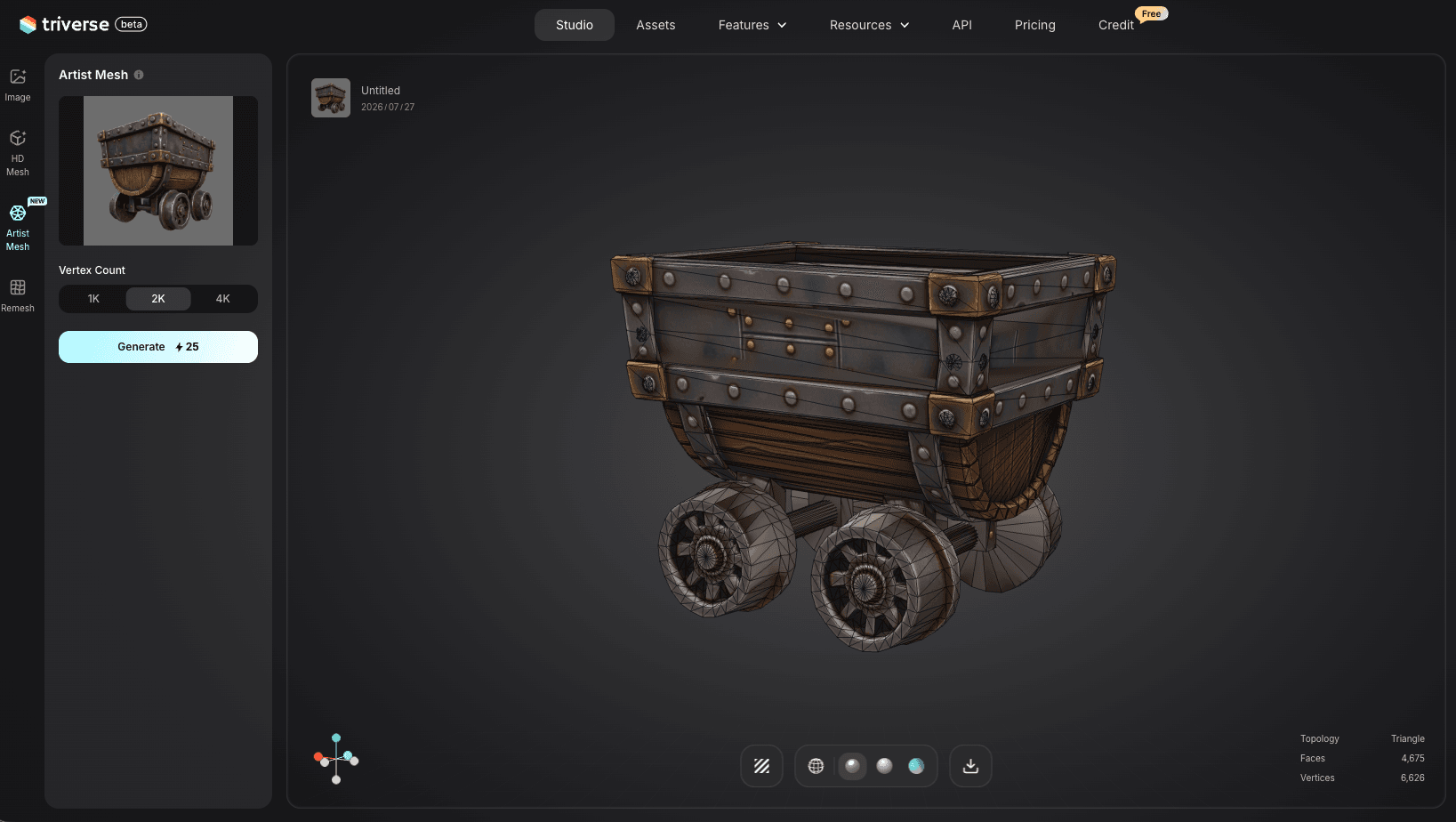
Artist Mesh от Triverse AI — это один из инструментов, который теперь позволяет выбирать топологию при генерации. Он может создавать чистую модель по референсному изображению с регулируемой плотностью: около 1 024 треугольников при настройке Low и 2 048 при Medium, причём вы можете выбрать топологию Quad или Triangle ещё до скачивания файла.
Если вы создаете жесткий реквизит, возьмите вывод в виде треугольников и поместите его прямо в движок. Если вы создаете персонажа, который должен деформироваться, возьмите вывод в виде четырехугольников и используйте его в качестве отправной точки для работы с потоками ребер. Выбор происходит на этапе генерации, а не во время чистки.
Часто задаваемые вопросы: ретопология — четырёхугольники против треугольников
Главный вывод: моделируйте в квадах, а экспортируйте в треугольниках
Выбор между квадами и треугольниками — это этап рабочего процесса, а не соревнование. Вы моделируете в квадах, потому что они обеспечивают поток рёбер, субдивижн и чистую деформацию. Финальная модель поставляется в треугольниках, потому что они необходимы GPU. Единственный вопрос пайплайна заключается в том, триангулировать ли сетку вручную на этапе экспорта или доверить это движку.
Для жестких объектов позвольте движку решать. Для персонажей и всего, что деформируется, выполните триангуляцию перед экспортом и проверьте результат в вашем целевом игровом движке. Как только вы увидите разницу в качестве шейдинга, вы не станете пропускать этот этап.
Если вы работаете с базовой сеткой, сгенерированной ИИ, Artist Mesh от Triverse AI теперь позволяет выбирать топологию из квадов или треугольников на этапе генерации. Выбирайте квады, когда нужны петли деформации, и треугольники, когда требуется статичный проп, который можно напрямую отправить в игровой движок. Это уменьшает количество решений, которые нужно принимать при ретопологии, и даёт вам больше контроля над конвейером вместо борьбы с ним.
Dennis Kirk is an AI 3D specialist and game developer with more than 5 years of industry experience, mastering production workflows across Unity, Unreal Engine, and Godot. He focuses on demystifying next-generation 3D workflows for creators of all skill levels. His writing spans hands-on technical walkthroughs, asset optimization strategies, and in-depth software reviews, helping developers build faster and smarter.