How to Model Fabric for 3D: Cloth Modeling, Materials & Game-Ready Workflows
Learn how to model fabric for 3D characters, find free and paid fabric material downloads, and set up cloth PBR textures in Unity and Unreal for game-ready assets.
A character walks across your game scene. The cloak catches an edge and hangs wrong. The dress fabric looks like painted plastic instead of heavy velvet. Something is off with the cloth simulation, but you cannot name it. Usually the problem is not the animation. It is the fabric material itself, or the lack of a proper fabric 3D model underneath the animation rig.
Modeling fabric for 3D means two different jobs. One is building cloth geometry: real-time simulation, sculpted drapes, or rigged costume pieces. The other is sourcing and creating the fabric material that makes the surface read as wool, silk, leather, or cotton under lighting. This guide covers both, with a workflow that takes a concept sketch to a game-ready fabric asset with correct PBR material.
What Is Fabric Modeling in 3D?
Fabric modeling in 3D is the process of creating cloth geometry or fabric material that behaves and looks like real fabric in a 3D scene. It covers three separate disciplines.
Cloth Simulation
Cloth simulation uses physics solvers to make fabric drape and react to movement. Marvelous Designer, Blender cloth sim, and Maya nCloth all solve fabric as a particle-spring mesh, producing realistic folds and collisions without manual keyframing.
Fabric Material Creation
Fabric material creation is the texturing and shading work that makes a surface read as a specific cloth under lighting. A velvet material and a cotton material can share the same roughness value and still look completely different because of normal map direction, subsurface scattering, and anisotropic highlights.
Fabric 3D Model Sourcing
Fabric 3D model sourcing is finding existing cloth geometry or material packs to use directly or as a base. Free marketplaces, paid packs, and AI-generated references all fall here.
Most tutorials address one of these. This guide puts all three in one pipeline.
How to Model Fabric Cloth: Techniques Compared
There are three main paths for getting cloth geometry into your scene. Each has a cost in time, skill, and fidelity.
Sculpting Fabric by Hand in ZBrush
The slowest route, but the most control. You pull strokes into cloth folds, add wrinkles at joints, and define the surface character of the fabric: heavy canvas versus light chiffon versus structured wool. ZBrush's FiberMesh works for stylized fabric strands, or you can work with subdivided geometry for smoother cloth.
This is the method behind most AAA hero costumes and cloth that needs to look intentional rather than simulated. The cost is hours per piece and a sculpting skill floor. A hand-sculpted cloth on a hero NPC will always beat a simulation for close-up shots, but that quality comes at production rate.
Cloth Simulation with Marvelous Designer
Marvelous Designer is the industry tool for garment design. You draw a 2D pattern, assign fabric physics properties, and run a simulation. The output is cloth geometry with accurate fold behavior, ready for export as an animated Alembic cache or static mesh.
The workflow is pattern-based, not mesh-based. A tailor who knows Marvelous Designer can design a coat faster in MD than any other tool because the paradigm matches the actual craft. For game assets, you simulate, retopologize the output mesh to a game-ready polygon count, then UV and texture.
Blender has a built-in cloth simulator that covers the same ground for free. It is less refined than Marvelous Designer but capable for simple props and secondary cloth. For a full comparison, see our guide on how game environment modeling handles fabric assets in open-world scenes. The Marvelous Designer official tutorials cover cloth simulation from first pattern to final export.
Generating Fabric Geometry with AI
AI image-to-3D tools can generate fabric-covered objects, cloth-covered props, and draped surfaces from a reference image. The output is not simulation-ready cloth, but it is useful as a high-poly reference for baking or as a base mesh for retopology.
For example, you upload a photo of a character in a leather jacket and the AI generates a 3D model of the fabric-covered surface. You retopologize the output to a game-ready mesh, then bake the AI-generated surface detail into a normal map. Triverse AI’s image-to-3D workspace handles this workflow, generating the fabric geometry as a starting point that saves sculpt time.
This is not a replacement for Marvelous Designer or cloth simulation. It is a shortcut for getting fabric geometry when you do not have a reference sculpt or garment designer on the team. The ArtStation tutorial on fabric cloth detailing in ZBrush covers the hand-sculpting side of cloth creation for reference.
Where to Find Fabric Materials for 3D Models
Before building a fabric material from scratch, check what already exists at the quality level you need.
Free Fabric Texture Downloads
Free fabric material sources vary wildly in quality. Some free packs are production-ready. Others have tiling artifacts, incorrect normal maps, or resolution too low for close-up shots.
Recommended Free Fabric Material Sources
- AmbientCG offers fabric textures with full PBR maps, including fabric normal maps with weave direction. The fabric category covers linen, cotton, silk, and wool in multiple colors and roughness levels. The AmbientCG fabric collection covers most common fabric types for game production.
- Poly Haven textures include a fabric and textile section with fabric normal maps, roughness, and displacement. All free for commercial use. Their fabric and textile library updates regularly.
- ShareTextures has a large fabric material collection, though quality varies. Check the fabric normal map resolution before downloading.
- 3dtextures.me tags fabric with full PBR sets for velvet, denim, and wool.
Red Flags on Free Fabric Materials
- Single diffuse map with no roughness or normal map. This is a flat color, not a fabric material.
- Normal maps that do not tile, visible at UV seams.
- Fabric weave normal maps that read as noise rather than a consistent directional pattern.
- Resolution below 1K for props, below 2K for hero characters.
Paid Fabric Material Packs
Paid packs justify the cost with consistent resolution, proper tiling, and fabric-specific shading. For game production, the time saved over sourcing and validating free fabric textures usually covers the license.
Poliigon offers fabric materials with custom fiber direction normal maps, correct anisotropy for silk and satin, and fabric-specific roughness parameters. Their fabric collection covers leather, wool, cotton, silk, and denim with consistent PBR set quality. The Poliigon fabric material page lists every available fabric type with resolution options.
Greyscale Gorilla’s fabric material collection targets Cinema 4D and Blender users, with fabric weave detail and proper roughness maps for soft and hard fabric types.
CGTrader and TurboSquid sell individual fabric material packs and full texture bundles. Prices range from a few dollars for single fabric materials to hundreds for production-grade sets. The CGTrader fabric texture page lets you filter by resolution and fabric type. For broader PBR material sourcing strategy, including fabric and beyond, see our AI texture generator guide.
How to Create Fabric Material from Scratch
When no existing fabric material fits, you build one. The process has four stages, and each one determines whether the fabric reads as real cloth under lighting.
Choosing the Right Fabric Type for Your Material
Start by deciding what the fabric needs to communicate in your scene. Weight is the primary distinction. Heavy fabrics like wool, denim, and canvas have rough surfaces, high roughness values, and a matte response to light. They scatter light broadly and have no specular highlights. Light fabrics like silk, satin, and chiffon have directional roughness and strong specular reflection at grazing angles. Cotton and linen fall in the middle: moderately rough, slight sheen, visible weave at close range.
Getting the fabric type wrong is the most common cause of a fabric material that looks fake. A velvet material needs high roughness and a directional normal map that reads as crushed pile. A leather material needs moderate roughness and a surface that reads as hide rather than cloth. Reference real fabric before you start texturing.
Creating Fabric Normal Maps
The fabric normal map is where most fabric materials live. The normal map encodes the weave direction, surface texture, and micro-detail of the fabric. Without a directional normal map, even a correct roughness value reads as flat.
For woven fabrics, the normal map needs a consistent crosshatch pattern that matches the fabric type. A wool normal map needs fibrous detail, not a geometric weave. A cotton normal map needs a smooth crosshatch that reads as soft rather than rough.
For game assets, 2K resolution is standard for hero fabric materials. Background fabric props can use 1K. The normal map should tile seamlessly with no visible seam at UV borders. Most fabric normal maps with tiling artifacts fail at UV borders where the weave direction flips, creating a visible line. Align your UV shells so the fabric weave direction is consistent across the seam, or accept the seam in a naturally hidden area like an inside seam.
For game assets, 2K resolution is standard for hero fabric materials. Background fabric props can use 1K. The normal map should tile seamlessly with no visible seam at UV borders. Most fabric normal maps with tiling artifacts fail at UV borders where the weave direction flips, creating a visible line. Align your UV shells so the fabric weave direction is consistent across the seam, or accept the seam in a naturally hidden area like an inside seam.
For a full guide to normal map baking and fabric material creation, see our normal map baking guide. For fabric with complex folds, baking a normal map from a high-poly sculpt adds the detail that the fabric normal map alone cannot capture. The Blender cloth simulation documentation covers every physics parameter in detail, from mass and stiffness to collision settings.
Roughness controls how matte or shiny the fabric appears. Most natural fabrics have high roughness, between 0.6 and 0.9. Silk is the exception: it has moderate roughness, around 0.3 to 0.5, with strong anisotropy.
Anisotropy is the directional sheen on fabrics like silk, satin, and brushed metal. Light reflects differently along the fiber direction than across it. Substance Painter and Marmoset Toolbag both support anisotropic fabric materials. In Blender, you enable anisotropy through a custom shader node setup.
Leather roughness is lower, around 0.4 to 0.6, because hide is smoother than woven fiber. Denim sits between cotton and leather in roughness. Wool is the roughest fabric type, at 0.8 to 0.95.
Thin, translucent fabrics like silk, chiffon, and cotton allow light to pass through and scatter inside the material. This is subsurface scattering. Without SSS, thin fabric looks like opaque plastic under backlighting.
In Substance Painter, enable subsurface scattering and set the transmission color to the fabric color at reduced intensity. In Blender Cycles, use a translucent shader mixed with the fabric's diffuse. Unreal and Unity both support fabric shader models with SSS for thin cloth.
SSS is essential for close-up fabric on characters. For fabric seen from a distance, SSS adds subtle realism but is not always noticeable. Budget your texture set accordingly.
Fabric Material Settings in Unity and Unreal
A perfect fabric material still looks wrong if the engine settings are incorrect. These are the settings that cause fabric to read as fabric rather than flat color.
Unity Fabric Material Setup
In Unity, import your fabric texture set. Set the shader to URP/HDRP Lit or the Built-in Standard shader. The fabric normal map goes in the Normal Map slot. Set the smoothness to match the fabric type: low for cotton and wool, moderate for silk and leather.
For fabric with thin geometry like a scarf or flag, enable Double Sided in the material settings so the fabric renders correctly from both sides.
If your fabric has anisotropic sheen, enable the Anisotropy property on the Lit shader and connect a roughness direction map. For SSS on thin fabric, enable transmission and set the transmission distance and color.
For a full game-ready asset checklist including fabric materials, see our game-ready 3D models guide.
Unreal Engine Fabric Material Setup
Unreal Engine 5 has a dedicated fabric shading model in the Material Editor. Set the Shading Model to Fabric. This enables fuzzy specular, which scatters light across the fabric surface rather than producing a sharp specular highlight. It is the primary reason Unreal fabric looks more convincing than the default Lit model.
Connect your roughness map as normal to the Fuzzy Shade input. Use a lower roughness value than you would in Substance Painter: Unreal’s fuzzy specular reads brighter than a standard specular, so you need to pull the roughness down to compensate.
For cloth simulation output from Marvelous Designer, import as an Alembic cache and apply a fabric material with the fuzzy shade model. Unreal’s nCloth integration handles fabric physics natively if you need simulation in-engine rather than pre-baked animation. The Unreal Engine cloth simulation documentation covers both nCloth and Chaos cloth setups.
Generate Custom Fabric Assets with Triverse AI
The fabric material is only half the problem. Some projects need a specific fabric-covered object: a leather chair, a velvet curtain, a character in a fur-lined coat. Building those from scratch means either a long sculpt session or an expensive material pack search.
Triverse AI generates 3D fabric-covered objects from text prompts or reference images. You describe the fabric surface and object in natural language, and the AI produces a textured mesh.
Step 1: Generate the fabric-covered object. Open Triverse AI Studio and upload a reference image or enter a prompt that specifies the fabric material, for example “leather armchair with worn fabric, dark brown, studio lighting.” Triverse outputs a textured 3D model.
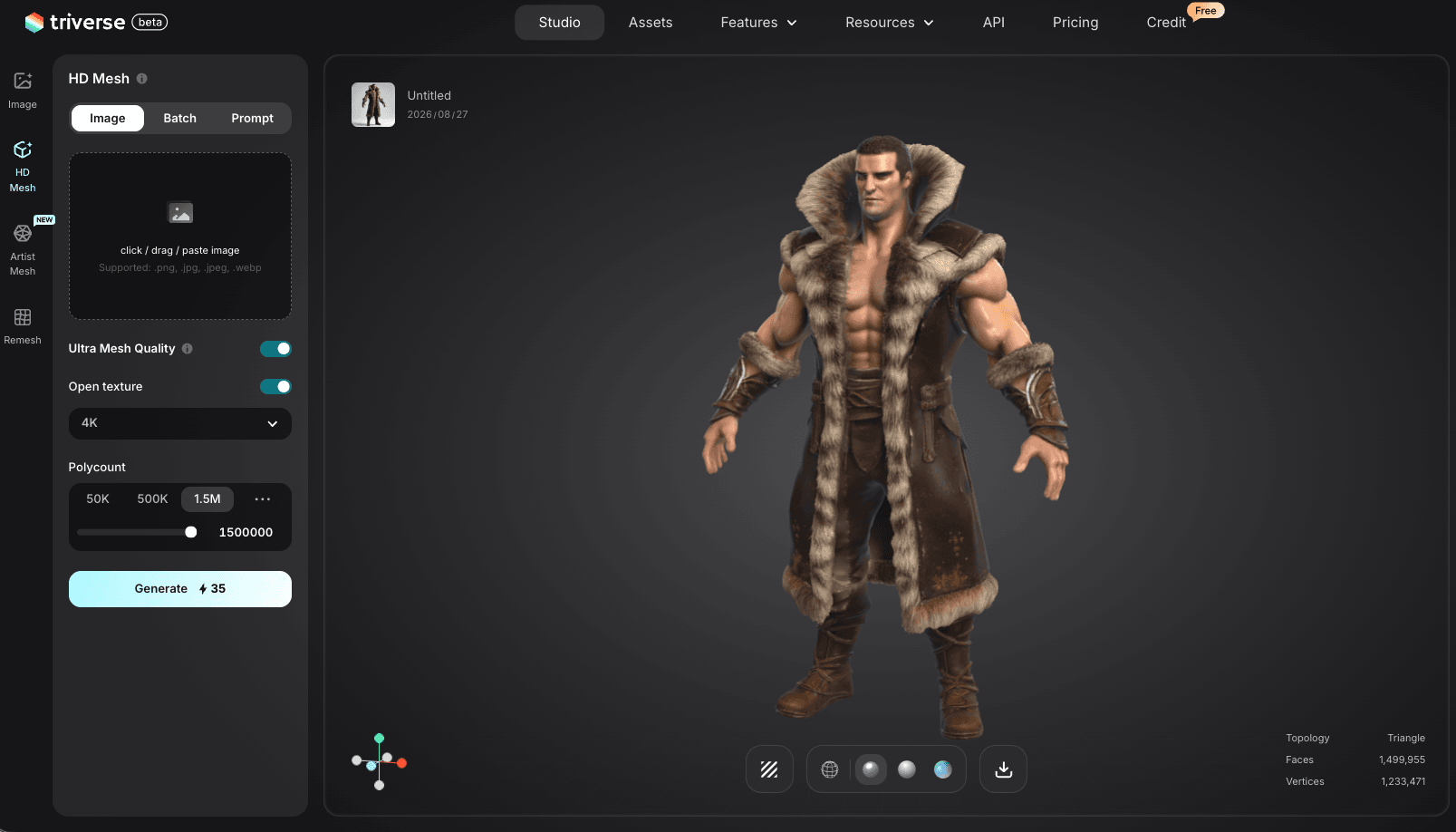
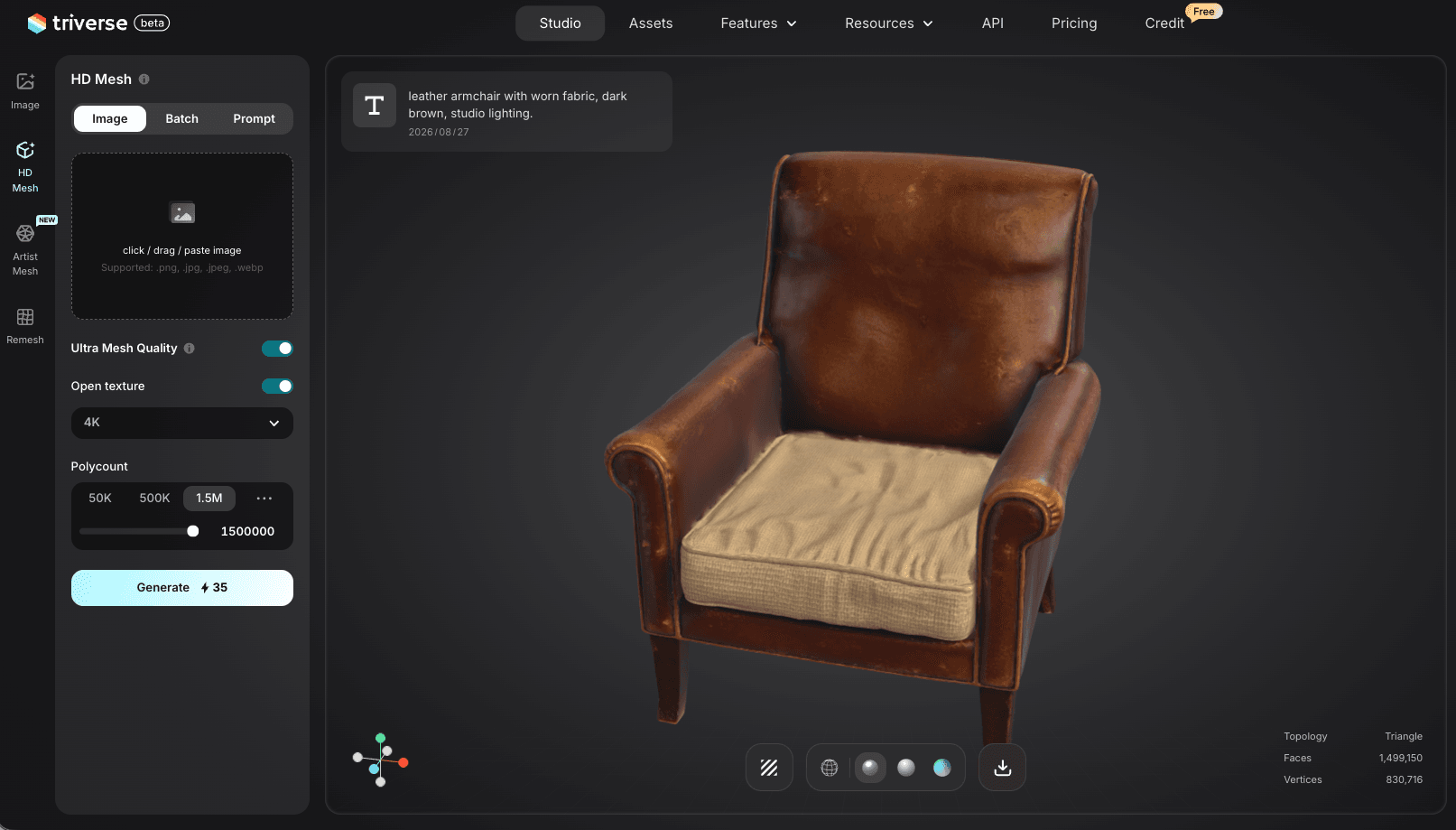
Step 2: Use the output as a texture source or base mesh. The generated model is not simulation-ready cloth, but the fabric surface texture it produces is usable as a reference for material authoring. Export the model as OBJ or FBX and bring it into your material pipeline.
Step 3: Retopologize and apply your game-ready fabric material. The Triverse output gives you a starting point. Retopologize to your target polygon count, apply your hand-crafted or sourced fabric PBR material, and import into Unity or Unreal with the fabric shader settings described above.
Triverse AI does not replace a fabric material artist. It reduces the time spent finding reference or building base geometry for fabric-covered objects, so your material artist focuses on the fabric texture and shading work that actually ships in the game. For the full game-ready asset checklist that includes fabric materials, see our game-ready 3D models guide. For a complete texture workflow that covers fabric PBR setup alongside other material types, see our textures for games PNG guide.
Bottom Line
Modeling fabric for 3D spans cloth geometry, fabric material creation, and fabric asset sourcing. For cloth geometry, use Marvelous Designer for production garments, Blender cloth sim for simple props, and hand sculpting for hero close-ups. For fabric materials, build the normal map around the weave direction, set roughness by fabric weight, and enable SSS for thin fabric. For sourcing, start with AmbientCG and Poly Haven for free fabric materials, then move to Poliigon for production-quality paid packs. In the engine, use the fabric shading model in Unreal and enable double-sided rendering in Unity. When you need a specific fabric-covered object fast, Triverse AI generates the base geometry and texture reference to jumpstart the pipeline.