What Is 3D Gaussian Splatting and How to Convert it Into 3D Mesh
3D Gaussian splatting turns photos into real-time, photorealistic 3D scenes. Learn how it works, how it compares to NeRF and photogrammetry, and where it fits into your pipeline.
You shot 40 photos of a carved wooden chair and want it in your game by Friday. Traditional photogrammetry would give you a mesh, but the cleanup alone eats a day. 3D Gaussian splatting takes those same photos and renders a photorealistic 3D scene in minutes, viewable from any angle on a plain GPU. It is the technique behind most of the "wow, that is a real place in real time" demos you have seen across 2024, 2025, and 2026. This guide covers what 3D Gaussian splatting actually is, how it stacks up against NeRF and photogrammetry, and the part most tutorials skip: what you do with a splat once you have one.
What Is 3D Gaussian Splatting?
3D Gaussian splatting is a rendering method that reconstructs a photorealistic 3D scene from a set of 2D images. Instead of building a polygonal mesh, it represents the scene as millions of tiny 3D Gaussian blobs, each with its own position, size, rotation, color, and transparency. When you look at the scene, those blobs are projected (or "splatted") onto the screen and blended together. From the right distance, they read as a continuous, sharp, photorealistic surface.
The method came out of a 2023 SIGGRAPH paper by researchers at Inria and the Max Planck Institute. The paper's title, 3D Gaussian Splatting for Real-Time Radiance Field Rendering, tells you the two things that made it matter: it is a radiance field technique like NeRF, but it renders in real time. For the formal definition, Gaussian splatting on Wikipedia is a decent starting point, and the PlayCanvas Gaussian Splatting docs show it running in a live engine.
How Gaussian Splatting Represents a 3D Scene
Each Gaussian is defined by a 3D covariance (its shape and orientation), a mean position, an opacity value, and spherical harmonic coefficients that store view-dependent color. Stack a few million of them and you have a volumetric model of the scene. There is no mesh, no UV map, and no texture file. Just points in space that know how to draw themselves.
Why 3D Gaussian Splatting Renders in Real Time
The trick is rasterization, not ray marching. Traditional NeRFs evaluate a neural network for every pixel. 3DGS sorts the Gaussians front to back on the GPU and draws them like sprites. That is why a trained splat hits 30 to 100+ frames per second on a single consumer GPU, where NeRF often crawls. The original paper reported training on roughly 30,000 images in 30 to 60 minutes and real-time view synthesis afterward.
3D Gaussian Splatting vs NeRF: The Real Difference
Both techniques learn a radiance field from images. The difference is what they learn and how they draw.
3DGS vs NeRF Training and Render Speed
NeRF trains a neural network to predict color and density at any 3D point. That is slow to train and slow to render. 3D Gaussian splatting skips the network at render time entirely. Once the Gaussians are optimized, rendering is just sorting and blending. If you need live preview or a web viewer, 3DGS wins without argument.
3D Gaussian Splatting Quality and Visual Artifacts
NeRF tends to smooth out fine detail and can blur sharp edges. 3DGS keeps crisp edges and high-frequency detail because it stores color more directly. You do get your own problems: splotchy floaters, dilated Gaussians in empty space, and odd warping at the edges of the captured area. Skilled capture reduces these, but they never fully disappear.
When NeRF Beats Gaussian Splatting
NeRF's continuous representation handles extreme viewpoint changes and transparent or fuzzy volumes (smoke, hair-like structures) better than discrete splats. If your scene has a lot of semi-transparent geometry and you do not need real-time playback, a NeRF variant can still look cleaner.
3D Gaussian Splatting vs Photogrammetry: Which Should You Capture With
This is the comparison that actually affects your workflow. Both start from photos. They end in very different assets.
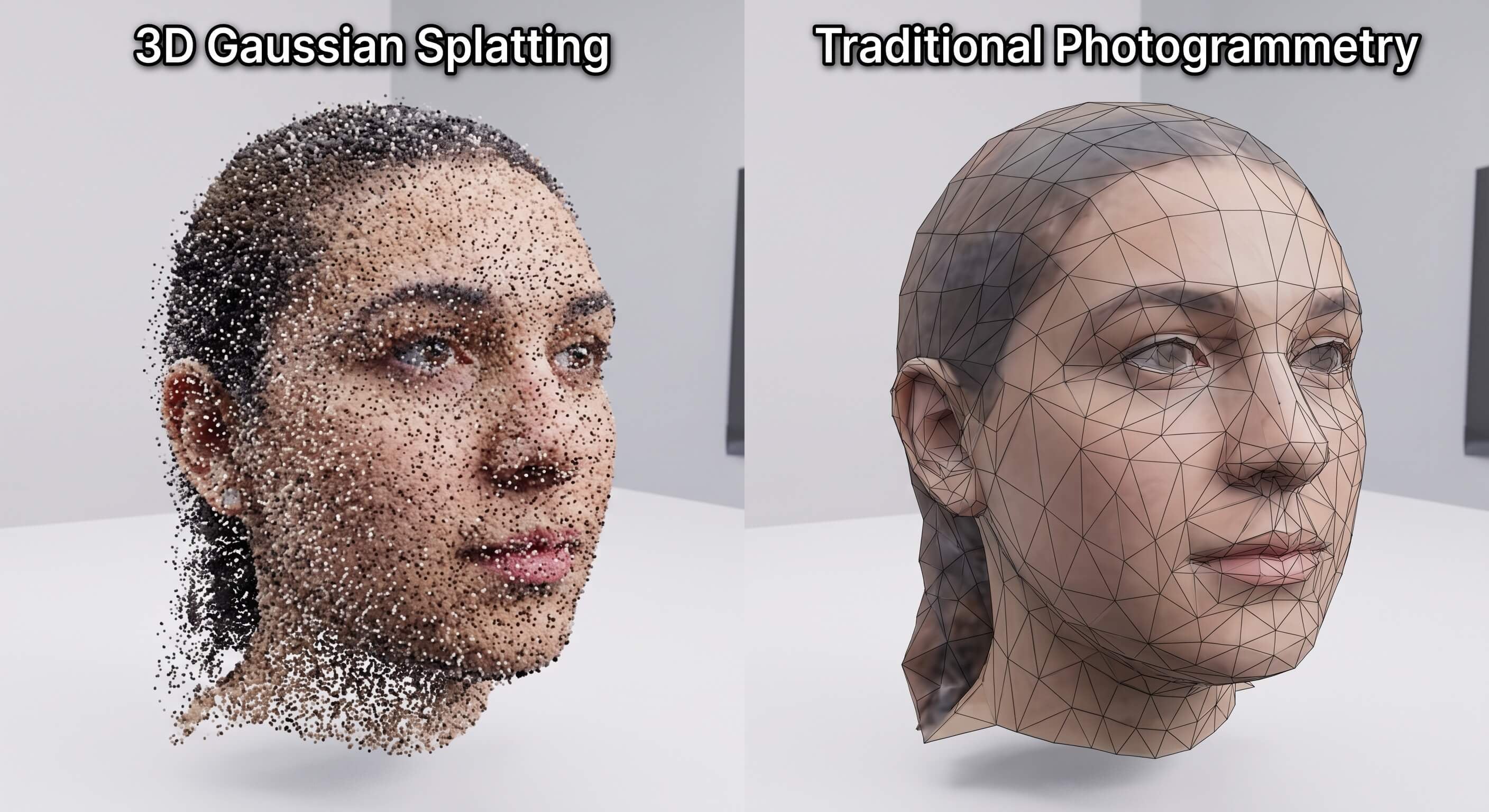
Mesh Output vs Gaussian Splatting Point Cloud
Photogrammetry produces a textured mesh: vertices, faces, UVs, a texture atlas you can drop into Unity or Unreal. Gaussian splatting produces a point cloud of Gaussians. It looks amazing, but it is not a mesh. You cannot rig it, you cannot easily texture-paint it, and you cannot deform it for animation without extra steps.
Editing and Animating a Gaussian Splatting Capture
A mesh from photogrammetry is editable in Blender like any other model. A splat lives in its own format (typically a .ply or .splat file). You can crop, recolor, and compress splats with dedicated editors, but the moment you want a character to walk or a door to open, the splat fights you. For static environments and archival captures, that is fine. For anything that moves, plan to convert or recreate.
How to Create a 3D Gaussian Splat From Photos
The capture is the part you control, and it decides your result more than the tool does.
Capture Photos for 3D Gaussian Splatting
Walk a full 360 circle around your subject. Overlap at least a third of each frame with the previous one. Shoot from a consistent height, and remember to look up and down so the top and bottom of the object are covered. Flat, featureless surfaces (a white wall, a clear sky) give the optimizer nothing to lock onto, so add reference detail or move on.
Image Overlap and Circle Strategy for Gaussian Splatting
A tight 360 pass with steady overlap beats a large pile of unrelated shots every time. Keep your phone in roughly the same plane as you circle, walk at a normal pace, and resist zooming mid-capture. The optimizer needs consistent scale clues, and a drifting camera height is the fastest way to get a wobbly splat.
Pick Your Gaussian Splatting Tool
Polycam Gaussian Splatting tool and Luma AI 3D capture both turn image sets or video into splats with almost no setup, and they run on your phone. For a free, local, high-control option, Postshot Gaussian Splatting trainer and the original Inria codebase give you the most knobs.
Train and View Your Gaussian Splat
Upload the images, let the tool estimate camera positions and optimize the Gaussians, then open the result in its viewer. Most tools export a .ply or .splat you can host on a web viewer or pull into a game engine. Expect training from a few minutes (phone apps) to under an hour (desktop, large sets).
Exporting .ply and .splat Files From Your Gaussian Splatting Tool
The .ply format carries the Gaussian parameters (position, covariance, color, opacity) and loads in most viewers and engine plugins. The .splat format is a lighter, streaming-friendly variant built for web playback. In 2026, two more formats matter: .spz is a compact, lossy-compressed splat that cuts file size sharply for shipping, and the Khronos Group's KHR_gaussian_splatting extension brings splats into the glTF standard for universal viewer support. Pick .ply for maximum compatibility, .spz when size matters, and watch glTF as the format war settles.
Gaussian Splatting Software and Capture Tools Compared
Tool | Input | Where it runs | Export | Best for |
|---|---|---|---|---|
Polycam | Photos, LiDAR, video | iOS, web, desktop | .ply, .obj | Quick mobile captures |
Luma AI | Photos, video | Web, app | .ply, .splat | NeRF + 3DGS hybrid captures |
KIRI Engine | Photos, video | Mobile, web | .ply | On-the-go scanning |
Postshot | Images | Desktop GPU | .ply | Free, high-control local training |
Inria codebase | Images | Desktop (CUDA) | .ply | Research and max quality |
None of these outputs a game-ready mesh by default. That gap is the real workflow problem, and it is where most "I made a splat" projects stall.
How to Use Gaussian Splats in Unity and Unreal Engine
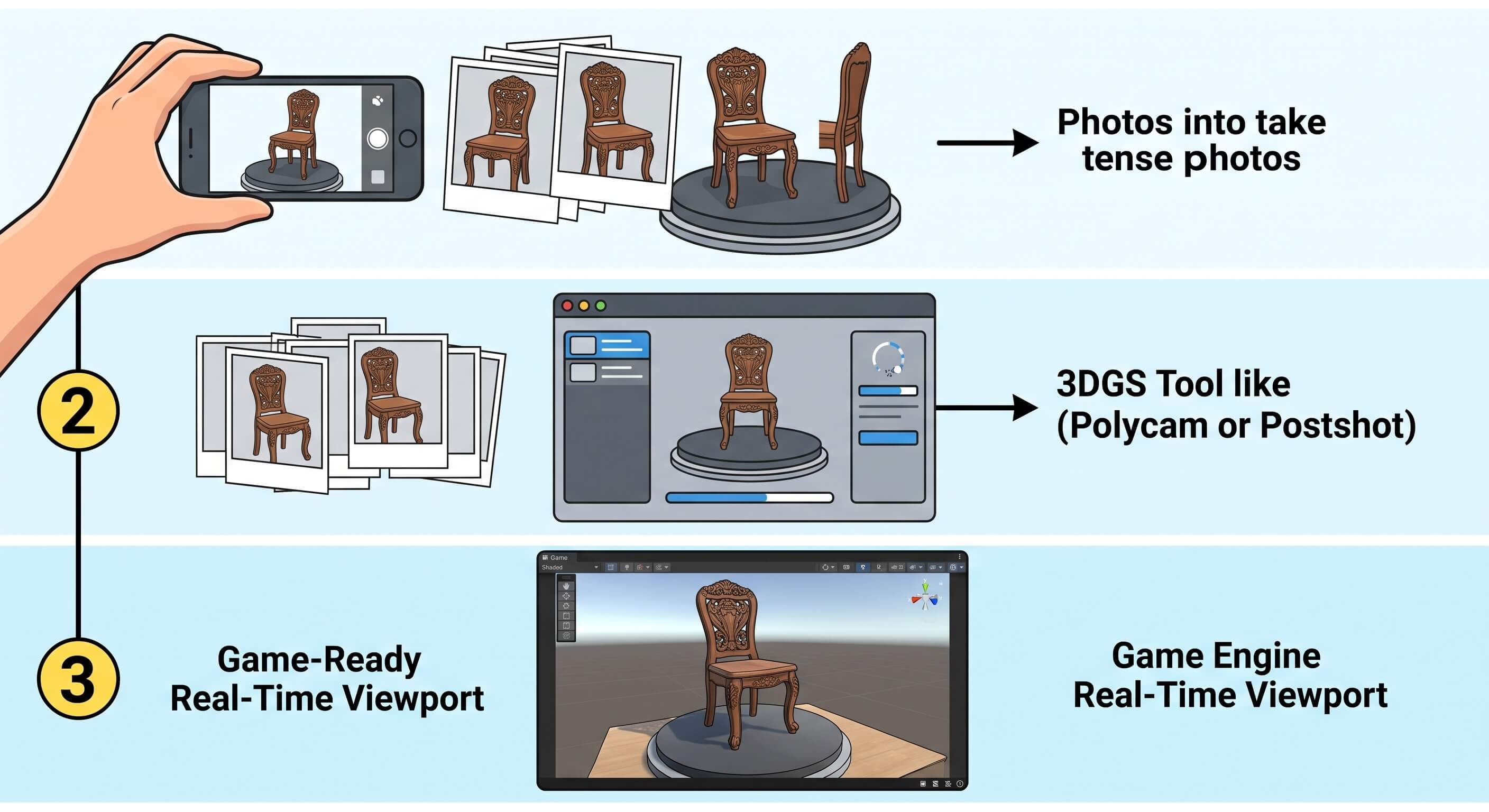
Getting a splat into a real-time engine is no longer exotic, but the support is uneven.
Unity Gaussian Splatting Support
Unity has the most mature path. The official Unity Gaussian Splatting package shipped through Unity's cloud tooling and pulls .ply and .spz files directly, using compute shaders for GPU sorting and rendering. As of 2026, this is the production-standard route for static backdrops and viewers.
Loading .ply Splats With the UnityGaussianSplatting Plugin
Drop your .ply into the project, assign it to the splat renderer component, and the plugin handles sorting and draw order on the GPU. Start with a few hundred thousand Gaussians for a quick sanity check before loading a multi-million-splat capture that may strain weaker hardware.
Unreal Engine Plugins for 3DGS
Unreal Engine still has no first-party Gaussian splatting support in 2026, but the plugin ecosystem is now production-grade. The Luma AI plugin (free on Fab) gives drag-and-drop .ply and .luma import with ready Blueprint assets, and NanoGS (released March 2026) adds Nanite-style LOD clusters, culling, and GPU sorting for large scenes. Detail loss on import still happens, so test your specific splat early before committing to a pipeline.
Gaussian Splatting Performance on Desktop and Mobile
A splat with a few million Gaussians runs smoothly on a desktop GPU. The same splat on a phone or a Quest headset is a different story. Splat counts, draw distance, and per-frame sorting cost add up fast. Plan to compress and cull, and accept that mobile real-time 3DGS is still a tuning exercise rather than a default. Browser viewers improved through 2026 thanks to native WebGPU compute shaders, but desktop engines still lead on large scenes.
Can You Convert a Gaussian Splat to a Mesh?
Short answer: yes, but it is not free.
Why Gaussian Splats Do Not Export to Mesh Cleanly
A splat is a cloud of fuzzy ellipsoids, not a surface. Conversion tools trace the visible shell of the Gaussians into a mesh, but the result is usually dense, noisy, and full of internal artifacts. You get geometry, but not clean topology, and not something you would hand to a rigger.
Where AI Mesh Generation Helps
When you need an editable, animatable asset rather than a captured one, a mesh generator is the faster route. For creating 3D models from original characters, an AI generator beats a scanner every time. Triverse AI turns a text prompt or a reference image into a clean, retopologized 3D model you can take straight into Blender. The contrast is the point: 3DGS captures what is in front of the camera, while a generator creates what is in your head.
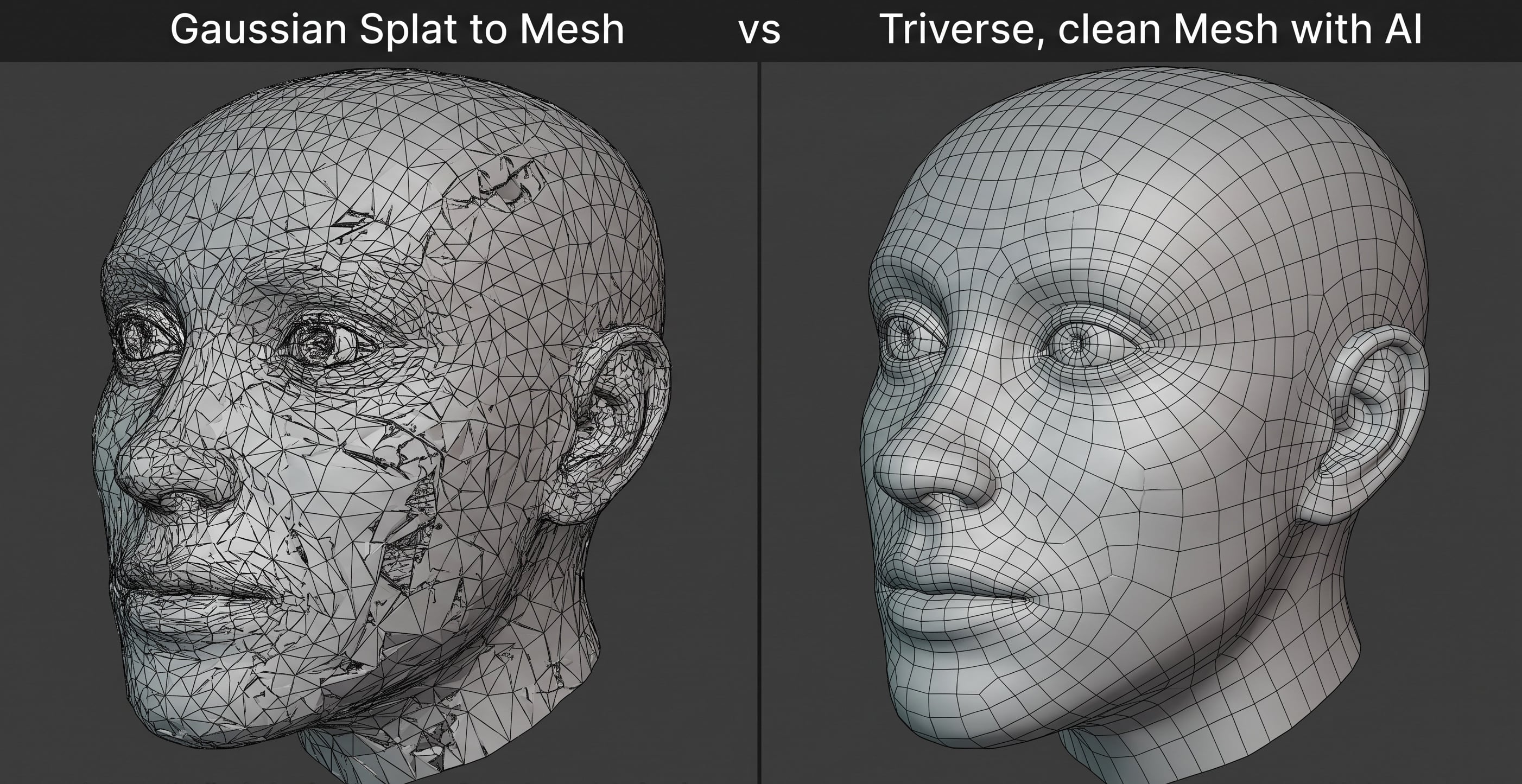
Generate Original Assets With Triverse AI
3D Gaussian splatting and AI mesh generation solve different halves of the same problem: getting a 3D asset from idea to engine.
Splats Capture, Generators Create
Use 3DGS when you have a real object or place to digitize. Use an AI generator when the asset does not exist yet, or when you need a mesh you can edit, rig, and animate. Teams without a scanning setup or a large art department get the most out of this split: capture the real-world reference, generate the original parts, and assemble in the engine.
When to Use Triverse Instead of 3DGS
If your goal is a game-ready character, a stylized prop, or anything that moves, skip the splat. Triverse outputs GLB and OBJ files with clean topology that meet game-ready specs, which a raw splat never will without heavy conversion. For a deeper look at keeping that topology clean, see our guide on clean topology best practices.
How to Choose: 3DGS, Photogrammetry, NeRF, or AI Generation
- Capture a real place or object and want it fast and photorealistic: 3D Gaussian splatting.
- Need a textured, editable mesh you can animate: photogrammetry (real object) or AI generation (imagined object).
- Need smooth view synthesis through fog, hair, or transparency: NeRF.
- Need an asset that does not exist yet and must be riggable: AI mesh generation.
Most production pipelines end up using two of these, not one. Capturing real reference with 3DGS and generating original parts with a mesh tool is a common, sensible split.
Polygonal mesh versus Gaussian splatting point cloud of the same wooden chairWorkflow from photos to gaussian splatting tool to a Unity or Unreal viewport. Photogrammetry mesh versus Gaussian splatting point cloud versus AI-generated clean mesh.
Bottom Line
3D Gaussian splatting is the fastest way to turn photos into a real-time, photorealistic 3D scene you can actually move through. It beats NeRF on speed and photogrammetry on capture time, but it hands you a point cloud, not a mesh. Know that going in. Use it for static captures and environments, pair it with photogrammetry or AI 3D generation tool like Triverse AI when you need something editable, and you will spend your time building rather than fighting file formats.