Model Export
March 24, 2026Unlike other platforms that lock your creations behind a paywall, Triverse AI allows you to download your generated 3D models for free now.
Currently, Triverse AI supports .glb and .fbx export formats.
What is GLB?
GLB is a widely used standard for web and real-time 3D applications.
It packages your mesh, UVs, and all PBR textures (Albedo, Normal, Roughness, Metallic) into a single, lightweight file for easy use and sharing.
GLB is optimized for lightweight, real-time use and easy sharing.
What is FBX?
FBX is a widely used file format for 3D content creation and animation workflows.
It supports complex data such as meshes, UVs, materials, rigs, and animations, making it ideal for use in software like Blender, Maya, and Unreal Engine.
FBX is more suitable for complex production workflows.
How to Export?
- Load any generated model in the center canvas.
- Click the Download ⬇️ icon at the bottom of the screen.
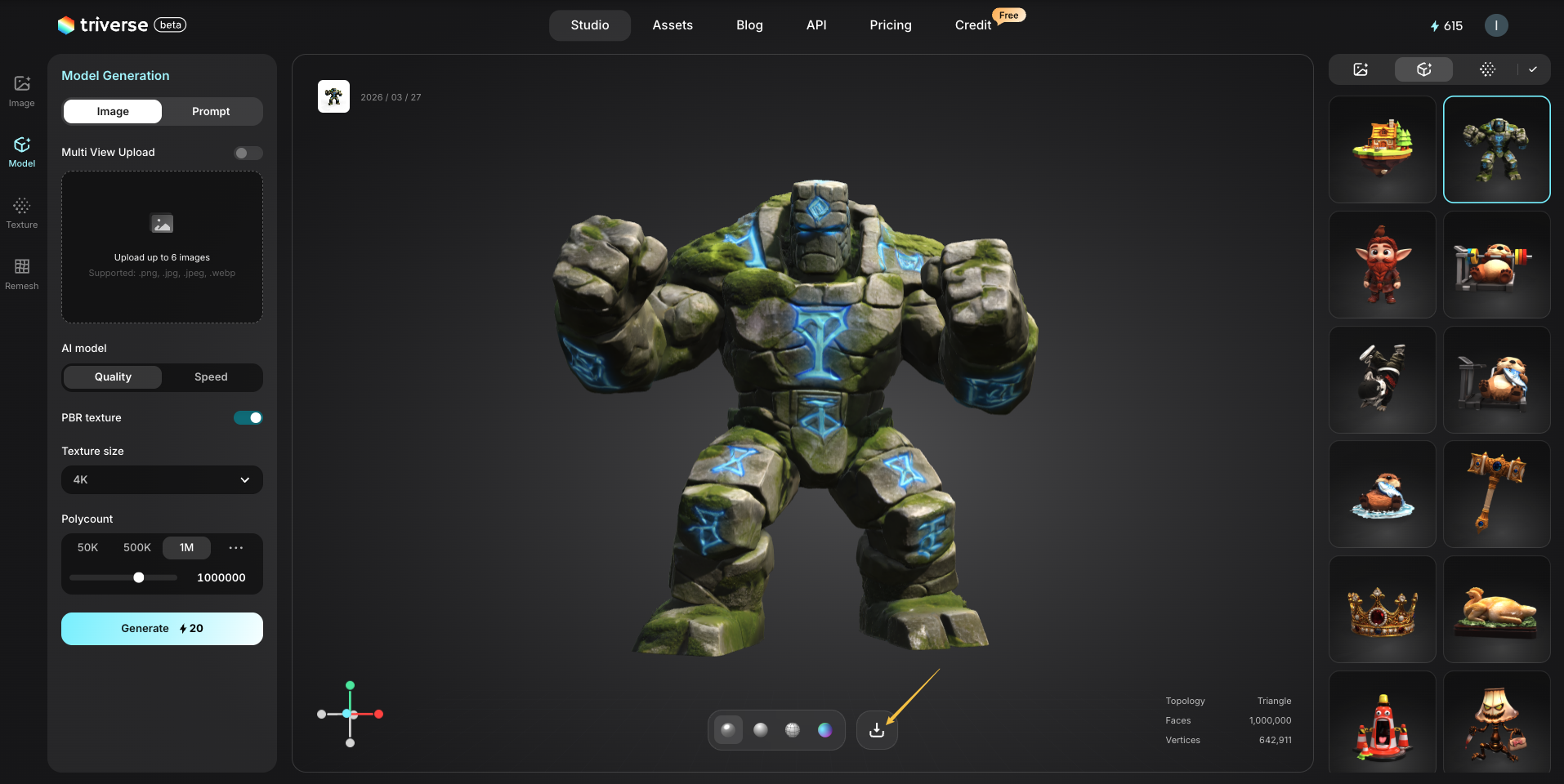
- Your
.glbor.fbxfile will download instantly at no extra cost, ready to import into your game engine or 3D software.
💡Pro Tip: Need OBJ?
If your workflow requires .obj, you can easily convert the file using Blender.
Simply import your .glb or .fbx file, then go to File → Export → OBJ to convert it. Or use an online converter.