Bodega Interior 3D Model: How to Source, Build, and Ship One for Games
A practical guide to the bodega interior 3D model: what makes a good one, how to source or build it in Blender, generate it with AI, and get it game-ready for Unity and Unreal.
Few spaces read as "New York" faster than a bodega. The narrow aisle, the deli counter, the wall of snacks, the cat. If you are building a game set in the city, a film backdrop, or an architectural walkthrough, a believable bodega interior 3D model does a lot of storytelling for you. The hard part is not finding a model. It is finding or building one that looks right and runs in a real-time engine without melting your frame budget.
This guide covers what a bodega interior 3D model actually needs to look like, the three ways to get one (download, model it yourself, or generate it), how to judge a downloaded asset before you commit, and how to get it into Unity or Unreal without surprises.
What Is a Bodega Interior 3D Model?
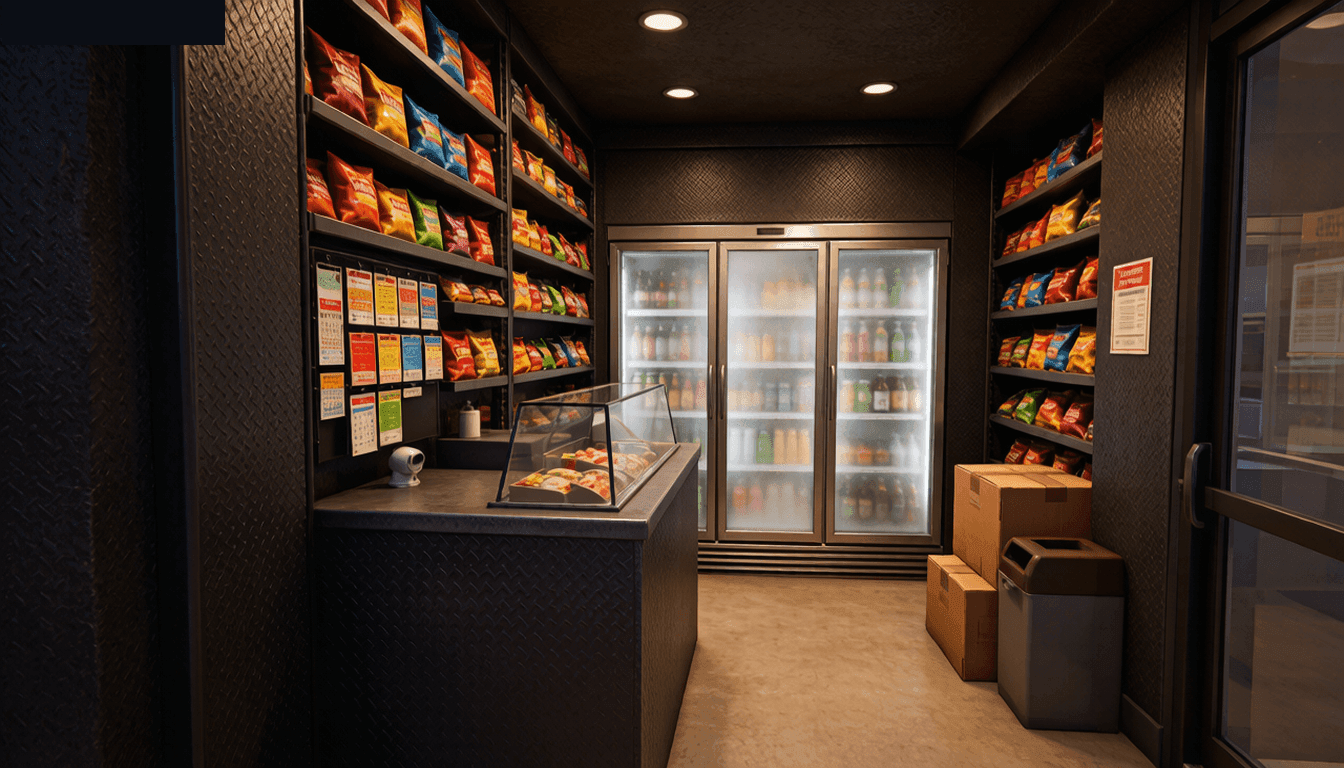
A bodega interior 3D model is a three-dimensional recreation of a small corner grocery store, built so you can walk a camera or a character through it. In the NYC sense, a bodega is a small independent grocery Wikipedia: Bodega, and searchers often describe the same asset as a "corner store 3D model interior" or a "convenience store 3D model interior." It is an environment asset, not a single prop. The model usually includes the room shell, shelving, the deli or counter area, coolers, and enough product detail to read as a working store rather than an empty box.
Bodega Interior vs. the "Kit Bodega" Character
Search for "bodega 3D model" and you will hit a confusing split. Part of the results point to the Kit Bodega character from the indie animation Gameoverse, a cat-like figure with outfits and rigs. That is not what this article is about. When you want the store, search the longer phrase "bodega interior 3D model" or "corner store 3D model interior" to filter out character packs. Getting this distinction right at the search stage saves you from downloading a stylized cat when you needed a shop.
What Makes the Bodega Look Read as a Bodega
The store is defined by clutter and density. A generic room with shelves does not sell it. The signals players recognize are the vertical product walls, the glass-door cooler bank, the counter with the lottery and blunt wraps, the hanging produce, and the cramped footprint. If your bodega interior 3D model has none of that, it is just a convenience store, and a generic one at that.
Common Uses: Games, Film, and Architectural Visualization
Most bodega interior models end up in one of three places. Game environments use them as a level beat or a side room. Film and virtual production use them for set extension. Architectural visualization uses a cleaned-up version to show a retail tenant fit-out. The poly budget and material setup differ by use, but the modeling logic stays the same.
What Makes a Good Bodega Interior 3D Model
Before you download or build, decide what "good" means for your project. A model that wins on a marketplace thumbnail can still fail in engine. Here is the checklist that actually matters.
Reference and Accuracy: The Cluttered Corner-Store Look
Start from real reference. A bodega is dense and a little messy. Shelves go nearly to the ceiling, products face outward in tight rows, and signage is handmade. If your bodega interior 3D model looks like a wide-aisle supermarket, you missed the brief. Pull reference photos of NYC corner stores specifically, not generic grocery interiors.
Modularity: Shelves, Counters, and Coolers as Separate Pieces
The best bodega interiors are not one solid mesh. They are a room shell plus modular props: shelf units, cooler banks, a deli counter, a lottery rack, and loose product props. Modularity lets you reconfigure the layout per scene and reuse pieces across levels. This is where how game environment modeling works in practice pays off, because environments are built from reusable kits, not single monuments.
Topology and Poly Count for Real-Time Engines
Real-time engines care about triangle count and clean topology. A bodega interior 3D model for a game should sit in the low-to-mid poly range for the shell, with detail carried by textures and normal maps rather than raw geometry. Hero props can be denser, but the room itself should stay light. Deciding your poly budget and what makes a model game-ready up front keeps the asset from blowing up your draw calls.
Texel Density and Material Setup
Consistent texel density is what makes the shelves and walls feel like they belong to the same world. Pick a target, like 512 pixels per meter for environment pieces, and hold every surface to it. Set up materials as PBR (base color, roughness, metallic, normal) so the model drops into a standard engine pipeline without a material rework.
Three Ways to Get a Bodega Interior 3D Model
You have three routes, and the right one depends on your budget, your deadline, and how much control you need.
Download From a Marketplace
Marketplaces are the fastest path if you just need a usable interior. Sketchfab, TurboSquid, and the Unity Asset Store all carry convenience store and corner store interiors, and on asset stores the same idea shows up as a "grocery store 3D model game asset" or a supermarket kit. Some are full modular kits; others are single static meshes. The catch is quality and licensing variance, which we cover in the evaluation section below.
Model It Yourself in Blender
Modeling it yourself in Blender's modeling tools gives total control over the look and the layout. The trade-off is time. A hand-built bodega interior 3D model takes days if you model every product, or a day if you kit-bash modular pieces and fake product density with texture. For a one-off hero location, the control is worth it. For a background set piece, it usually is not.
Generate It With AI
AI generation turns a reference image or a text prompt into a base mesh in minutes. It will not hand you a finished, game-ready bodega interior on the first pass, but it removes the blank-page problem. For teams without a dedicated environment artist, this is the path that turns a Tuesday afternoon into a blockout you can react to.
How to Evaluate a Downloaded Bodega Interior 3D Model
Downloading is easy. Downloading something you can actually ship is harder. Run this check before you pay or commit.
Check the License Before You Download
License is the first filter, not the last. A model marked "editorial" or "personal use" can block commercial game release. Read the license on Sketchfab or the asset store listing, confirm it covers commercial use, and keep a copy of the terms. A great-looking bodega interior 3D model is worthless if the license forbids shipping it.
Inspect Topology, UVs, and Scale
Open the model before trusting the preview. Check that the UVs are unwrapped and not overlapping, that the scale is sane (the door should be around two meters, not two centimeters), and that the geometry is clean enough to edit. Many marketplace interiors are baked static meshes with no usable UVs for lightmaps, which matters if you plan to use baked lighting.
Red Flags: Non-Manifold Geometry and Missing Textures
Two issues kill a downloaded asset fast. Non-manifold geometry breaks collision and physics. Missing or renamed textures turn your detailed store into a grey box the moment you import it. If the listing has no wireframe or texture preview, assume the worst and test a free sample first.
Building a Bodega Interior in Blender (Modular Workflow)
If you build it yourself, work modular from the start. You will move faster and the result will be more reusable.
Block Out the Floor Plan First
Lay down a rough floor plan before any detail. A typical bodega is a long, narrow rectangle, maybe four to six meters wide and ten to fifteen deep, with the counter near the entrance and shelves running the length. Block the walls, floor, and counter as simple boxes. Get the walkable space right before you add a single can of Goya.
Model the Hero Props: Deli Counter, Shelving, Cooler
Once the shell reads, model the pieces that define the space. The deli counter, the gondola shelving, and the cooler bank are the three heroes. These get the most screen time, so they earn the most geometry. Everything else can be suggested with texture and a few loose props.
Kit-Bash With Modular Pieces
Do not model the whole store as one object. Build shelf modules, cooler modules, and counter modules, then assemble them in the block-out. This keeps your bodega interior 3D model editable and lets you drop the same pieces into a different store later. If you want the theory behind this, modular low-poly environments is the same idea applied to whole worlds.
Shelving Units as Reusable Modules
Build one gondola shelf module and instance it. Vary the product texture per instance so the repeated geometry does not read as copy-paste. A row of identical shelves with identical products is the fastest way to break the illusion.
The Deli Counter and Lottery Rack
The counter is where players look for interaction, so give it detail: the sneeze guard, the lottery ticket rack, the blunt wrap carousel, the tip jar. These small, specific objects are what make a bodega interior 3D model feel authored rather than generated.
Generating a Bodega Interior 3D Model With AI
AI generation is the fastest way to get from nothing to a blockout. The honest framing is that it gives you a starting point, not a finished ship.
When AI Generation Is the Faster Starting Point
Use AI generation when you need to explore layouts quickly, when you lack reference, or when the bodega is a background beat rather than a hero location. The best AI 3D model generators for game dev each take a different approach to this, but the workflow below is the common shape. It is also the right call for teams without a dedicated environment artist who still need something on screen this sprint. The trade-off is that the output needs a cleanup pass before it is engine-ready.
From Prompt or Reference Image to Mesh
Image-to-3D tools take a reference photo of a real corner store and produce a base mesh with textures. Text-to-3D tools take a written description. For a bodega interior 3D model, a reference image of an actual store beats a text prompt, because the model needs to see the density and the specific fixtures. The product walls and cooler bank are hard to describe and easy to photograph.
A single photo still contains many objects, and a bodega interior 3D model reads through all of them. A split workflow helps: a tool like Triverse AI’s Split takes that one photo and separates it into individual cards, one per object, so the shelving, cooler bank, deli counter, and lottery rack each become their own model. You then model the room shell yourself and kit-bash the pieces together, which matches the modular build from the Blender section. The honest limit is that Split returns props and hero pieces, not a clean architectural shell, so the shell stays a hand-built or downloaded mesh.
The Cleanup Pass: Making AI Output Game-Ready
AI output arrives as a single messy mesh with auto UVs and baked-in detail. To ship it, run a cleanup pass: separate the shell from the props, fix non-manifold geometry, re-unwrap the pieces you care about, and rebuild the hero props by hand. If you want individual shelves, coolers, or the counter as separate assets, generate 3D props from an image or text prompt and assemble them in Blender instead of trying to cut them out of one block. Tools like Triverse AI produce export-ready meshes with PBR textures, so the manual pass is cleanup, not a rebuild from zero.
Getting Your Bodega Interior Game-Ready
A model is not done when it looks good in the viewport. It is done when it imports cleanly and runs.
Export Formats: GLB, FBX, and OBJ
Pick your export format based on target engine. GLB is the clean default for real-time and web viewers, built on the glTF. FBX carries rigging and is the standard for Unity and Unreal import. OBJ is universal but loses material hierarchy. Match the format to your pipeline before you start, not after you have a broken import.
Importing Into Unity and Unreal Engine
Unity and Unreal handle static environments differently, but the prep is the same: clean scale, sensible pivots, and a second UV channel if you bake lighting. Unity's model import settings let you fix scale and generate colliders on import. Unreal's asset import pipeline does the same with its own defaults. Test the import early so you are not debugging scale at the end of the project.
Lightmap UVs and Collision
If you use baked lighting, your bodega interior 3D model needs a clean lightmap UV channel with padding between islands, or you get light bleed across shelves. Add simple box collision to the shell and counters so the player cannot walk through the deli. These are the steps that separate a portfolio render from a shippable level.
Common Mistakes When Building a Bodega Interior 3D Model
A few errors show up again and again, and most are avoidable.
Mistake 1: One Giant Static Mesh
Building the whole store as a single mesh feels efficient until you need to move a shelf or reuse a wall. Modular pieces cost a little more upfront and save you a full rebuild later.
Mistake 2: Ignoring Scale and Pivot Points
Import a model with the door at two centimeters or a pivot at the roofline and the whole scene breaks. Set scale and pivots during modeling, not during debugging.
Mistake 3: Forgetting the "Bodega" Details
A clean, spacious, well-lit interior is a supermarket, not a bodega. The cat, the lottery rack, the cramped aisle, and the handmade signage are the difference between a generic store and a recognizable one. Spend your detail budget on those.
Bottom Line
A bodega interior 3D model is an environment asset defined by density and specific fixtures, not a generic room. Get one by downloading a marketplace kit, modeling it modularly in Blender, or generating a blockout with AI and cleaning it up. Judge any download on license, topology, and textures before you commit. Build modular so the pieces are reusable. And remember that the bodega reads as a bodega because of its details, so spend your effort on the counter, the coolers, and the clutter. Decide the path by your deadline: marketplace for speed, Blender for control, AI generators like Triverse AI for a fast start you finish by hand.