A Pose vs T Pose: Which Bind Pose Should Your 3D Character Use?
T-pose or A-pose for your rig? A practical breakdown of the real trade-off for rigging, topology, and game-engine import, plus a fast way to choose."
When you bind a humanoid skeleton, the first real call is the rest pose: T or A. You already know you're rigging and skinning a character; the open question is which bind pose to commit to before weight painting starts. It sounds like a minor decision, but it quietly sets how much shoulder pain you'll be fixing later and whether the mesh drops cleanly into Unity or Unreal. This is the A-pose vs. T-pose choice every character artist makes. It does depend on what the character does. Here's the real tradeoff, how each engine treats it, and a fast way to pick.
What Are A-Pose and T-Pose
Before comparing them, get the geometry straight. Both are bind poses: the neutral rest position your mesh is bound to its skeleton in. Everything after that (every animation, every retarget) is measured against this starting shape.
The T-Pose: Arms Out, Parallel to the Ground
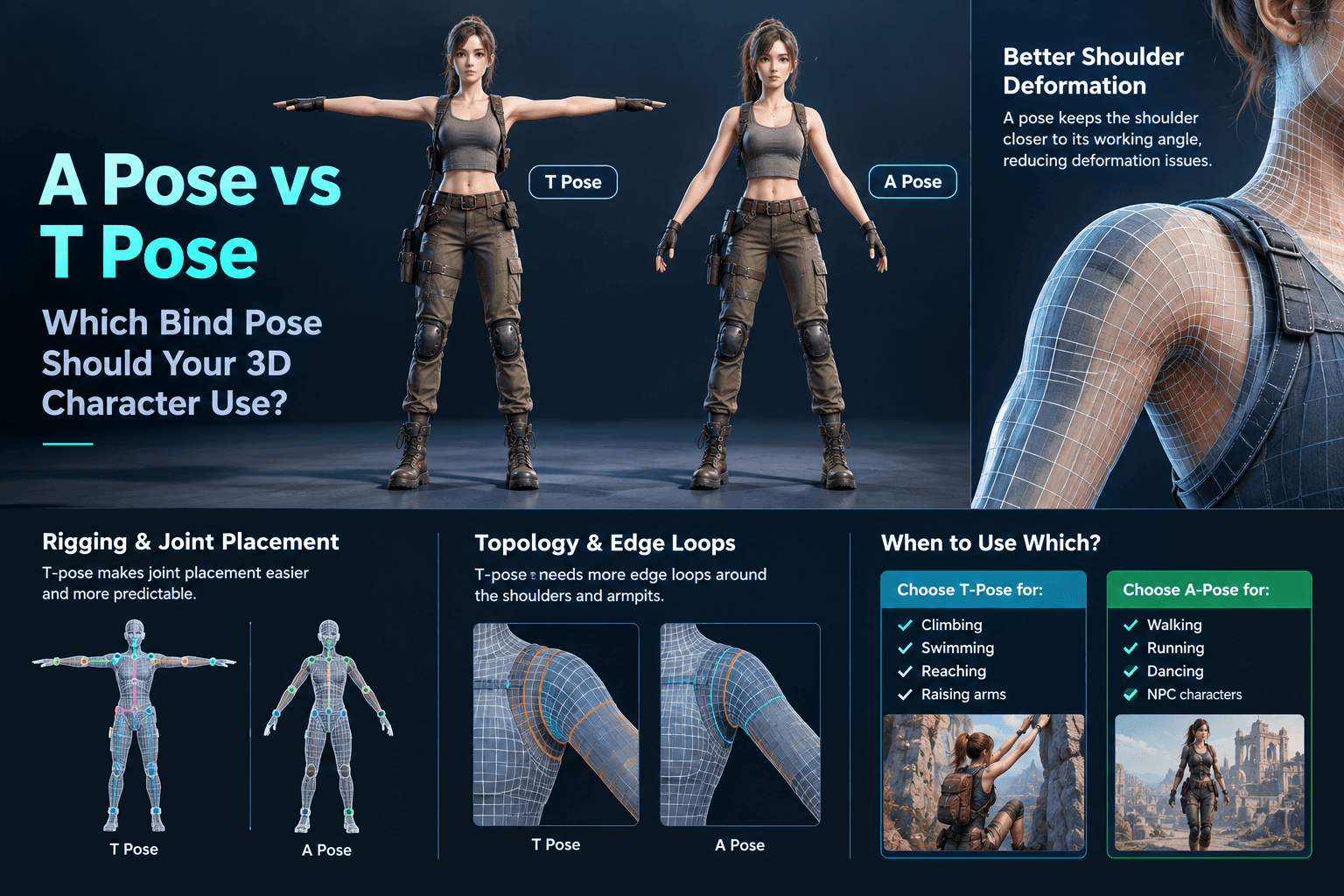
In a T-pose, the character stands upright with arms extended straight out to the sides, forming a T. Palms usually face down or forward. It's the pose you've seen a thousand times in asset stores and loading screens, and it's the default reference pose game engines expect.
The reason it stuck: the arms line up almost perfectly with the world X axis. When you're placing shoulder, elbow, and wrist joints, that alignment makes the skeleton obvious. You're not guessing where the bone goes because the limb is already laid out flat for you.
The A-Pose: Arms Dropped About 45 Degrees
An A-pose keeps the arms down at roughly a 45-degree angle instead of horizontal, so the silhouette looks more like a relaxed soldier at attention than a crucifix. The hands sit a bit away from the hips rather than straight out. As RebusFarm's guide to the T-pose points out, the A-pose is the bind pose people reach for when shoulder deformation quality matters more than rigging convenience.
That small drop is the entire reason A-pose exists. The arms spend most of their life somewhere near this angle in real animation, so the mesh is bound closer to where it'll actually deform.
Why These Are Called Bind Poses (Not Just "Resting")
A bind pose is the shape the skinning math is solved at. When you weight-paint, you're telling each vertex, "how much does this bone move me from the bind pose." Change the bind pose after skinning and every weight breaks. So the pose you pick at bind time is locked in. Choose wrong and you either re-skin or live with the consequences. That's why a pose vs T-pose is a pipeline decision, not a styling one.
A Pose vs T Pose for Character Modeling: The Real Tradeoff
The real difference is three things: where you put joints, where your edge loops go, and how the shoulders hold up under animation.
T Pose vs A Pose for Rigging and Joint Placement
The T-pose wins on rigging ergonomics, hands down. Arms parallel to the ground means the shoulder, elbow, and wrist joints sit on clean, predictable axes. A junior rigger (or an auto-rigger) can place a sane skeleton in minutes. The A-pose costs you that convenience. The arms angle down, so joint placement takes a steadier hand and you're more likely to introduce twist where you didn't want it.
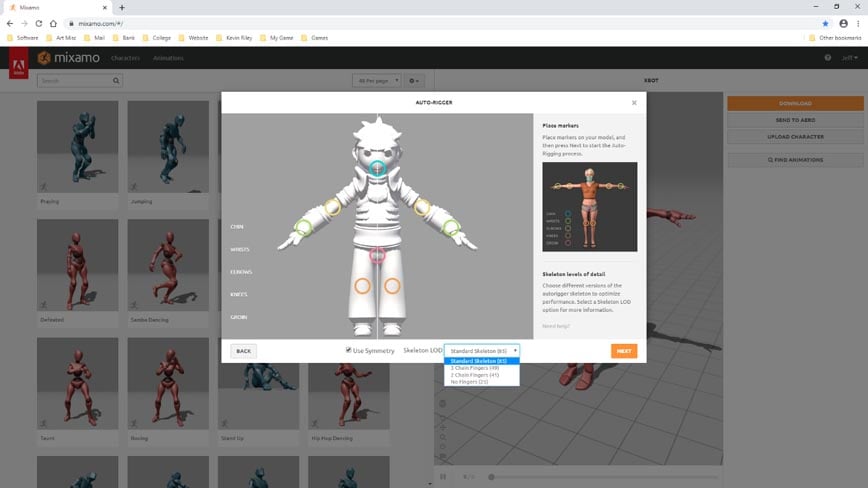
This is also why nearly every auto-rig system, Mixamo included, assumes a T-pose. Feed it an A-posed model and you're fighting the tool before you've started.
A Pose vs T Pose Topology: Where Edge Loops Go
A T-pose stretches the shoulder and armpit wide open, which means you need extra edge loops packed around those joints to keep deformation clean when the arm drops. Skip them, and you get the classic "webbed armpit" pinch.
An A-pose already has the arm near its working angle, so the shoulder is closer to its deformed state at bind time. You generally need fewer rescue loops there. If you want the deeper mechanics of where edge density actually matters, Triverse's guide to clean, game-ready topology walks through building a mesh that deforms well.
Either way, poor topology makes the A-pose vs T-pose question louder than it needs to be. Get your loops right, and the gap between the two poses shrinks fast.
A Pose vs T Pose Deformation: Shoulders and Armpits
When the arm swings from horizontal down to your side, the shoulder skin has to travel a long way. In a T-pose bind, that's a big delta from rest, and big deltas are where skinning artifacts live. The A-pose starts the shoulder closer to its destination, so "arm down" looks smoother and the armpit is less likely to collapse.
The flip side: raise the arm overhead in an A-pose bind, and you're now deforming away from rest in the opposite direction, which can pinch just as badly. Neither pose wins outright. You're picking which extreme your character will hit most.
When to Use A Pose vs T Pose for Game Characters
Skip the forum threads. Match the bind pose to the motion your character does most.
Pick T-Pose When the Arms Go Up (Climb, Swim, Reach)
If your character spends time with arms overhead (climbing ledges, swimming, reaching, firing a rifle at a raised angle), bind in T-pose. You're biasing the rest shape toward the upper extreme, so those high-arm poses deform cleanly. Platformer and action heroes (think Uncharted or Tomb Raider style traversal) are textbook T-pose cases.
Pick A-Pose for Everyday Motion (Walk, Run, Dance)
For characters whose arms mostly hang, swing, or gesture at waist-to-shoulder height (runners, dancers, most NPCs), the A-pose gives more natural shoulder movement with less armpit collapse. You'll spend less time fixing pinches in the animation phase.
A Pose vs T Pose: Why Proper Weighting Makes the Gap Small
With good topology and careful weight painting, the A-pose vs T-pose gap is minor. A veteran rigger can make a T-posed character deform beautifully at the side, and an A-posed one reach overhead without tearing. The pose choice is a head start, not a verdict. If you're seeing ugly deformation, fix your weights and loops before you blame the pose.
A Pose vs T Pose in Your Pipeline: Blender, Mixamo, and Unity
Enough theory. Here's how the two poses behave in the tools you actually open.
A Pose vs T Pose in Blender: Modeling and Rigging
Blender doesn't care which pose you model in; it'll bind whatever shape you give it. But the community consensus on Blender Stack Exchange (and the long-running Polycount thread on T-pose vs A-pose) is clear: T-pose is easier to model and rig the arms in, especially the hands, because everything's laid out flat. If you model in A-pose, expect to work a little harder placing finger and wrist joints. Either way, keep a duplicate of the un-bound mesh around. A retopo pass that goes sideways is recoverable from the raw file, not from a half-edited one.
A Pose vs T Pose in Mixamo: Auto-Rig Defaults
Mixamo (Adobe's free auto-rigger) is built around the T-pose. Upload a clean T-posed character, drop the joint markers, and you get a rigged, skinned, animated skeleton in minutes. Upload an A-pose and the auto-placement gets finicky. You'll be nudging markers by hand. If your pipeline includes Mixamo, T-pose is simply the easier path.
A Pose vs T Pose in Unity: Enforce T-Pose on Import
Most people forget the Unity step. Unity's humanoid avatar system is designed around the T-pose. It's the pose Unity uses to map your skeleton to its standardized bone structure, and it's the recommended pose to model in. If your character imports in some other pose and animations look broken, Unity gives you "Reset" and "Enforce T-Pose" in the Avatar window to snap it back. So even if you bind in A-pose for nicer shoulders, you'll often still present a T-pose to Unity for clean retargeting across characters.
A Pose vs T Pose for Generated 3D Characters
For AI-generated characters, this is where most A-pose vs T-pose write-ups go quiet. When you generate a 3D character from text, the model ships in whatever pose the generator decided. You didn't bind it. You didn't choose the rest shape. The real question isn't "which should I pick" but "what did I get, and what do I do with it?"
What Pose Does Your AI-Generated Character Ship In?
Most generative pipelines output a roughly neutral mesh with the arms somewhere between A and T. You won't always get a clean bind pose you can actually animate, and you almost never get a skeleton. Treat the raw output as a sculpt, not a rigged asset. The A-pose vs. T-pose debate is moot until you've added your own bones.
Set the Bind Pose Before You Generate: T-Pose Reference Images
The cheapest fix happens upstream. If you're starting from character art, run it through Triverse AI's T / A-Pose image tool before you generate.
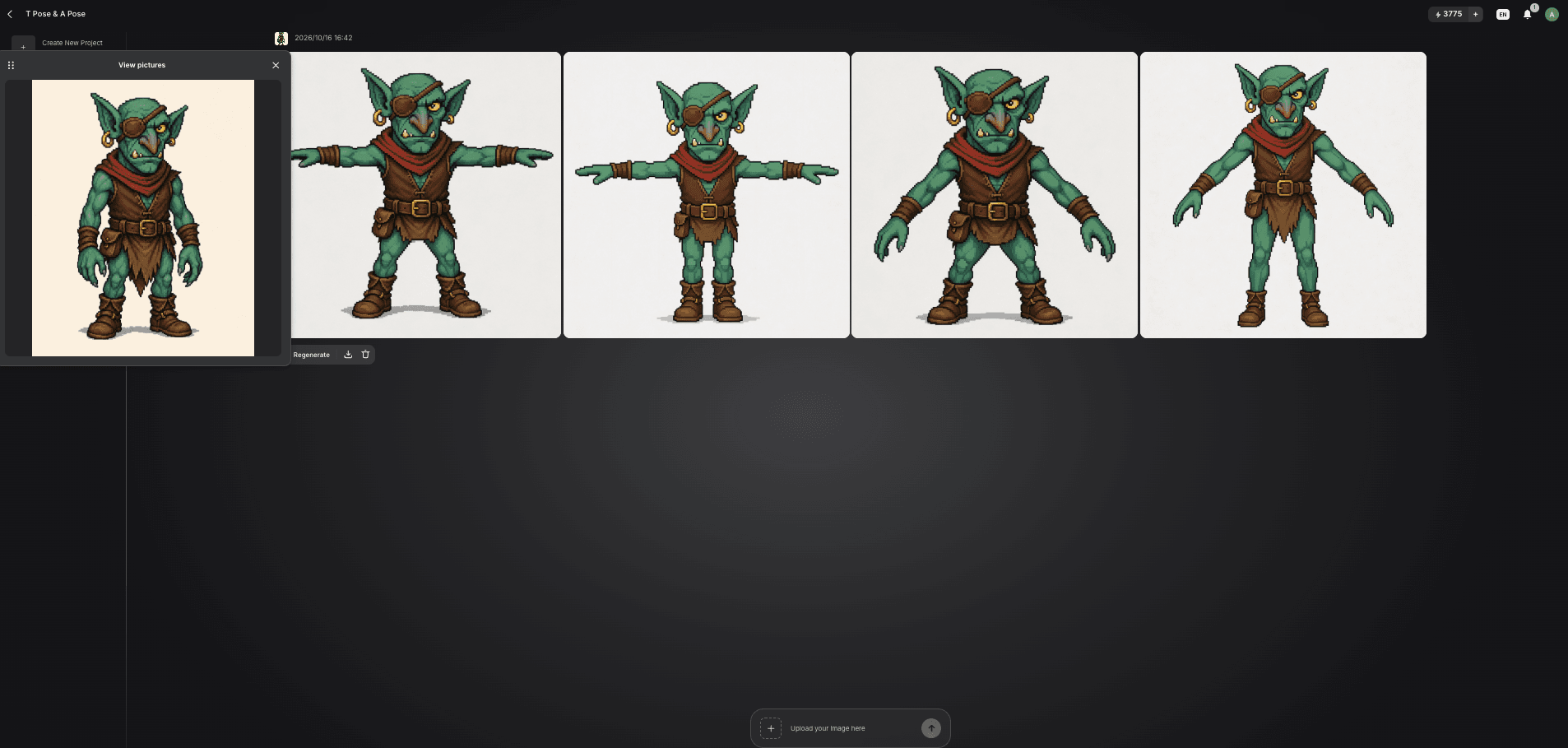
It converts a character into a standard T-pose for rigging and animation, so image-to-3D starts from a silhouette that's easy to bind, instead of a heroic stance you'd undo in Blender later.
The generator follows the pose it's given, which means a T-pose reference usually gets you a T-pose mesh out.
Generate the Model in T Pose with Artist Mesh, Then Bind
For the mesh itself, Triverse's Artist Mesh generates low-poly 3D models with clean topology, which is exactly what you want underneath a skin. The text-to-3D workflow covers the full path from prompt to a file ready for your engine. You still rig and bind the result yourself, but starting from a T-posed reference and a tidy mesh means your time goes into weight painting, not into fixing arms that were crossed in the source art.
Re-Posing a Generated Model to A Pose or T Pose Before Rigging
If the mesh still lands in an awkward pose, fix that before any auto-rigger touches it: straighten the arms into a clean T or A, center the spine, zero out odd rotations. A tidy rest pose is what makes Mixamo and Unity happy downstream. When you're ready to ship it out, the export guide covers FBX, GLB, and OBJ with the pose baked in, and the UV unwrapping and texture stretching notes explain why shoulder distortion shows up as torn textures when your bind pose and UVs fight each other.
A Pose vs T Pose: Quick Decision Cheat Sheet
If your character mostly... | Bind in | Why |
|---|---|---|
Climbs, swims, reaches overhead | T-pose | Biases rest shape to the upper arm extreme |
Walks, runs, dances, gestures | A-pose | Smoother shoulders, less armpit collapse |
Goes through Mixamo auto-rig | T-pose | The tool assumes it |
Imports into Unity humanoid | T-pose (presented to engine) | Unity's avatar mapping expects it |
Generating a character from artwork | T-pose reference image first | The generator follows the pose it's given |
You're a meticulous rigger | Either | Good weights beat pose choice |
T-pose is the safe default for pipelines built on auto-rigging and Unity. A-pose is the craft choice for characters whose shoulders you want to look right in calm, everyday motion. Base the call on what the character does, not on which pose photographs better.
A Pose vs T Pose: Frequently Asked Questions
The Bottom Line on A-Pose VS T-Pose
T-pose is the pragmatic default: easier rigging, auto-riggers like it, and Unity expects it. A-pose is the refined option for characters whose shoulders you want to look natural during calm, everyday movement. Build your topology around the pose you pick, and move on. If your character started as a generated mesh, set the pose yourself, preferably before you generate it.