Full Body Female 3D Model Assets: Free & Paid Sources Plus AI Generation
Find or generate full body female 3D model assets. Free sources (Sketchfab, TurboSquid, CGTrader), paid packs (Unreal Marketplace, Unity Asset Store), and Triverse AI for custom female characters.
You need a full body female 3D model for your game. A protagonist. A merchant who stands behind a counter in your RPG village. A quest giver who walks the player through the tutorial. You open Sketchfab and search. The first page is a mix: a hyper-realistic head bust with no body, a stylized anime girl with a custom skeleton that does not match Unity's humanoid rig, and a low-poly character with no textures at all.
The problem is not a lack of female 3D models. The problem is finding one that matches your art direction, fits your polygon budget, and actually works in your engine without weeks of cleanup. This guide covers where to find full body female 3D models that are game-ready, what female-specific technical details to check before you download, and when to generate a custom female character instead.
Where to Find Free Full Body Female 3D Models
Free assets exist. Quality varies. Most need some cleanup before they are production-ready.
Sketchfab: Free Female Character Downloads
Sketchfab hosts a large library of free 3D models, including full body female characters. Search for "female character," "woman 3D model," or "female base mesh." Filter by "Downloadable" and "Animated" to find rigged models with motion data. Many Sketchfab uploads use Creative Commons licenses, which allows commercial use with attribution.
One verified example is the Ferdnunes CC-BY Female Character collection on Sketchfab, which includes multiple stylized female body types with clean geometry. Another is the Alderic female base mesh with 37,700 triangles, placing it in the mid-poly range suitable for desktop indie games. The model includes a full body with clean topology, but you need to check whether the skeleton matches Unity or Unreal's humanoid rig before you commit.
The trade-off with free Sketchfab models is inconsistency. Some uploads include full PBR texture sets. Others ship with only a diffuse map. Some use standard bone naming conventions. Others require manual bone mapping. Always check the model page for file formats, polygon count, license type, and whether the creator included a rig.
TurboSquid and Free Female Models
TurboSquid offers a curated selection of free female 3D models. The free tier includes base meshes, low-poly characters, and practice sculpts. Filter by "Free" to narrow results. TurboSquid models often include multiple file formats, which is useful if you work across Blender, Maya, or 3ds Max.
Free TurboSquid models sometimes use restrictive licenses. Some are for personal use only. Some require credit. Some prohibit redistribution. Read the license field on each product page. If you plan to ship a commercial game, confirm that the license allows it.
CGTrader Free Female Character Assets
CGTrader hosts free female character models with verification data for geometry, UVs, and textures. Use filters to select "Free," "Rigged," and "Low-poly" to find game-ready assets. CGTrader's verification badges help you avoid broken downloads, which is useful when you are scanning dozens of options quickly.
Free models on CGTrader sometimes use custom licenses that restrict commercial use. Check the license type on each product page. If a model is marked "Royalty Free," you can use it in a commercial game. If it says "Editorial" or "Personal Use Only," it is not safe for a shipped title.
What to Avoid in Free Female 3D Models
Watch for four red flags. First, a model with no rigging cannot animate unless you rig it yourself, which is a multi-hour task. Second, a model with only a diffuse map and no normal or roughness map will look flat under PBR lighting. Third, a model with a stylized art style that does not match your game will break visual consistency across your cast. Fourth, a model with a non-humanoid skeleton may require manual bone mapping in Unity or Unreal, which adds setup time and can break animation retargeting.
Best Paid Full Body Female 3D Model Packs
Paid assets often include higher quality textures, more animations, and engine-specific formats that save setup time.
Unreal Engine Marketplace: Female Character Packs
The Unreal Engine Marketplace sells female character packs built for UE4 and UE5. Search for "female character," "woman," or "female NPC" to find rigged models with animations. Many packs include blueprints, materials, and LOD setups that work out of the box. The skeleton often matches the UE4 mannequin, which makes animation retargeting easier.
Some Unreal Marketplace packs include modular female character systems. A modular female hero pack might include multiple heads, hairstyles, body types, and clothing pieces that you can mix and match, letting you create a cast of distinct female characters from a single asset pack.
Unity Asset Store: Female Character Assets
The Unity Asset Store offers similar packs for Unity developers. Look for "female character," "woman," or "female NPC" in the character category. Unity packages often include prefabs, scripts, and example scenes. Check the description for "Humanoid Rig" to confirm that the model uses Unity's animation system.
CGTrader Premium: High-Quality Female Models
CGTrader's paid section includes high-detail full body female 3D models with facial rigs, cloth simulation setups, and multiple LOD levels. These models target cinematic use or high-end games. The price range is $20 to $200 depending on complexity. If you need a close-up hero character with detailed facial features and realistic skin shaders, a premium model may save time compared to building from scratch.
Female Character Anatomy and Base Mesh Workflow
Before you download a female character model, understand the female-specific proportions and workflow that separate a convincing female character from a male mesh with a different head.
Female Proportions: What Makes a Female Character Read as Female
Female character proportions differ from male proportions in specific, measurable ways. The shoulders are narrower. The hips are wider. The waist-to-hip ratio is higher. The overall silhouette reads as female even before you add clothing, hair, or makeup.
A common reference framework is the eight-head system: a realistic female character is roughly eight heads tall, compared to seven and a half to eight heads for a realistic male character. The hips in a female base mesh are typically one and three-quarter head widths, compared to one and a half for males. The waist sits higher relative to the hips, and the pelvis has a wider angle.
Stylized female characters amplify these proportions. A stylized female base mesh might use larger eyes, a smaller chin, longer legs relative to the torso, and a more pronounced hip-to-waist ratio. A low-poly female NPC might simplify these cues into a narrower shoulder width, wider hip silhouette, and higher waist placement to read clearly as female at distance.
Mixing proportions breaks immersion. A character that reads as female from the front but has male shoulder-to-hip proportions from the side looks wrong. Check the wireframe from multiple angles before you commit.
The Female Base Mesh Pipeline
A production-quality female character usually follows a pipeline from base mesh to high-poly sculpt to game-ready low-poly with baked textures.
The base mesh is a low-poly or medium-poly mesh with clean topology that follows female anatomical landmarks. The topology flows around the bust, follows the curve of the hips, and maintains even edge loop distribution for clean deformation during animation. For edge loop principles, see our quads vs triangles guide. For a guide on clean topology principles, see our clean topology mesh best practices article.
From the base mesh, a high-poly sculpt captures surface detail: muscle definition, skin pore texture, cloth fold depth. For a stylized character, the sculpt phase exaggerates the stylized proportions and adds surface detail that supports the art direction, such as cel-shading seam lines or hard surface accents for sci-fi armor.
The bake phase transfers high-poly detail into texture maps on the low-poly mesh. Normal maps capture surface curvature like wrinkles, pores, and cloth weave. Ambient occlusion maps capture contact shadows in crevices like the under-bust, waist, and hip crease. Displacement maps add real geometry depth for characters seen up close. Female skin benefits from subsurface scattering data in the albedo map or a dedicated SSS map, which simulates how light penetrates skin and scatters, giving cheeks and ears a warm, translucent glow under direct lighting.
Female Character UV Mapping Considerations
Female character UVs follow the same principles as any game character, but the UV island layout should account for female body proportions. The chest area needs UV space proportional to its screen real estate. The hip and waist region, which often shows through clothing in female character designs, needs clean, undistorted UVs. For characters with facial close-ups, dedicate sufficient UV space to the face and neck.
If a downloaded model has UVs with heavy distortion in the chest or hip area, you will see texture stretching in engine. This is a common issue with free marketplace models that were not designed for PBR workflows. You can fix it with UV relaxation in Blender or Maya, but it takes time. It is worth checking the UV layout before you download.
How to Choose a Full Body Female 3D Model
Not every female character fits every project. Match the model to your art style, platform, and animation needs.
Match Art Style: Stylized vs Realistic Female Characters
A realistic female character uses photorealistic skin, detailed clothing, and anatomically correct proportions. This fits AAA games, cinematic trailers, and high-end PC titles. A stylized female character uses exaggerated proportions, flat colors, and bold shapes. This fits mobile games, indie projects, and stylized art directions like low-poly or toon shading.
Mixing styles breaks immersion. A realistic female character in a low-poly world looks out of place. A stylized cartoon woman in a photorealistic scene breaks visual consistency. Check the model's wireframe, texture style, and silhouette before you buy.
Check Polygon Count for Target Platform
Mobile games often cap character polygon counts at 10,000 to 30,000 triangles for NPCs. Desktop indie games can handle 30,000 to 80,000 triangles. Hero characters in AAA games on high-end hardware may use 100,000 triangles or more. Female NPCs who appear in the background do not need the same polygon budget as the protagonist.
Verify Rigging and Animation Compatibility
A rigged model has a skeleton. An animated model has motion data. Both are required for a game character. Check the file format list on the model page. FBX is the most common interchange format for rigged characters in Unity and Unreal. OBJ works for static meshes but does not support rigging. Blend files require Blender and may need conversion.
If a model includes animations, check the animation list. A basic set might include idle, walk, run, and jump. A detailed set might include talking, gesturing, and specific actions like holding a weapon or sitting. Female character animations often need slight adjustments compared to generic motion packs: a softer walk cycle, different shoulder dynamics during running, and subtler idle breathing motions. If the model has no animations, you need to source motion data separately.
When Marketplace Assets Do Not Match Your Game
Stock assets save time, but they come with trade-offs. You may find a model with the right proportions but the wrong art style. Or a model with perfect geometry but a skeleton that does not match your engine. Or a character that looks good in screenshots but has no facial rig for dialogue scenes.
Common Problems with Stock Female Character Models
Art direction mismatch. The model's style does not fit your game's visual language. A hyper-realistic female character in a stylized mobile game breaks consistency across your cast.
Polygon budget overrun. The model has 200,000 triangles, which is too heavy for your target platform. Decimation destroys the silhouette, and female character silhouettes are more sensitive to polygon reduction than male characters because the distinctive features are in the hip and chest proportions, which are the first things to degrade under aggressive decimation.
Skeleton incompatibility. The rig uses non-standard bone names. Unity or Unreal cannot auto-map it to a humanoid avatar. Female characters often use the same skeleton structure as generic humanoid rigs, but some stylized packs use custom bone setups that require manual retargeting.
Missing facial rig. Your game has dialogue scenes. The model has no blend shapes or facial bones. Characters can move their jaw, but the eyes, brows, and mouth corners stay frozen, which reads as uncanny in close-up dialogue shots.
Texture resolution too low. The model ships with 1K textures. In close-up shots during cutscenes, the skin looks blurry. Female characters in close-up need albedo maps with clean skin tones and makeup, roughness maps with realistic skin sheen, and normal maps with pore detail. A 2K or 4K texture set is the minimum for close-up female characters in narrative games.
When any of these problems occur, you face a choice: spend hours fixing the asset, or generate a custom female character that matches your requirements from the start.
Generate a Custom Full Body Female 3D Model with Triverse AI
When stock assets do not match your art direction, generating a custom female character is faster than sculpting from scratch. Triverse AI allows you to create a full body female 3D model from a text prompt or reference image, with geometry and textures that match your game's style.
Step 1: Write a Prompt or Upload a Reference. Open Triverse AI Studio and select the HD Mesh workspace. Describe the character you need: "Female game character, athletic build, ponytail hair, casual clothing, stylized art direction, clean topology." The more specific the prompt, the closer the first pass will be to your vision.
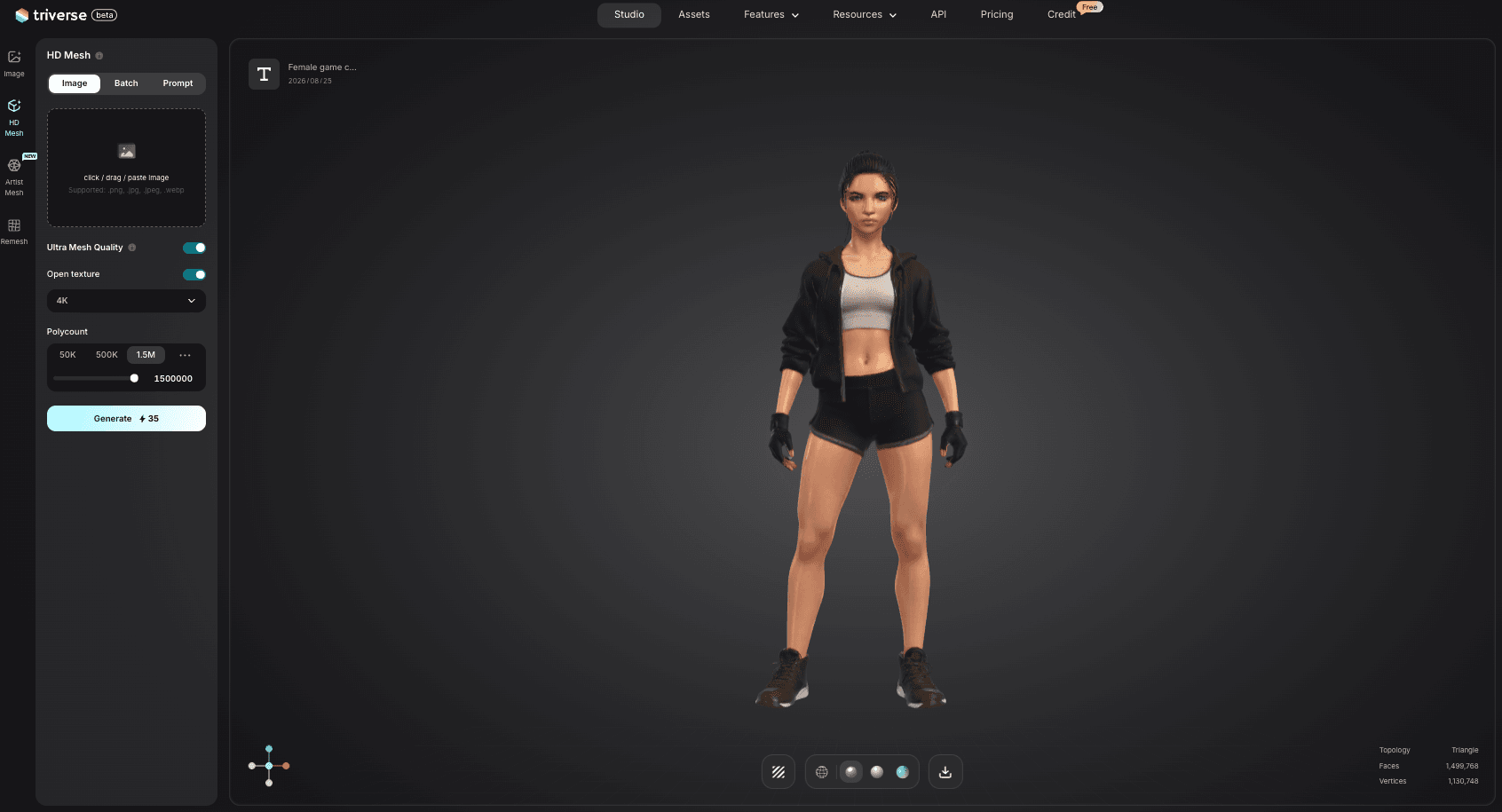
Alternatively, upload a concept sketch or photo reference to guide the generation.
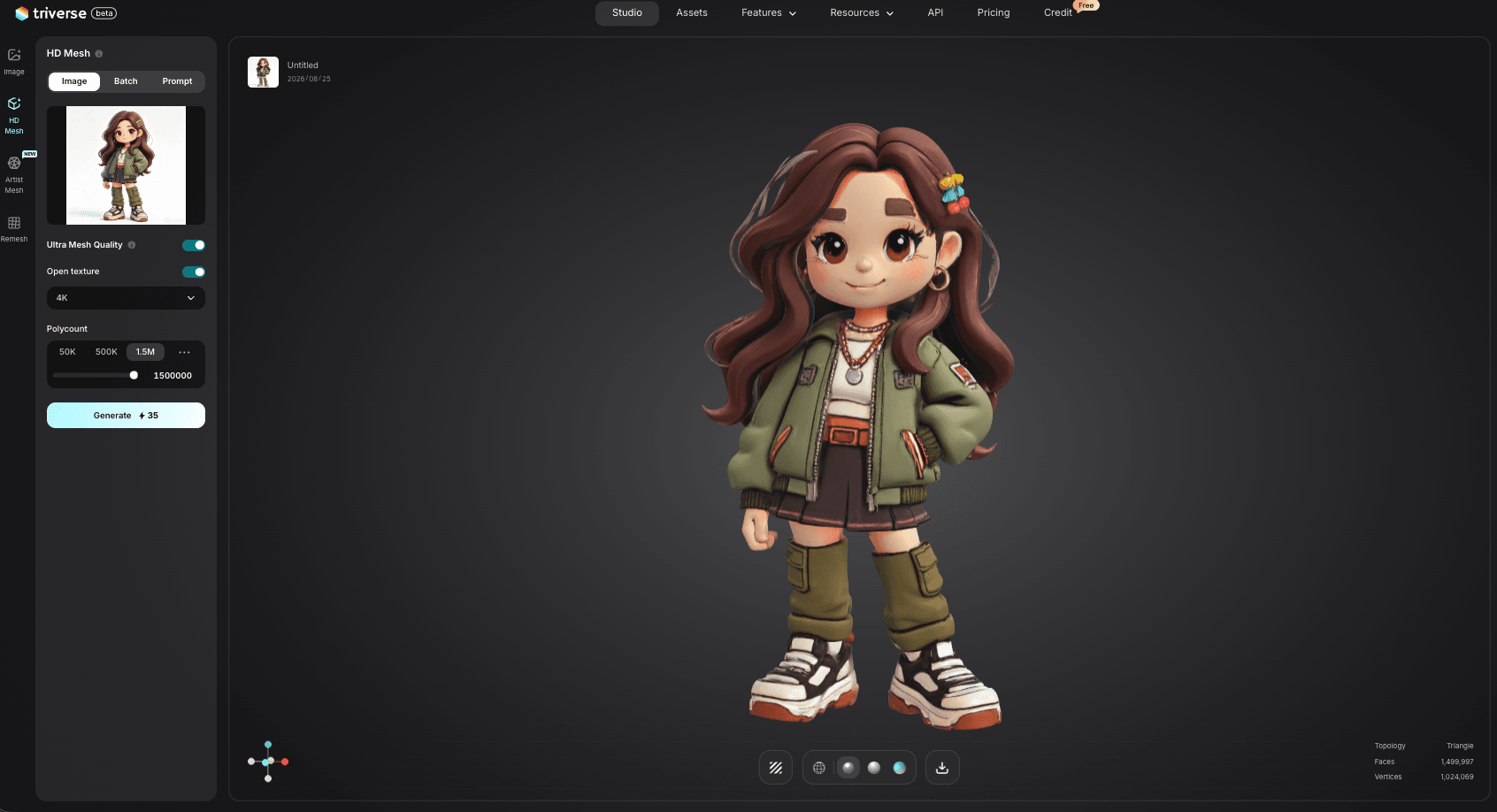
Step 2: Choose Vertex Count and Generate. For a background NPC, select 2K vertices. For a hero character or dialogue-heavy female NPC, select 4K vertices for more facial detail and cloth definition. Hit Generate. A 25-credit generation typically completes in under a minute, and the output is a mesh with PBR textures ready for export.
Step 3: Export and Refine in Your Engine. Download as FBX or OBJ. Import into Unity or Unreal. Check the silhouette, the texture maps, and the scale. If the character needs rigging, use Mixamo or your DCC tool of choice to add a skeleton. The generated model is a starting point, not a finished production asset. You may need to adjust proportions, add clothing details, refine the facial mesh for close-up dialogue, or retarget animations to match your game's motion style.
What Triverse AI Cannot Do
Triverse AI generates a mesh and PBR textures. It does not auto-rig the character or provide animations. You still need to add a skeleton and motion data in your engine or DCC tool.
Bottom Line
Start by searching stock libraries. Sketchfab, TurboSquid, and CGTrader cover most art styles for free or cheap, and they solve 80 percent of your full body female 3D model needs. When the available assets do not match your art direction, polygon budget, or engine skeleton, generate a custom female character with Triverse AI instead of spending hours fixing a mismatched download. Download first, generate only when the stock options fall short.