How to Make a VTuber Model: 5 Real Routes From Character Idea to Live Stream
How to make a VTuber model without drawing skills or a $2,000 budget. Compare VRoid, Blender, commissions, and AI 3D generation with real costs and timelines.
You just watched a streamer with a sharp anime avatar that tilts its head when they talk, blinks on cue, and does a little bounce when they laugh. Now you want one. Then you check commission prices and your browser tab sits open for a while.
The gap between "I want a VTuber model" and "I have one I can stream with" is the most misunderstood part of this hobby. Some people think it costs $2,000 minimum. Others think AI tools will hand them a finished avatar in three minutes. Both are wrong, and the truth sits somewhere useful in between.
This guide breaks down the five routes people actually use to make a VTuber model, what each one really costs in money and time, and the technical step most tutorials skip that decides whether your model actually moves when you talk.
How to Make a VTuber Model: The 5 Routes That Actually Work
Every VTuber model starts the same way: someone designs a character, then someone builds it. The difference between the routes below is who does the building and how much control you keep.
VTuber avatar reacting on stream with real-time face tracking
Make a VTuber Model in VRoid Studio (Free, Fast, Recognizable)
VRoid Studio is the default answer for a reason. It is free, runs on PC and mobile, and exports a working VRM file with a humanoid rig and basic facial expressions in about 30 to 90 minutes. You drag sliders for face shape, eyes, hair, and outfit, and the program generates the texture as you go.
The catch is the look. Every VRoid model starts from the same base mesh, so experienced viewers can often spot one from the thumbnail. Customization beyond the sliders means opening Blender anyway, which brings back the skill barrier you were trying to avoid.
Commission a VTuber Model From an Artist
A commissioned VTuber model is the gold standard if you have a specific design in mind and the budget to match. Pricing from Rokoko's guide on making or buying a VTuber model lines up with what you will find on artist marketplaces: entry-level 3D models run $300 to $600, mid-tier fully rigged models with blendshapes and physics run $800 to $2,000, and high-end production work hits $3,000 to $5,000. Turnaround is usually 6 to 12 weeks.
You get exactly what you asked for, but you are betting real money on a format before you have a single viewer.
Build a 3D VTuber Model in Blender From Scratch
Blender is free, and it gives you total control over the final model. It also has the steepest learning curve on this list. Modeling, UV unwrapping, rigging, shape keys for expressions, then the VRM add-on on top. Most people need 3 to 6 months of consistent practice before the results look stream-ready.
Generate a VTuber Model With AI 3D Tools
AI 3D generation has gotten real in the last couple of years. Tools like Triverse AI, Meshy, and Tripo turn a text prompt or an image into a textured 3D character in minutes, not weeks. If character generation is your main goal, our breakdown of the best 3D character maker options compares the current tools side by side. The honest catch: what comes out is a model, not a VTuber avatar. Most of these tools export GLB, OBJ, or FBX, and they do not include the facial blendshapes that face tracking software needs. You still need to rig and set up expressions before you can stream. More on that below, because it is the part everyone skips.
Skip 3D With Live2D or a PNGTuber
Live2D models are 2D illustrations cut into layers and warped in the Live2D Cubism editor. They have a hand-drawn look that dominates the VTuber space, but the illustration work is usually commissioned too, and the rigging is fiddly. PNGTubers are the true budget option: a few static PNGs that swap based on your expression. Zero motion, zero cost, five minutes to set up.
VTuber Model Routes at a Glance
Route | Cost | Time to stream | Barrier | What you get |
|---|---|---|---|---|
VRoid Studio | Free | 30–90 min | None | A template-looking VRM you can stream today |
Blender from scratch | Free | 3–6 months learning | High | Full control, unique model |
AI 3D generation | Free tier or credits | 1–2 days | Low–medium | Custom-looking base, needs rigging |
Commission | $300–$5,000 | 6–12 weeks | None (you pay) | Exactly your design, fully rigged |
Live2D / PNGTuber | $0–$2,000 | Minutes to 8 weeks | None–medium | 2D look, no head-depth tracking |
The pattern is simple: you trade time, money, or uniqueness. Pick the route that matches what you have least of.
How Long Does It Take to Make a VTuber Model?
Timelines vary wildly by route, and most guides lowball them. Here are the numbers that hold up in practice:
- VRoid Studio: 30 to 90 minutes to a basic usable model. 2 to 4 hours if you want it to stop looking default.
- Commission: 6 to 12 weeks from deposit to delivery, including revision rounds.
- Blender from scratch: 3 to 6 months of learning before you can produce a model you would show anyone.
- AI generation plus setup: 1 to 2 days total. About 5 minutes to generate the base model, then an afternoon of cleaning up and rigging in Blender, then an hour to test tracking in your streaming software.
The AI route looks dramatically faster, and it is. Just do not mistake "generated" for "done."
How Much Does It Cost to Make a VTuber Model?
Route | Cost | Time | Uniqueness | Skill needed |
|---|---|---|---|---|
VRoid Studio | Free | 30–90 min | Low (template look) | None |
Blender from scratch | Free | 3–6 months of learning | High | High |
AI 3D generation | Free tier or credits | ~1–2 days | Medium-high | Low-medium |
Commission | $300–$5,000 | 6–12 weeks | High | None |
Live2D | $200–$2,000+ (art + rig) | 2–8 weeks | High | None (if commissioned) |
Two patterns stand out. First, "free" always costs either time or uniqueness. Second, the middle tier, which barely existed three years ago, is now the most interesting option: AI generation for a couple of dollars in credits plus a day of your time gets you a custom-looking model for less than the entry-level commission price.
The Part Nobody Warns You About: Blendshapes and VRM
Here is the technical detail that separates a model that impresses viewers from a model that sits frozen on screen, and almost no tutorial covers it.
Why Facial Blendshapes Decide Whether Your VTuber Model Works
Face tracking software like VSeeFace does not animate your model magically. It reads named shape keys, called blendshapes, that have to exist inside the model file itself.
The Blendshapes Your VTuber Model Needs for Face Tracking
When you blink, the software looks for a blendshape called Blink_L and Blink_R. When you talk, it looks for mouth shapes named A, I, U, E, and O. A model without these named shapes will not move, no matter how good your webcam tracking is.
Facial blendshape labels on a VTuber face: Blink_L, Blink_R, and A, I, U, E, O vowel mouth shapes
This is the exact reason a raw GLB file from a generic AI 3D generator cannot go straight to stream. It is geometry and texture, but it has no expression shapes. A commissioned model includes them because a rigger builds them by hand, which is a big part of what you are paying for.
VRM Format Explained: What Face Tracking Needs
VRM is an open avatar format made by the VRoid Hub team. It packages geometry, textures, a humanoid rig, named blendshapes, and spring bone physics into one file. Streaming software reads the VRM's internal naming to drive your avatar. The reason AI tools hand you GLB or OBJ instead of VRM comes down to what each format stores, which we cover in our GLB vs OBJ comparison for 3D assets. Streamlabs' guide on 3D VTuber avatars walks through the practical setup once you have a VRM ready. VRM 0.x is the version most current tools support, so check your streaming software before assuming you need 1.0.
VTuber Model Software That Reads VRM
VRM-compatible software ecosystem: VSeeFace, Warudo, VTube Studio, Luppet connected to central VRM avatar
VSeeFace, Warudo, VTube Studio, and Luppet all load VRM directly and start face tracking with minimal setup. VSeeFace is the usual recommendation for newcomers because it works with a plain webcam, no iPhone needed. Warudo adds scene design and animation layers if you want a more produced stream.
Software | Tracks with | VRM version | Spring physics | Notes |
|---|---|---|---|---|
VSeeFace | Webcam (local) | 0.x | Yes | No iPhone needed, free |
Warudo | Webcam, MediaPipe | 0.x | Yes | Scene and animation layers |
VTube Studio | Webcam, phone | 0.x and 1.0 | Yes | Strong on 2D and 3D |
Luppet | Webcam, iPhone | 0.x | Yes | Older but stable |
Most tools still default to VRM 0.x, so export that version unless your software specifically asks for 1.0.
How to Make a VTuber Model With AI (and Fix What AI Gets Wrong)
This is the full pipeline that actually works if you want an AI-generated base without a commission budget. It assumes no drawing skill and no prior Blender experience, just patience for one weekend.
Step 1: Generate the 3D Model From Text or Image
AI 3D generation workflow: text prompt to mesh preview to Blender cleanup to VRM export
Write a detailed prompt or upload a character reference image to an AI 3D tool. Specific descriptors beat vague ones: hair color, eye style, outfit type, personality keywords. Generate a few variations and pick the closest match to your vision. For character work specifically, creating 3D models from original characters walks through the image-to-3D workflow with reference sheets.
Step 2: Clean Up the Mesh in Blender
AI output is rarely perfect. Expect to fix intersecting geometry, smooth out lumpy areas, and check that the texture maps are assigned cleanly. If you end up redoing textures while you are in there, our texture guide for game characters covers resolution budgets and material setup. If you are new to Blender, this step alone teaches you more about modeling than a month of tutorials, because you are fixing real problems instead of following along.
Step 3: Retopologize and Add Blendshapes
This is the step that makes your model trackable. Retopologize the head and face so the topology supports clean deformation, then build the key shape keys: eye blinks, mouth vowels, and a few expressions. Our guide on clean topology mesh best practices covers the retopology side in detail, and it applies directly to avatar work.
Step 4: Export as VRM and Test in VSeeFace
Install the VRM add-on for Blender, export as VRM 0.x, then load the file in VSeeFace. Test every expression in front of the camera. This is where you find out which shape keys you named wrong, and it is a 20-minute fix, not a redesign.
Generate Your Own VTuber Model Base With Triverse AI
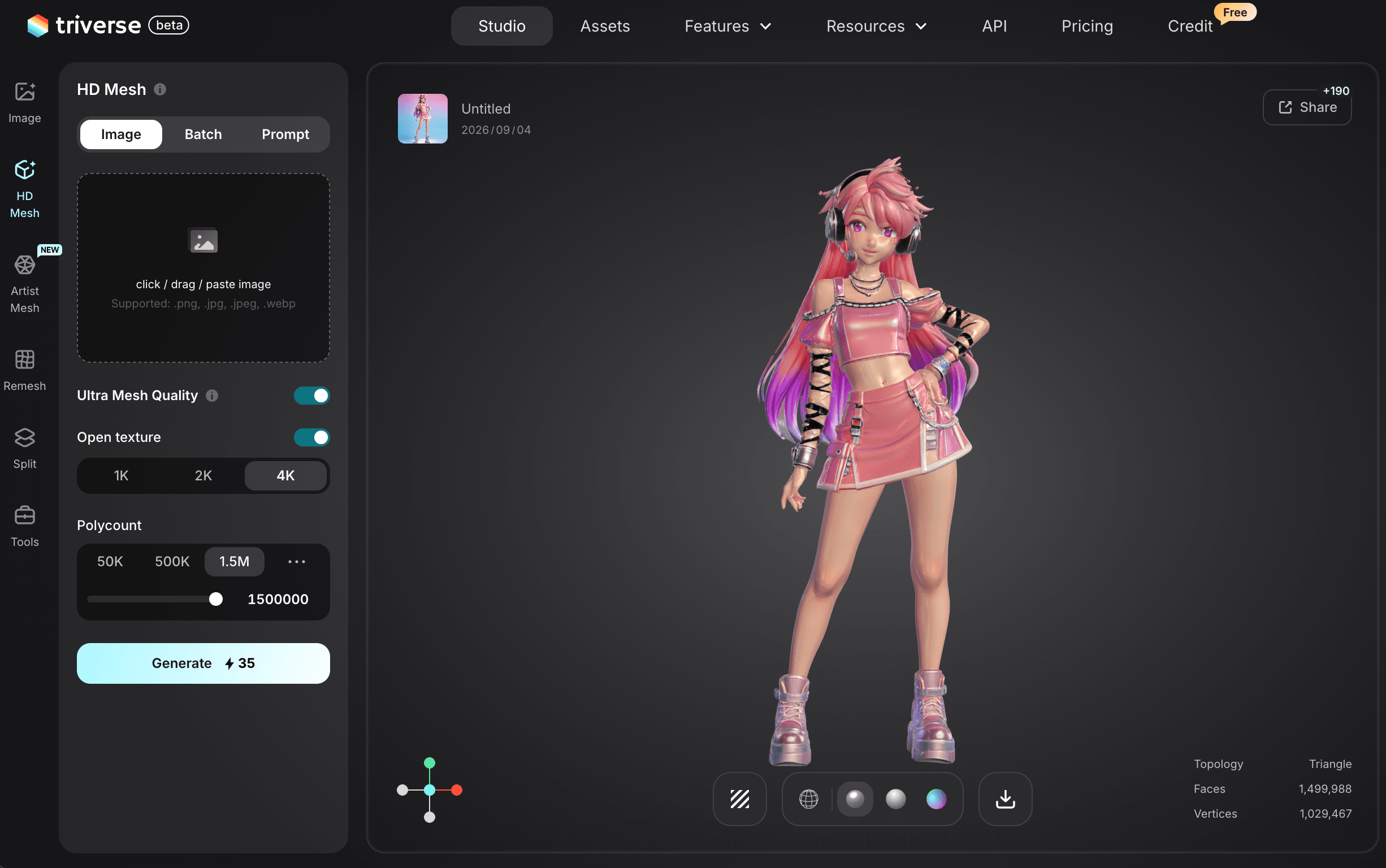
For the generation step above, Triverse AI is worth a look. It turns text or images into textured 3D characters in about a minute, and exports GLB, OBJ, and FBX that drop straight into Blender for the cleanup and rigging steps.
What Triverse Can Do for a VTuber Pipeline
It handles the hard part of getting from nothing to a base mesh with usable topology.
Vertex Count Presets for Avatar Retopology
The Vertex Count presets let you generate a lower-poly base for easy retopology or a denser mesh if you want more detail to preserve. Each generation costs 25 credits and finishes in about a minute, which makes iterating on character concepts genuinely cheap compared to re-commissioning an artist.
Export Formats That Fit a Blender VTuber Workflow
The output is a clean triangle or quad mesh, which means less cleanup work in Step 2 than you might expect from AI geometry. GLB, OBJ, and FBX exports drop straight into Blender for the rigging stages that follow.
What Triverse Won't Do (Honest Limits)
It does not output VRM, and it does not build facial blendshapes. No current AI 3D tool honestly replaces the rigging step for VTubing. Treat Triverse as the modeling stage of your pipeline, then do the blendshape and rigging work in Blender. That split, AI for geometry and manual for expression, is where the realistic workflow lives in 2026.
How to Choose the Right VTuber Model Method
Your situation decides the route. Match the method to your budget, deadline, and how much you care about a unique look.
Make a VTuber Model on a Tight Budget
VRoid Studio gets you streaming today for free. Accept the template look, upgrade later when you know the format works for you.
Make a VTuber Model Fast With a Small Budget
AI generation plus a focused Blender weekend gets you a custom-looking model in about two days for a few dollars in credits.
Commission a VTuber Model With a Specific Vision
Commission an artist. You are paying for the blendshapes, rigging, and art direction that make a model feel alive, and those are worth the 6 to 12 week wait.
Build a VTuber Model for a Serious Channel Identity
Generate 3 or 4 AI concepts first, pick the direction that fits your brand, then hand that shortlist to a commissioned artist as a reference brief. You get the artist's craft with a design you already validated.
Bottom Line
You can make a VTuber model today for free with VRoid, in a weekend with AI generation plus Blender, or in a few months with a commission. The route you pick matters less than knowing what you are actually signing up for: a model file is not an avatar until it has blendshapes, a rig, and a VRM wrapper that your streaming software can read.
Start with the cheapest route that gets you on camera. You can always commission the upgrade later, and by then you will know exactly what to ask for.