How to Choose Free Anime 3D Models: Formats, Licenses, and Use Cases
A practical guide to evaluating free anime 3D models before use, covering formats, licenses, rigging, topology, textures, and requirements for games, VTubers, animation, and 3D printing.
Finding a free anime 3D model is easy. Finding one that actually works for your project takes more checking. A model that looks right in the preview may still be unsuitable for a game, VTuber avatar, animation, or 3D print.
Before downloading, look beyond appearance and check the file format, license, topology, textures, rigging, and intended use. These details determine whether a premade anime mesh can move into your workflow with minimal work or needs substantial editing first.
This guide explains how to evaluate free anime 3D models based on what you plan to make.
What Should You Check Before Downloading a Free Anime 3D Model?
Check | Why it matters | Common examples |
License | Determines whether you can modify, use commercially, or redistribute the model | Personal use, commercial use, attribution |
File format | Determines whether the model fits your software or platform | FBX, GLB, VRM, OBJ, STL, 3MF |
Rigging | Determines whether the character can enter an animation or avatar workflow directly | Rigged, unrigged |
Topology / polycount | Affects editing, deformation, and real-time performance | Low-poly, high-poly |
Textures / materials | Determines how much of the finished appearance transfers with the model | Toon textures, PBR maps, separate materials |
Model completeness | Helps avoid models with missing views, parts, or materials | Full-body, separate parts |
Intended use | Different workflows require different model structures | Game asset, VRM avatar, printable mesh |
Start with the final use, because each workflow has different technical requirements.
How to Choose a Free Anime 3D Model by Use Case
Different workflows prioritize different parts of the model. Use the sections below to identify which qualities matter most for your project.
For Games
For game development, prioritize polygon count, topology, rigging, texture size, and animation compatibility. A model designed for offline rendering may be too heavy for real-time use, while an existing rig may still need to match your engine or animation pipeline.
If the asset will be animated, also check whether the skeleton and deformation quality are suitable for the movements you need. For a more detailed production checklist, see what makes a 3D model game-ready.
For VTubers and Virtual Avatars
For VTuber and virtual avatar workflows, start with compatibility with your target avatar ecosystem. Check whether the model includes the humanoid rig, facial expressions, eye and mouth controls, and other features required by the application you plan to use.
Licensing also matters if the avatar will appear in monetized streams, videos, commissions, or branded content. For VRChat-specific workflows, see our guide to making a custom VRChat avatar.
For 3D Printing
For 3D printing, focus on the geometry rather than rigging or texture setup. The mesh should be suitable for physical fabrication, with enough thickness, connected geometry, and a pose that can be supported and printed reliably.
Pay particular attention to thin hair, floating accessories, intersecting clothing, weapons, and other small details. Complex characters may also work better when divided into separate printable parts.
For Animation and Rendering
For animation, rig quality and deformation matter more than raw mesh detail. Check whether the skeleton, weight painting, and facial controls are suitable for the movements and expressions your project requires.
For rendering, focus more on materials, textures, and shader compatibility. Anime models often rely on toon shading or application-specific material setups, so the downloaded model may not automatically reproduce the preview appearance in another 3D application.
Which File Format Should You Download?
The right anime 3D model format depends on what you want to do after downloading it.
Format | Best for | What to know |
FBX | Games, animation, DCC workflows | Common for characters, rigs, and animation transfer |
GLB / glTF | Real-time, web, general exchange | Can package geometry, materials, and textures efficiently |
VRM | VTubers and virtual avatars | Designed around humanoid avatar workflows |
OBJ | Static mesh exchange | Useful for geometry, but generally not a complete rig or animation workflow |
STL | 3D printing | Primarily carries geometry rather than a conventional texture workflow |
3MF | 3D printing | Can preserve more print-related information than STL |
Choose FBX when your workflow depends heavily on character rigs, animation, or established DCC and game-engine pipelines.
Choose GLB or glTF when you want a portable model for real-time applications, web-based 3D, previewing, or workflows where keeping geometry and materials together is useful.
Choose VRM when the character will primarily function as a humanoid virtual avatar. It is especially relevant to VTuber and avatar applications that explicitly support the format.
Choose OBJ when you mainly need a static mesh for further editing or conversion. It can be sufficient for geometry exchange, but it is usually a poor choice when the value of the model depends on its rig or animation data.
For 3D printing, STL remains widely supported, while 3MF can carry additional printing-related information. In either case, you still need to inspect the geometry itself before printing.
How to Check the Technical Quality of a Premade Anime Mesh
The file format may be compatible with your software, but that says little about how much work the model will need once you open it. A polished preview can hide weak deformation, uneven topology, missing texture dependencies, or parts that are difficult to separate and edit.
The fastest way to judge a premade model is to inspect it in the same way you expect to use it. If it needs animation, test the joints. If you plan to modify the character, look closely at the mesh structure and how the parts are organized. If appearance matters, check the UVs, textures, and material setup rather than relying on the preview alone.
Rigging and Deformation
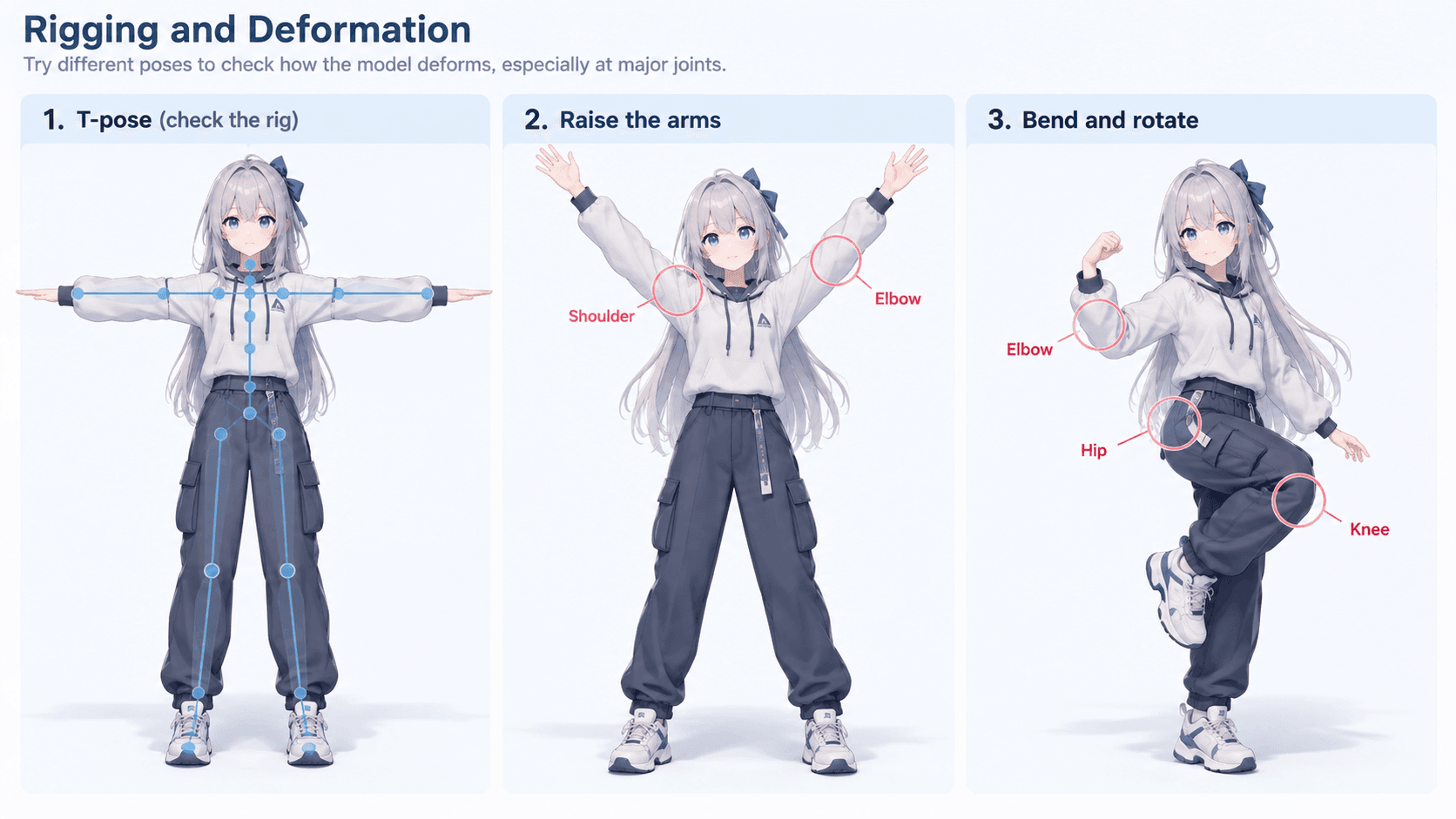
For an animated or poseable character, start by moving the rig.
A humanoid skeleton normally includes the spine, head, neck, arms, hands, legs, and feet. Depending on the intended workflow, you may also need eye, jaw, mouth, or facial controls. A model labeled as rigged may include all of these, only the basic body bones, or something in between.
Raise the arms, bend the elbows and knees, and rotate the hips. These simple poses reveal a surprising amount about the skinning. Watch for shoulders that pinch, elbows that lose volume, sleeves that twist, or body geometry that pushes through clothing.
Poor deformation usually points to weight-painting problems or a rig that was not set up carefully for that area. A simpler rig with clean deformation is often more useful than a more elaborate one that still needs extensive correction.
Topology and Polycount
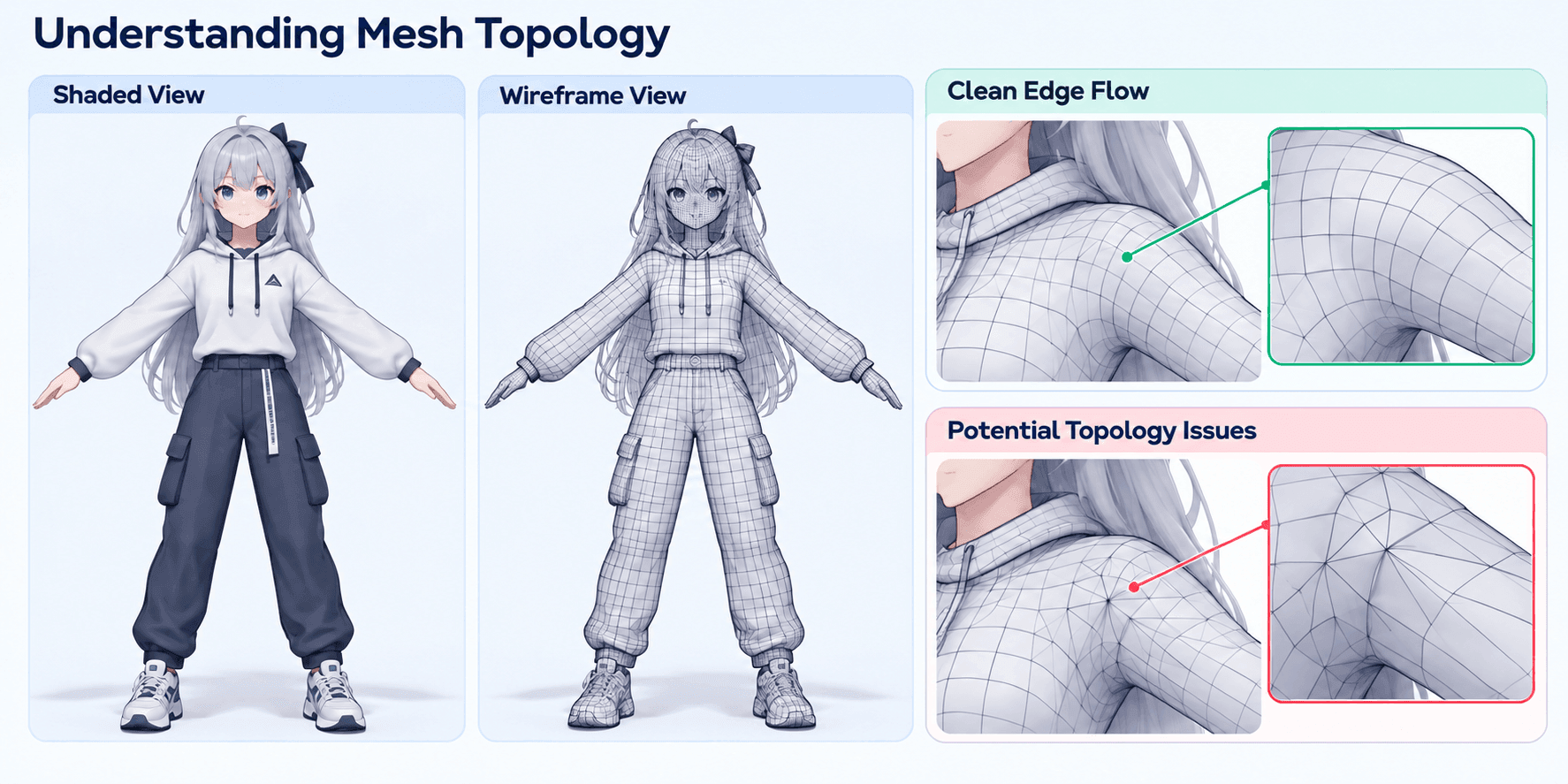
Turn on the wireframe before judging the polycount.
The total number of polygons tells you how dense the model is, but the wireframe shows where that geometry has actually been used. Around the shoulders, elbows, knees, hips, mouth, and eyes, the edge flow should generally follow the shape and movement of the character. Clean loops in these areas make deformation and later editing much easier.
Anime models can also spend a large amount of geometry on hair, layered clothing, accessories, or surfaces hidden underneath other parts. That may be justified if the detail is visible and important. It becomes less useful when high density is concentrated in places that contribute little to the final result while key deformation areas remain poorly constructed.
Polycount is therefore most useful as a practical constraint. Consider how much detail needs to be visible, how much the character needs to move, and whether the model will require further optimization or editing.
For a deeper comparison, see low-poly vs. high-poly 3D models.
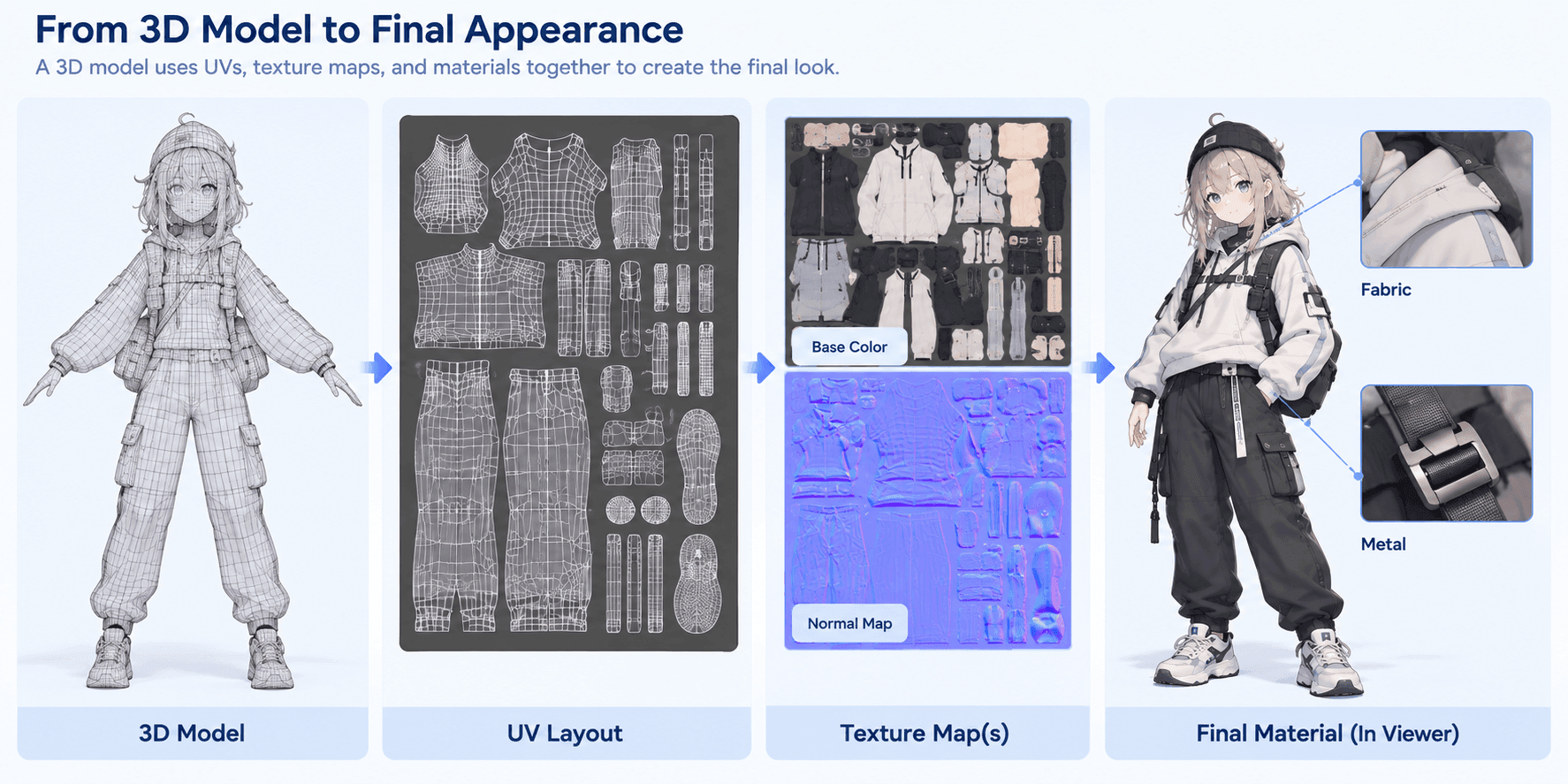
UVs, Textures, and Materials
A good mesh can still become troublesome if the texture setup is incomplete.
Start with the UVs. Look for obvious stretching, awkward seams, or large differences in texel density between parts of the character. These issues may be easy to ignore in a finished render, but they become much more noticeable if you need to repaint textures or make material changes later.
Then check the files included with the model. The textures shown in the preview should actually be present, linked correctly, and large enough for the level of detail your project requires.
Materials need separate attention. Anime characters often depend on toon shaders, outlines, custom node setups, or materials created for a specific application. If those shaders do not transfer to your software, the geometry may import correctly while the character looks noticeably different from the original preview. In that case, part of the material setup will need to be rebuilt.
Separate Parts and Editability
Open the object list or hierarchy and see how the character has been divided.
Hair, clothing, eyes, accessories, weapons, and other major elements are much easier to modify when they can be selected independently. This is especially useful if you expect to change outfits, remove accessories, adjust materials, or create several variations from the same base character.
The body underneath the clothing can be handled in different ways. Some models preserve the full body, which makes clothing changes easier. Others remove hidden areas to reduce overlap and unnecessary geometry.
Neither setup is automatically better. A complete body gives you more freedom to edit, while deleted hidden surfaces can reduce clipping and cleanup in a character that will always use the same outfit.
Mesh Integrity and Cleanup
Before moving the asset further into production, check for basic mesh problems.
Flipped normals, duplicated vertices, overlapping faces, holes, disconnected pieces, and non-manifold geometry are all worth catching early. Some of these issues only take a few minutes to fix, but others can become more disruptive once the model has already been rigged, textured, exported, or prepared for printing.
Normals are a common example. If the surface direction is wrong, parts of the mesh may shade incorrectly or appear transparent or invisible after import.
A premade model does not need to be perfectly clean to be useful. The more important question is how much repair it needs before it fits your workflow. A few small fixes may be an acceptable tradeoff for a free asset. Rebuilding several major areas is a different calculation.
How to Check the License and Source
A technically suitable model can still be unusable for a project if the license does not cover what you plan to do with it.
Before downloading an asset for anything beyond casual personal use, find the original license and source page. The word free usually refers to the download price. Commercial use, editing, redistribution, and attribution are separate permissions.
Commercial Use
Look for an explicit statement about commercial use if the model will appear in a paid game, monetized video, commission, advertisement, merchandise, or revenue-generating avatar.
Some creators include commercial use in the free license. Others allow only personal use unless you purchase a separate license or ask for permission.
If the terms do not clearly cover your intended use, do not assume that a free download includes commercial rights.
Modification
Modification rights vary considerably between licenses.
One creator may allow recoloring and mesh edits but prohibit redistribution of the edited file. Another may allow changes to clothing, proportions, topology, or materials while placing restrictions on derivative characters.
Read this section before making substantial edits. The fact that a model opens normally in Blender or another DCC only tells you that it can be edited technically.
Redistribution
Using a model in a finished project is different from giving other people access to the model itself.
A license may allow the character to appear in a game while still prohibiting the source mesh from being shared, resold, bundled into an asset pack, or distributed in an easily extractable form.
This becomes especially important when other users, clients, or collaborators will receive editable project files rather than only rendered output.
Attribution
If credit is required, record the exact creator name and any link or wording specified by the license.
Keep that information with the asset itself. Attribution details are easy to lose when a model moves through several folders, collaborators, or production stages.
Source and Ownership
Whenever possible, download from the creator’s own page or the platform where the asset was originally published.
Reposts and mirror sites can remove or alter license information, omit creator details, or preserve an older version of the terms. In some cases, the person uploading the file may not have permission to redistribute it at all.
For a model used in a serious project, keep a record of the original source and the license terms that applied when you downloaded it. A saved copy of the license page or a screenshot is usually enough.
When to Use a Premade Model vs. Create a Custom One
Premade anime models work well when an existing asset already fits most of your project requirements. They are especially useful for generic characters, background NPCs, prototypes, reusable assets, or base meshes that only need limited editing.
A custom starting point becomes more practical when the character design itself matters. If the project depends on a specific hairstyle, outfit, silhouette, accessories, or an existing character illustration, searching for a model that is “close enough” can lead to more modification work than expected.
A useful rule is to compare the cost of adaptation with the cost of creating a new starting point. If a premade model needs major changes to its shape, clothing, topology, rig, or materials before it matches the design, a custom workflow may save more time.
If you already have character artwork, image-based 3D generation offers another route. Triverse AI can use an existing character image to generate a custom starting model, which can then be refined for the target workflow.
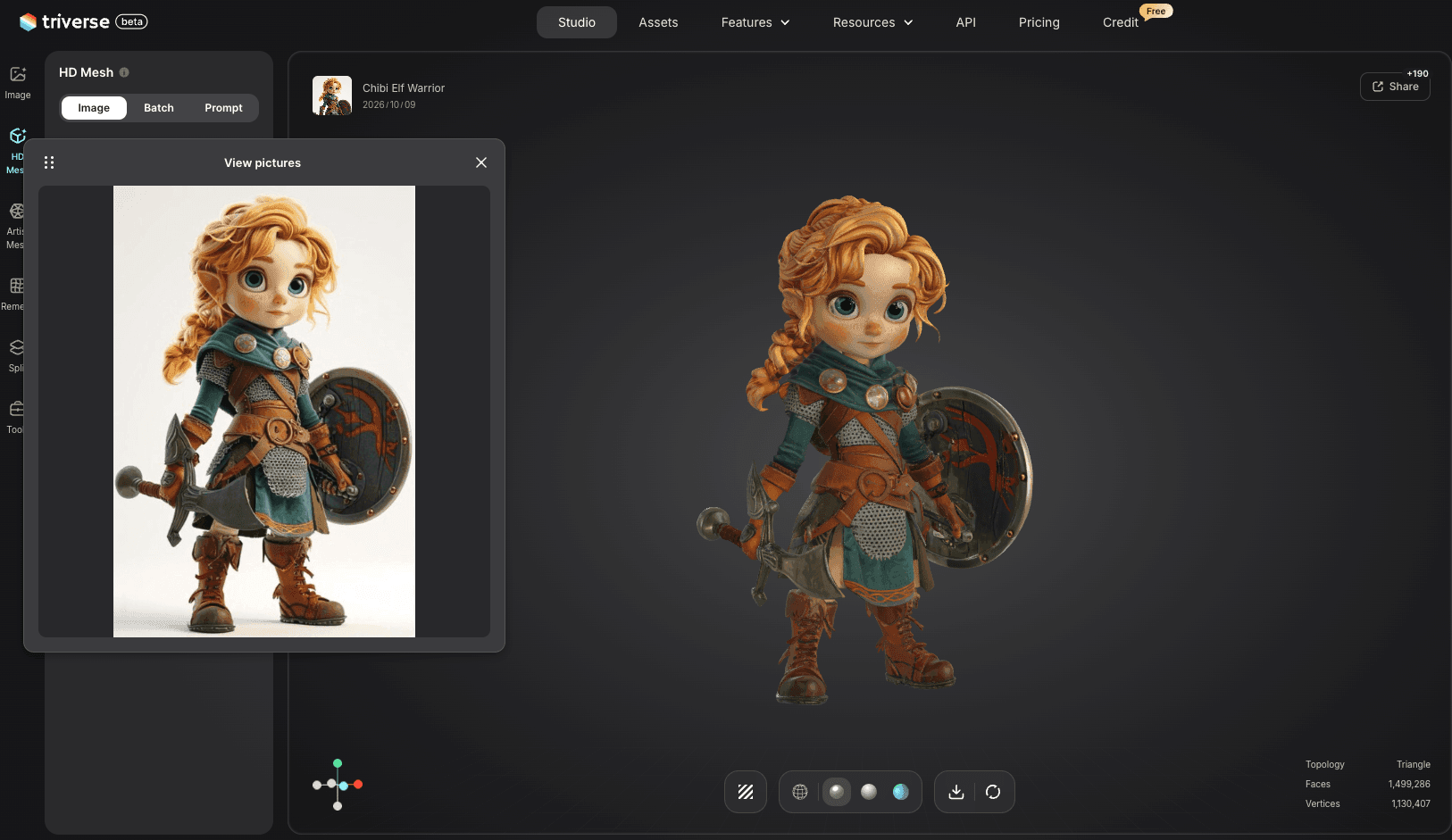
If you are still deciding between premade assets, AI-assisted generation, and other character-creation workflows, see our guide to 3D anime character makers.
Pick for the Workflow, Not Just the Preview
The best free anime 3D model is the one that fits what you plan to do after downloading it. Start with the final workflow, then check whether the model’s format, license, structure, and technical quality support that use without creating unnecessary rework.
Premade models are efficient when an existing asset already fits most of the project. If a specific original character, outfit, or silhouette is central to the design, creating a custom starting model may be more practical than continuing to search for an approximate match.