Artist Mesh
July 9, 2026AI-generated 3D models look great until you inspect the mesh. Dense, chaotic geometry means hours of manual retopology before any asset can ship in a real-time pipeline. Triverse's new feature, Artist Mesh, was built to solve that topology problem.
What is Artist Mesh?
Artist Mesh is a generation mode in Triverse AI that produces clean, low-poly 3D meshes, ready for game engines, VR, and real-time applications in seconds.
Instead of dense geometry that requires hours of retopology, Artist Mesh outputs clean, structured edge flow with controllable vertex counts. The result is a lightweight mesh you can easily edit, rig, animate, and drop into Unity or Unreal.
To help you quickly understand Artist Mesh and how to use it, we have provided a YouTube video tutorial:
How to Use Artist Mesh (Step-by-Step)
Generating a production-ready 3D model in Triverse Studio takes only a few clicks.
Step 1: Upload Your Concept
Select the Artist Mesh tab on the left sidebar, then click, drag, or paste your reference image.
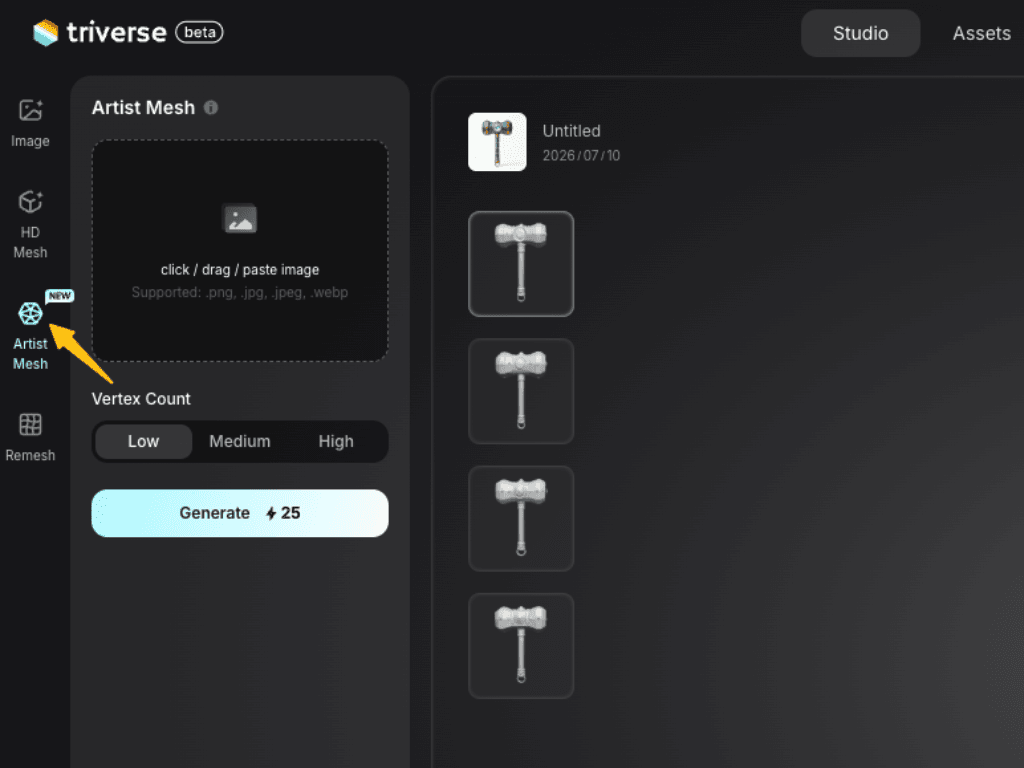
Best Inputs: For optimal results, use clean concepts like game-ready props, stylized characters, anime-inspired designs, and weapons.
Step 2: Configure Vertex Count
Artist Mesh lets you set your poly budget before generation. Choose from three tiers:
- Low (~1,024 Vertices): Perfect for background props, mobile games, and high-performance XR.
- Medium (~2,048 Vertices): The standard choice for most indie game assets and secondary characters.
- High (~4,096 Vertices): Ideal for hero assets or objects that require a more detailed silhouette.
Step 3: Generate in Seconds
Click Generate (Cost: 25 credits). In ~20 seconds, Triverse AI produces 4 mesh variations. Pick the one with the cleanest wireframe and silhouette, then proceed to Texture or Export.
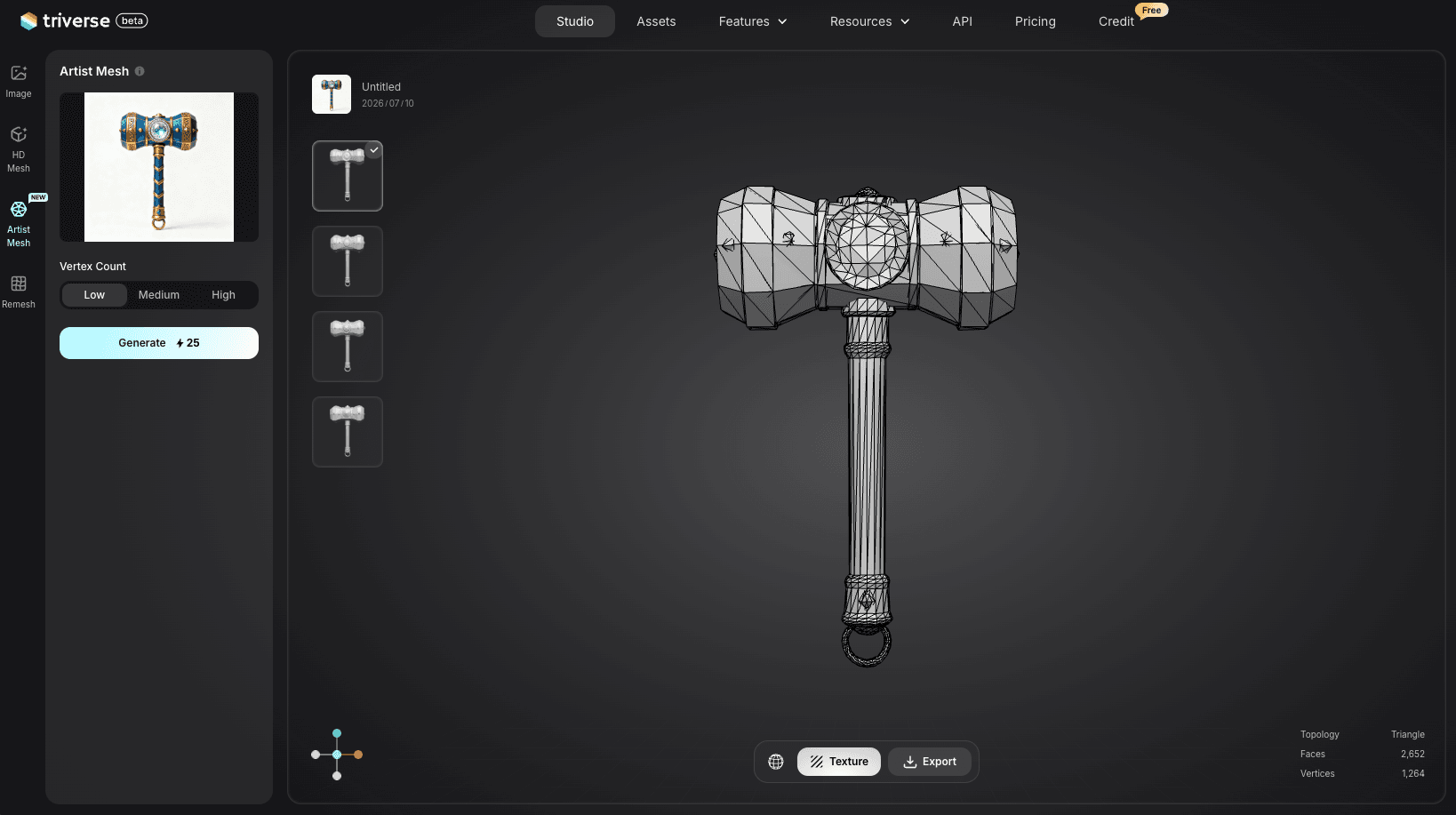
Use the viewport stats (Faces, Vertices, Topology) to confirm the result matches your target poly budget.
Step 4: Texture & Export
Next, if you need, you can click Texture to choose your texture size (4K, 2K, or 1K; 4K is selected by default), then click Generate Texture. It supports you generate PBR texture from an image or a text prompt.
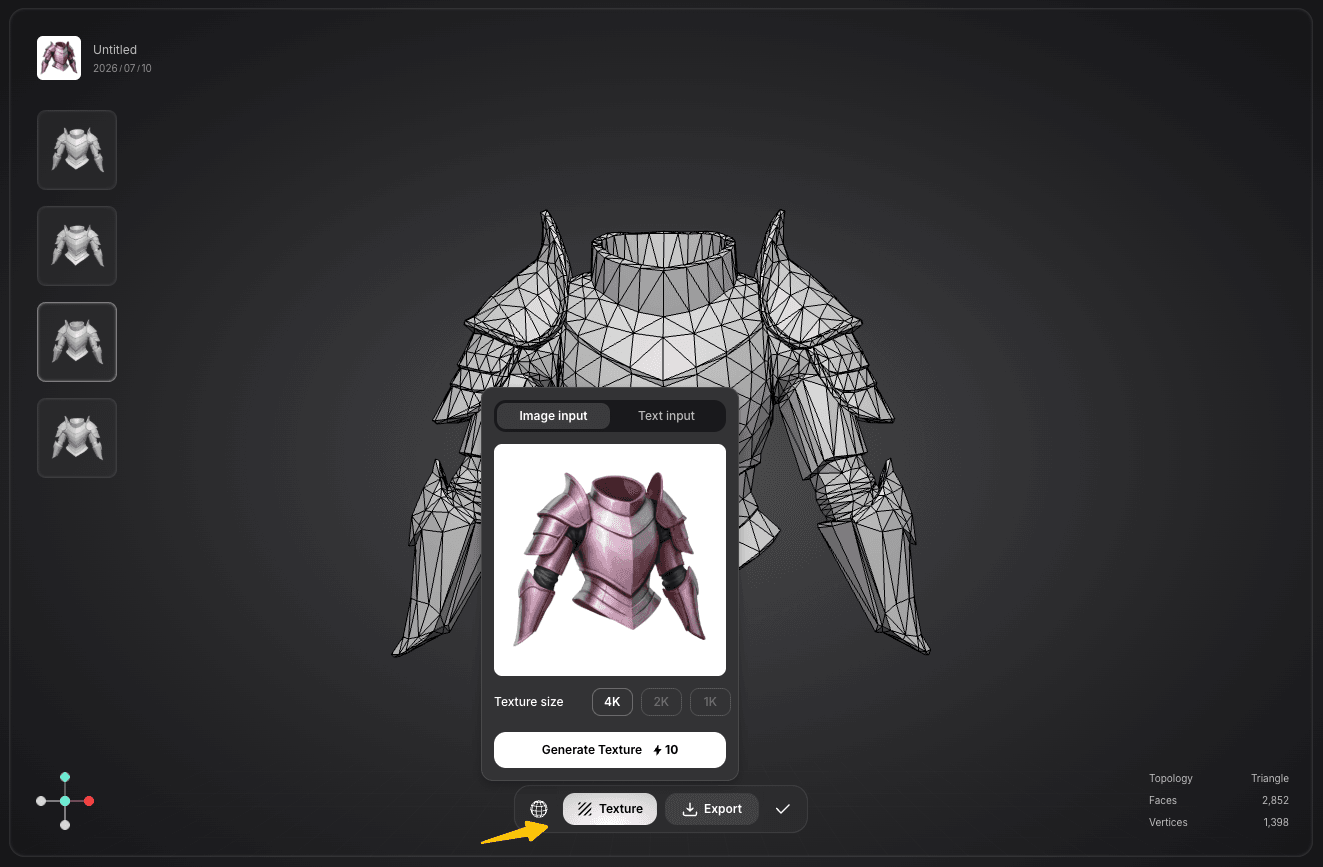
Once the AI-generated materials are applied, hit Export to download in the format that fits your pipeline:
- GLB: web 3D, XR apps, lightweight real-time pipelines
- FBX: Unity, Unreal, Blender, skeletal animation workflows
- OBJ: general 3D software import, UV editing
- USDZ: Apple AR frameworks (ARKit, Reality Composer)
- STL / 3MF: 3D printing slicers (Cura, PrusaSlicer)
Because Artist Mesh outputs clean topology, the exported model imports directly into your engine or software with no retopology step.
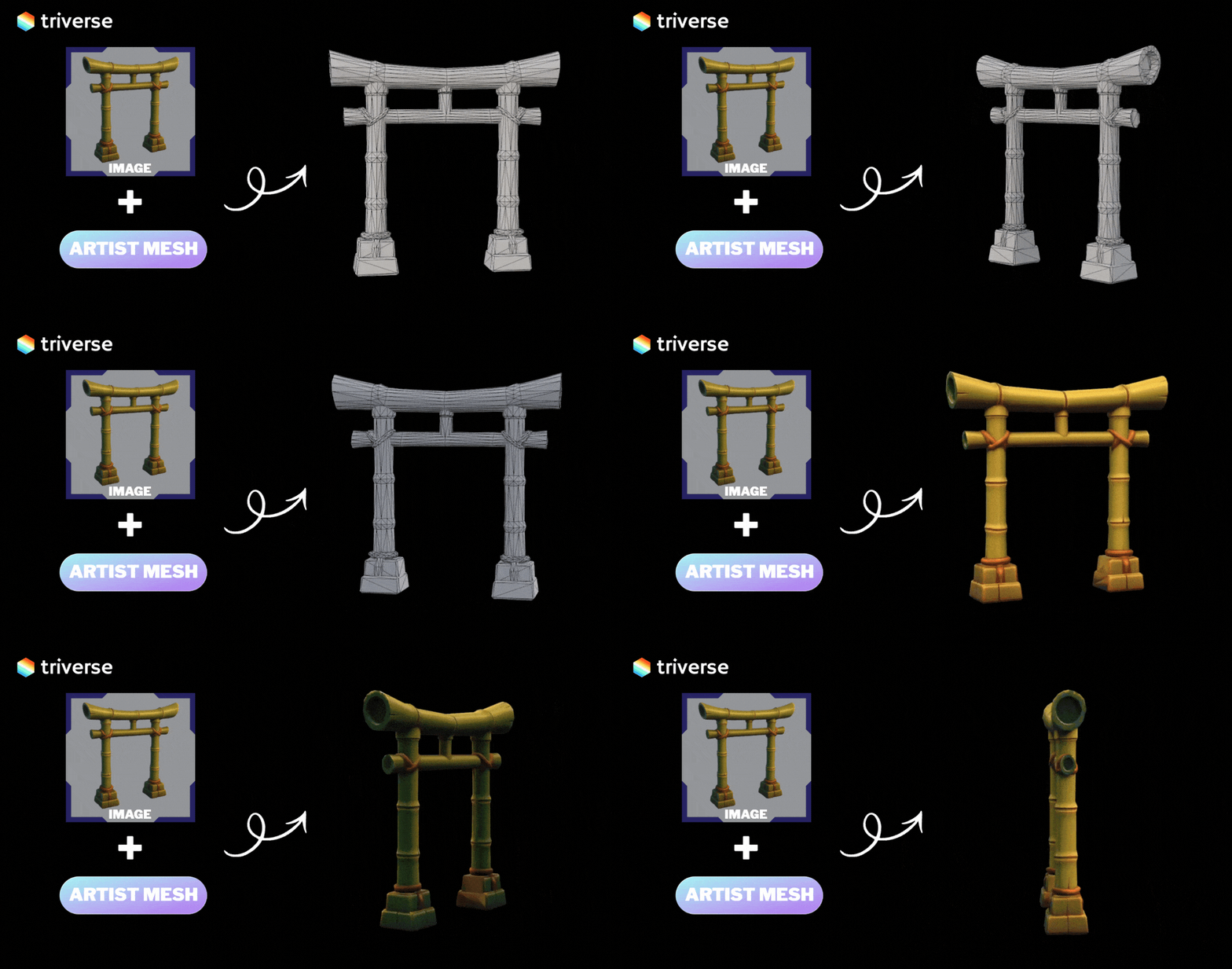
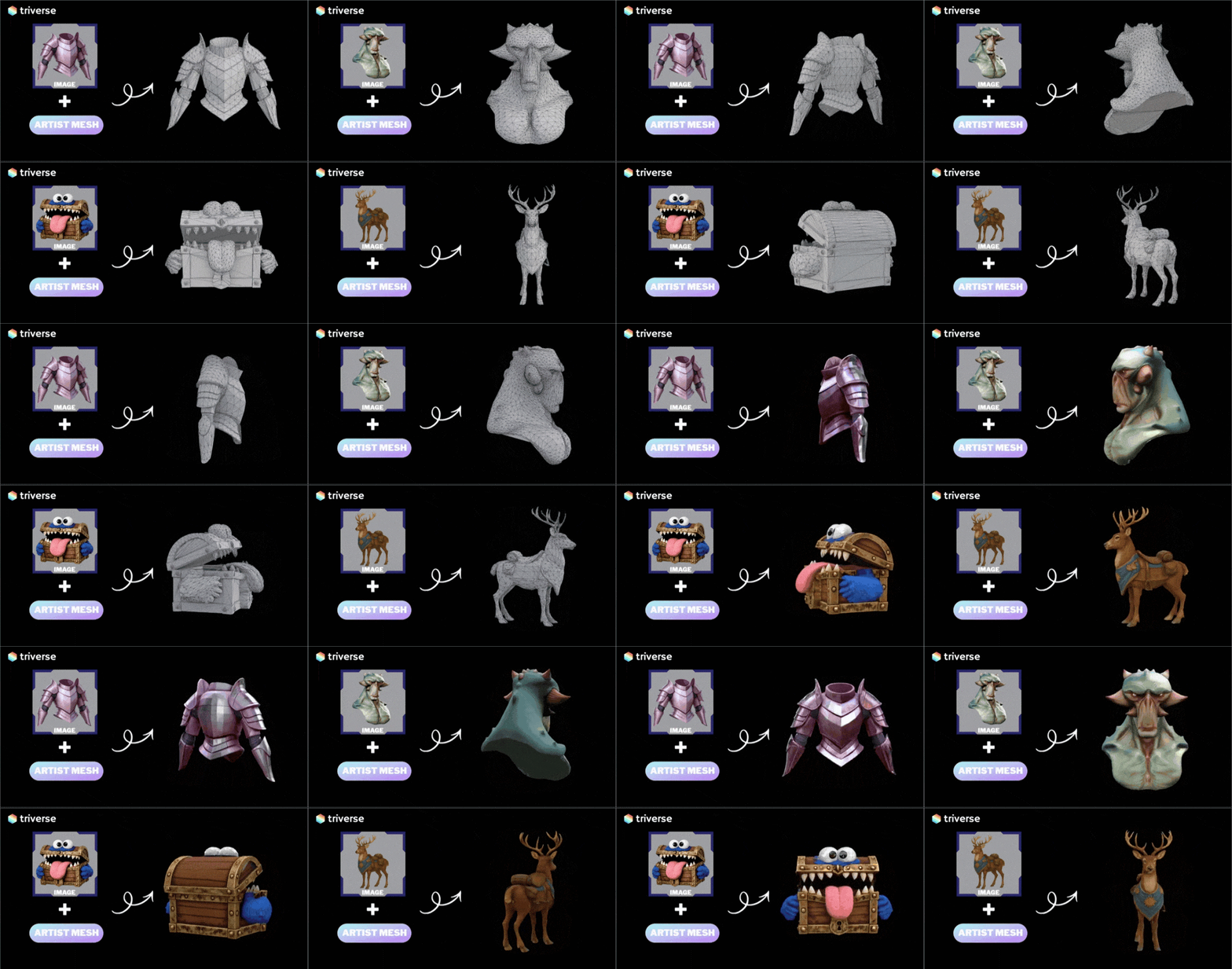
Here are a few Artist Mesh outputs, shown in both wireframe and PBR texture so you can see the clean, organized topology.
Real Workflows with Artist Mesh (Best Use Cases)
Artist Mesh isn't just a shortcut; it’s a new way to build 3D libraries.
- Rapid Prototyping: Skip the cleanup cycle. Go from Generate, Export, Use. Small teams can populate entire levels in an afternoon.
- Stylized & Anime Pipelines: Clean silhouettes and structured topology that works with toon shaders out of the box.
- Scalable Asset Libraries: Generate dozens of unique props or weapons at scale. Optimization is handled automatically.
Who Benefits Most from Artistic Mesh:
- Game developers: Building prop and environment libraries at scale, where per-asset retopology hours multiply into weeks.
- Indie teams: Without a dedicated 3D artist, who need to move from concept to in-engine asset fast.
- XR / AR creators: Where performance constraints and clean geometry are critical for real-time rendering.
- Production pipelines: Generate, test, replace, iterate without the cleanup bottleneck.
Artist Mesh VS. HD Mesh: Choosing the Right Tool
Each mode in Triverse serves a specific purpose in your creative journey. Here is how they compare:
Artistic Mesh | HD Mesh | |
|---|---|---|
Focus | Topology & performance | Visual detail & fidelity |
Geometry | Clean low-poly, quad-dominant | Dense high-poly, detail-rich |
Speed | ~20 seconds | 2-5 minutes |
Editing | Rig-ready, easy UV & editing | Requires retopology first |
Best for | Games, XR, animation, props | Cinematic renders, normal map baking |
The Verdict:
Artist Mesh = speed + game-ready. HD Mesh = detail + cinematic quality. Pick based on what your pipeline needs.
Try It Now
Try Artist Mesh free in Triverse Studio. Your first game-ready 3D model is seconds away.