10 Best Free 3D Modeling Software in 2026 (Online & Desktop)
Discover the best free 3D modeling tools—from Blender to FreeCAD. Compare features, limits, and best uses.
September 20, 2026
Choosing free 3D modeling software can be difficult because tools differ in workflow, learning curve, and ideal use cases. Simpler programs are easier to start with but may be limiting, while more advanced tools often take longer to learn.
Free plans also vary in what they include, with possible limits on commercial use, privacy, export options, and more. Free to start does not always mean free for the full workflow.
This guide compares 10 online and desktop tools by free features, limitations, and best use cases across general modeling, CAD, architecture, interiors, games, and characters.
Free 3D Modeling Software: Quick Comparison
Category | Software | Best for | Platform | Free access and main limitations |
General 3D modeling & rapid generation | Simple models and basic 3D-printing designs | Online | Free modeling, saving, and export to common formats; its overall commercial-use terms are unclear, and built-in or third-party content may have separate conditions | |
General 3D modeling & rapid generation | Modeling, sculpting, animation, and rendering | Desktop | All core features are free and open source, including commercial use; third-party add-ons and content may cost extra | |
General 3D modeling & rapid generation | Creating an initial 3D model from an image or text prompt | Online | Registration provides free credits; generating models and textures consumes them | |
Engineering design & parametric CAD | Parametric parts, assemblies, and online collaboration | Online | Limited to non-commercial use, and every design document is public | |
Engineering design & parametric CAD | Local parametric part and engineering design | Desktop | Fully free and open source, with commercial use and private local files supported | |
Architecture & interior design | Architectural massing, interior spaces, and furniture concepts | Online | Limited to non-commercial use; desktop applications, extensions, LayOut, and additional exchange formats require a paid plan | |
Architecture & interior design | Floor plans and furniture layouts | Online and desktop | The open-source desktop version supports free commercial use; the web and paid Store versions include different features and preinstalled content | |
Game models & characters | Low-poly, pixel-art, and Minecraft models | Online and desktop | Fully free and open source, with commercial use allowed for original work; modeling, animation, and export capabilities vary by the selected format | |
Game models & characters | Voxel models, scenes, and rendered artwork | Desktop | Free to use, with commercial use allowed for original work; currently available only for Windows and macOS | |
Game models & characters | Anime-style humanoid characters and avatars | Desktop | Original characters can be created, saved, and exported for free; third-party content remains subject to its own license terms |
How We Evaluated These Tools
Different modeling methods are built for different kinds of work, so a single overall score would be misleading. Instead, we grouped the tools by use case and compared them across the following criteria.
- Task fit: We looked at how each program creates models and which kinds of 3D work that approach handles best, Such as 3D printing, architectural design, or game development.
- Free capabilities: We checked which core features are available at no cost, including whether users can save their work and export the formats they need.
- Usage conditions: We compared commercial-use rights, file visibility, supported platforms, usage limits, and the point at which a paid plan becomes necessary.
- Further editing and output: We considered whether exported models remain practical to edit and how easily they can move into another modeling application.
If your main priority is ease of learning rather than task-specific features, see our guide to the best 3D modeling software for beginners.
General 3D Modeling
These tools offer several ways to get started, from combining geometric shapes and generating models with AI to building them manually. Together, they cover general creative work such as 3D printing, visual content, and concept development without being tied to one industry.
Tinkercad (Simple Online Modeling and 3D Printing)
Tinkercad is an online tool that builds 3D models from preset geometric shapes. It is quick to pick up and works well for simple designs, with free modeling, saving, and export to formats such as STL and OBJ. Complex surfaces and models made from many objects soon become cumbersome, however, and anyone planning commercial use should confirm the relevant terms with Autodesk.
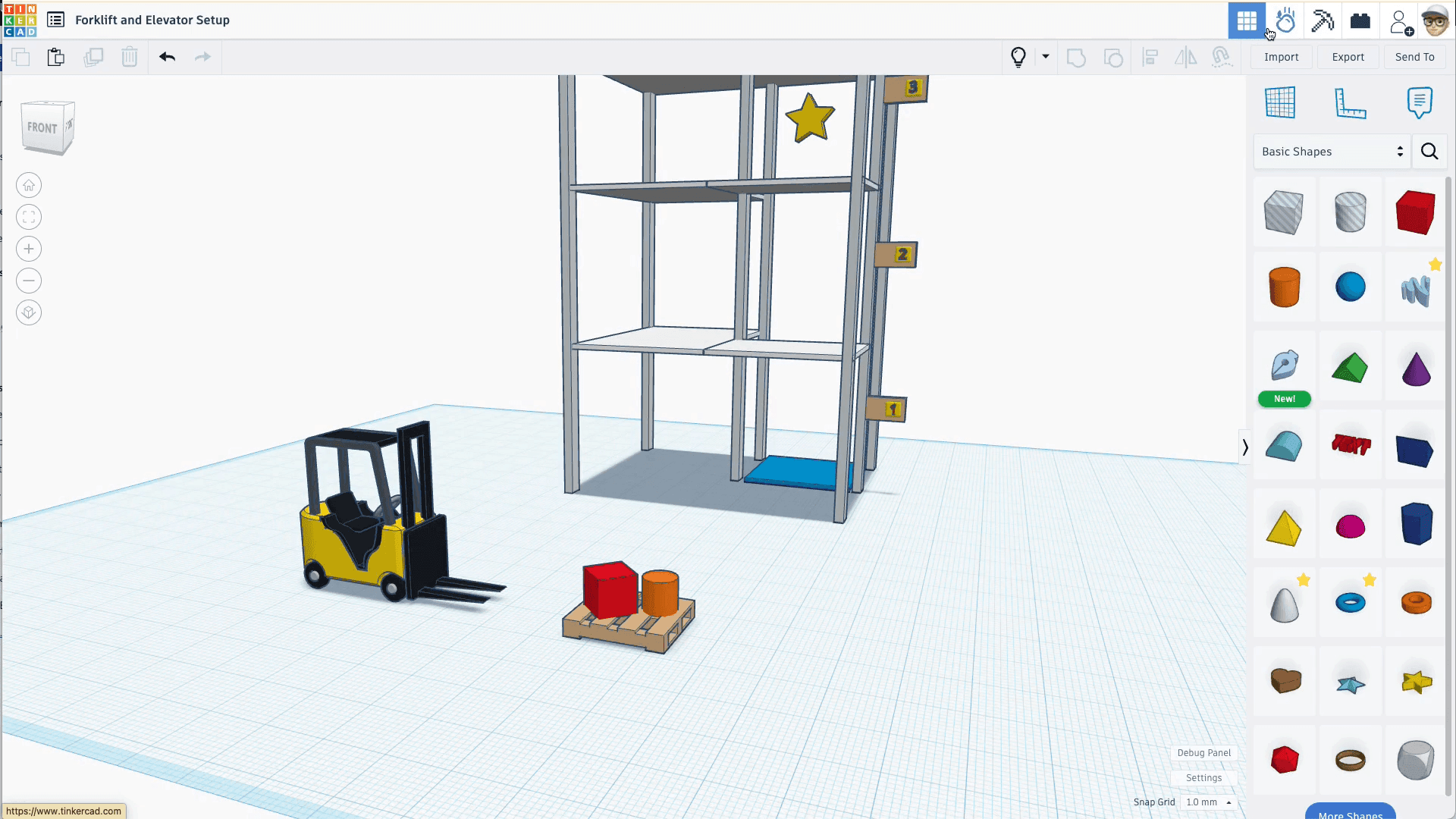
(image source: Tinkercad official)
⭐️Core Features
- Preset shape library: Basic solids, text, and adjustable shapes can be placed directly in the workspace and combined into a model.
- Solid and hole operations: Objects can be designated as solids or holes, then grouped to add, subtract, and combine geometry.
- Workplane and dimension tools: The ruler, alignment controls, and workplane make it easier to set an object's size, position, and placement surface accurately.
✅ Pros
- Simple models come together quickly: Building a model usually involves little more than placing shapes and adjusting a few values, so there is very little setup.
- Dimension controls are easy to understand: Numeric inputs, the ruler, and alignment tools are integrated directly into the visual workspace.
- Useful for light edits to existing models: After importing a model, you can add, subtract, or combine geometry without rebuilding the entire form.
❌Cons
- Complex structures are cumbersome to revise: Dimensions, holes, and mating features are not linked parametrically, while continuous surfaces often require several basic shapes. Later changes can therefore affect multiple areas.
- Models become harder to manage as object counts grow: Performance can decline in files with many objects or highly complex imports, while keeping the structure organized becomes increasingly difficult.
- Commercial-use terms are not fully explicit: Although many users sell models and printed objects made in Tinkercad, Autodesk's public terms do not clearly grant a comprehensive commercial-use license. Built-in and third-party content requires particular care.
👍🏻 Best For
Tinkercad is best for individuals, 3D-printing hobbyists, and classrooms that need a quick way to produce simple models. It works particularly well for basic prototypes and light modifications to existing geometry. Parametric CAD or a full modeling application is a better choice when you need linked dimensions, complex surfaces, or assembly relationships.
Blender (Open-Source Desktop Software for End-to-End 3D Creation)
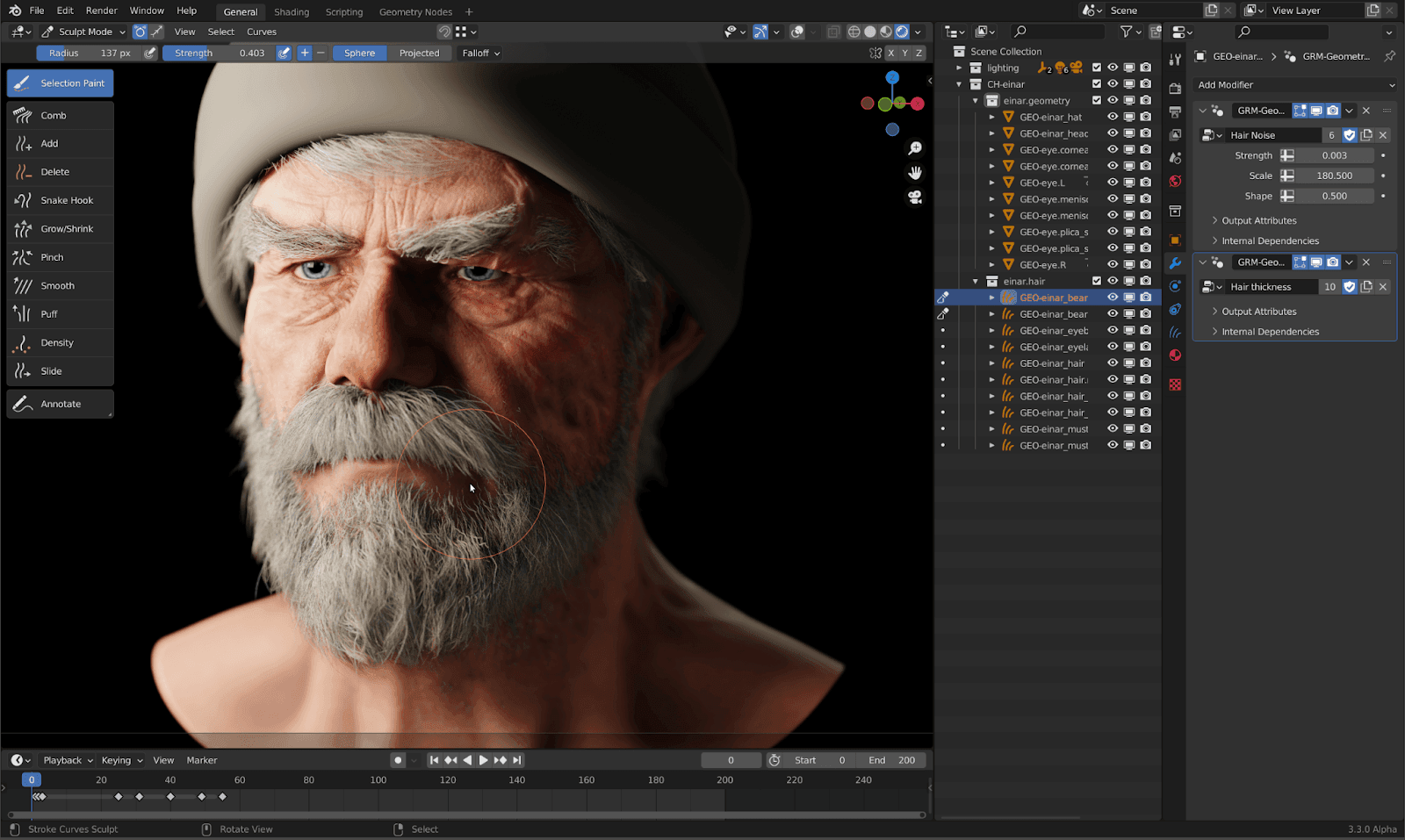
Blender is a free, open-source desktop application that brings modeling, sculpting, materials, animation, and rendering into one production environment. That breadth makes it a strong long-term tool for creators who want detailed control over both the model and the final output, though it also gives Blender a substantial learning curve. Every core feature is free, and original work can be used commercially.
(image source: Blender Essentials blog)
⭐️Core Features
- Mesh modeling and digital sculpting: Start from primitive geometry or an existing model, edit vertices, edges, and faces for structural control, or use sculpting tools to shape the silhouette and surface detail.
- Model refinement and texturing: Modifiers provide nondestructive operations such as mirroring, arrays, and subdivision, while UV unwrapping, texture painting, and material tools define the model's appearance.
- Animation and final output: Finished models can be rigged, weighted, and animated in Blender. Its lighting, camera, and rendering tools can then produce polished stills, videos, or product visualization animations.
✅Pros
- Scales to complex creative work: A simple prop can develop into a detailed character or complete scene without forcing you to change your main tool.
- Covers the full 3D production pipeline: Modeling, materials, rigging, animation, and rendering can all continue in the same file, alongside models imported from other applications.
- Fully free and open source: Blender places no limits on file counts, exports, or commercial use, making it practical for a long-term portfolio and production workflow.
❌Cons
- Learning the basics takes time: New users need to understand concepts such as Edit Mode, topology, modifiers, and materials. The application can feel excessive if you only make simple models occasionally.
- Not built around dimension-driven engineering design: Blender can work at defined dimensions, but its native workflow lacks the sketch constraints, feature history, and assembly relationships found in parametric CAD.
- Model quality depends on cleanup experience: Topology, UVs, rig weights, and output settings all require active management. Imported models may also need mesh cleanup, material correction, or polygon optimization.
👍🏻Best For
Blender is best for creators who are willing to invest in learning and want detailed control over model structure and final presentation. It is particularly well suited to game models, characters, organic forms, scene rendering, and model cleanup. A lighter tool may be faster for simple printable parts.
Triverse AI (Online AI Tool for Generating 3D Models from Images or Text)
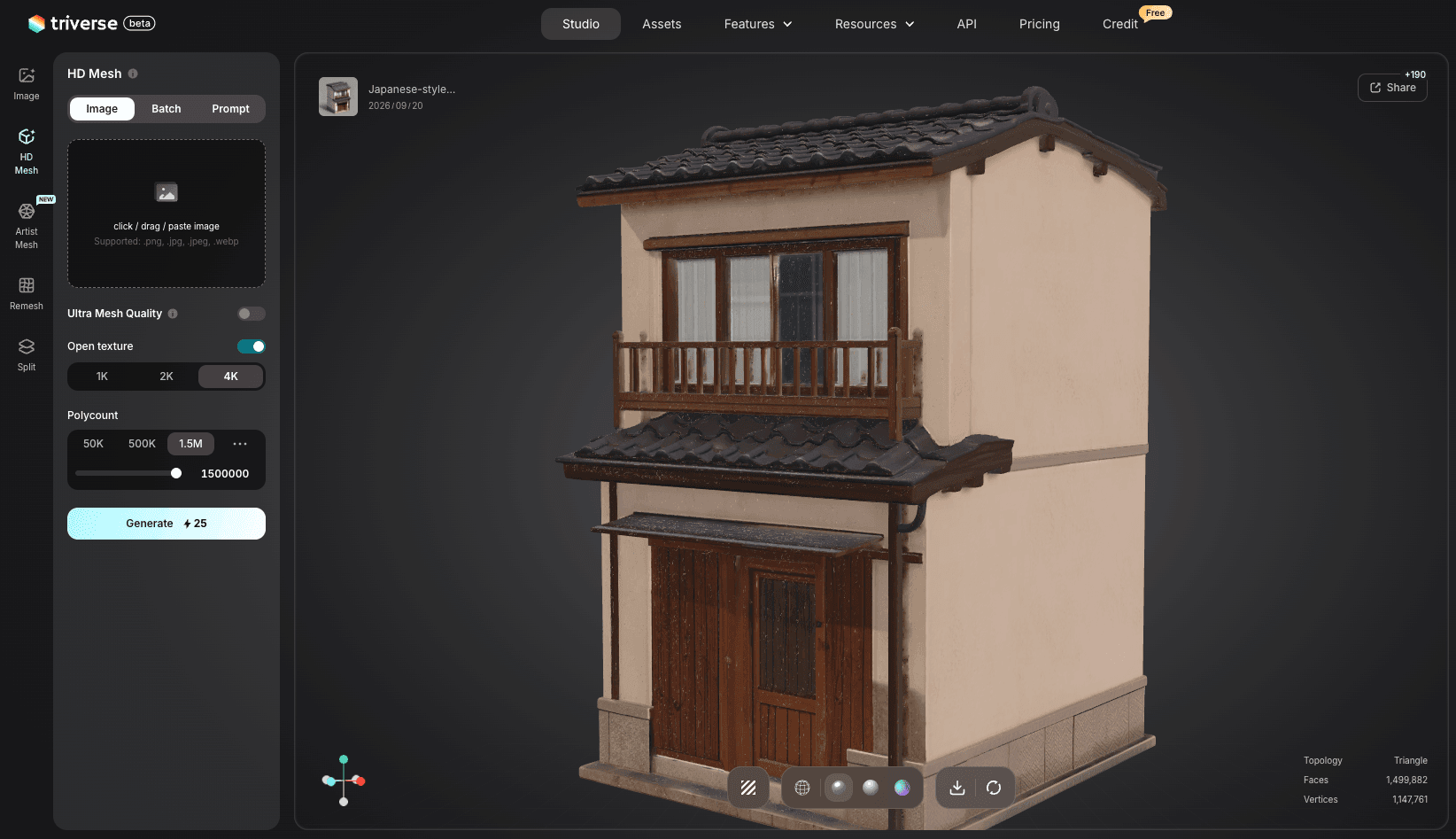
Triverse AI is an online AI tool that creates textured 3D models through image-to-3D generation or text-to-3D generation. It shortens the path from a visual idea to a model you can inspect and refine, but generated results vary and some concepts may take more than one attempt. Each generation task consumes credits, while registration and designated tasks provide free credits to get started.
⭐️Core Features
- Image-to-3D: Upload a reference image and choose between HD Mesh for detailed geometry and Artist Mesh for faster, lower-poly output with cleaner topology that is easier to edit. Split can separate an image into individual parts, allowing selected components to be generated independently.
- text-to-3D: Enter a text prompt to generate a 3D model without a reference image, with AI assistance to refine the prompt if needed.
- AI texture generation: Generate textures from your image or prompt to quickly refine a model’s color and surface appearance.
- Free model export: Preview generated models in 3D or wireframe view, then export them for free as GLB, STL, or 3MF for further editing.
✅Pros
- Reduces the manual work at the start: A reference image or text prompt can quickly produce a starter model, letting you move to inspection and iteration sooner.
- Makes different visual directions easier to explore: Replace the reference image or revise the prompt to try a new form without rebuilding every option manually.
- Works well with existing 3D workflows: Generated models can be brought into other 3D software for cleanup, refinement, rigging, animation, or further production work.
❌Cons
- AI may infer hidden details: Occluded areas, backs, and small parts may be generated inaccurately, though a well-prepared input image can reduce errors.
- HD Mesh may need cleanup: Detailed meshes can require some refinement, while Artist Mesh is designed for cleaner, easier-to-edit topology.
- Credit-based generation: Unlike fully free or open-source tools, Triverse uses credits for model and texture generation, so free usage depends on the credits available.
👍🏻Best For
Triverse AI is best for 3D creators who already have a reference image or a clear visual idea and want to reduce the manual work at the beginning of the process. It also suits independent developers who need to test the direction of a character, prop, or presentation model quickly. If the result needs detailed cleanup, rigging, or animation, it can be exported to Blender or a similar application.
Engineering Design and Parametric CAD
Engineering and parametric CAD tools control part geometry through sketch constraints, dimensions, and feature history. They are the natural choice when a design needs repeated dimensional changes or must develop into an assembly.
Onshape Free (Parametric CAD for Public Designs and Online Collaboration)
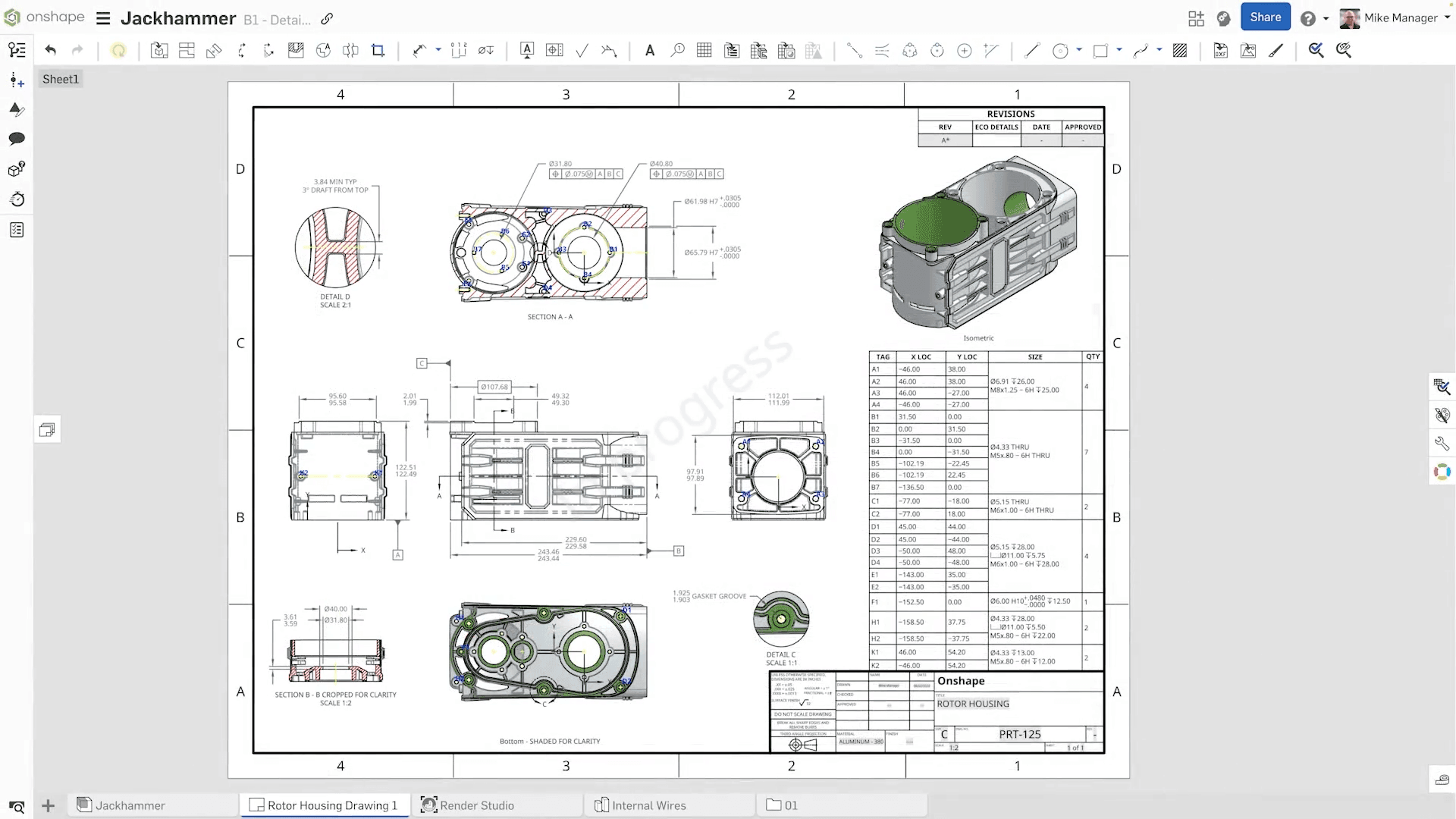
Onshape Free is a browser-based parametric CAD system for non-commercial work. Sketch constraints, dimensions, and feature history provide precise control over parts, which can then be developed into assemblies or exported in common formats. Every document created on the free plan is public and can be viewed and copied by other users, so the plan is unsuitable for private designs or commercial work.
(image source: Onshape official)
⭐️Core Features
- Parametric part design: Start with a dimensioned, constrained 2D sketch, then turn it into a solid with modeling features. When a sketch or feature parameter changes, related geometry recalculates according to the relationships already in place.
- Assemblies and motion relationships: Place multiple parts in an assembly and use mates to control their position and movement, making it possible to check whether components connect and move correctly.
- Cloud-based version management: Onshape saves work automatically and provides versions, branches, and shared editing for comparing alternatives or collaborating with others.
✅Pros
- Efficient dimensional revisions: Once constraints are set up correctly, changing a few key parameters updates the related geometry automatically.
- Parts flow naturally into assemblies: Finished parts can move directly into the assembly environment, where you can check connection points and motion relationships.
- Convenient collaboration across devices: Sign in from another computer to continue editing, while sharing, comments, and version history stay together in the same document.
❌Cons
- Free documents are public and limited to non-commercial use: Other users can view and copy designs created on the free plan, making it unsuitable for confidential work.
- Parametric design logic takes time to learn: Sketch constraints, feature dependencies, and assembly relationships require planning. Poor references or constraints can cause downstream features to fail after an upstream change.
- Full editability stays in Onshape: Exported STEP, STL, and 3MF files are useful for exchange and manufacturing, but they do not retain Onshape's parameters or feature history. The same editing logic therefore cannot continue in another application.
👍🏻Best For
Onshape Free is best for non-commercial users who can accept public documents and need to revise parts frequently or collaborate online. Local, open-source CAD is a better fit when designs must remain private, be edited offline, or be used commercially at no cost.
FreeCAD (Parametric CAD for Private Local Work and Free Commercial Use)
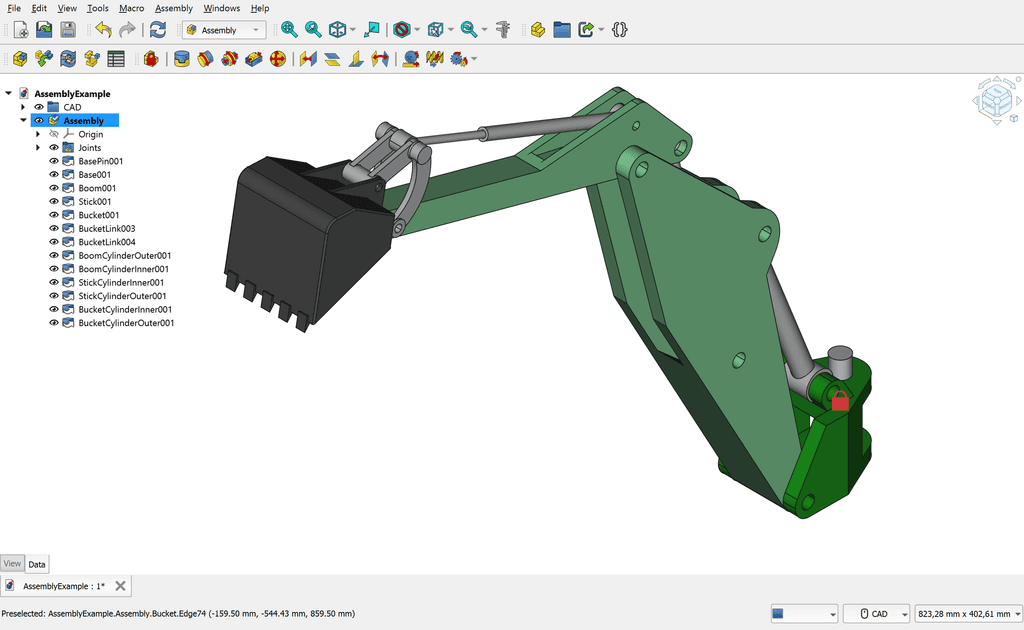
FreeCAD is a free, open-source desktop application for building editable solid models with sketch constraints, dimensions, and feature history. It is well suited to functional parts and engineering prototypes, with local file storage and commercial use included. Its tools are spread across several workbenches, however, so the interface takes time to learn.
(image source: FreeCAD Wiki)
⭐️Core Features
- Sketch constraints: Define dimensions and geometric relationships in a 2D profile to establish the key structure of a part and create a stable foundation for later changes.
- Feature-based solid modeling: Build a part progressively with features such as pads, pockets, and fillets. When changes are needed, return to the sketch or feature parameters and let the model recalculate.
- Task-specific workbenches: Sketching, part design, assemblies, technical drawings, and other functions are organized into separate workbenches, so you can switch toolsets as the work progresses.
✅Pros
- Private designs and commercial use are included: Core modeling, saving, and export features are available without a subscription, and users are not required to publish their work.
- Engineering files stay under the user's control: Files can be edited offline and stored locally in FCStd format for independent backup and long-term maintenance.
- Well suited to functional parts that change over time: Dimensions and constraints preserve relationships between features, so key parameters can be revised without rebuilding the entire model.
❌Cons
- The workbench structure takes adjustment: Different tasks live in separate workbenches, and tool placement and interaction patterns are not completely consistent throughout the application.
- Complex revisions require careful dependency management: Changes to upstream geometry can break downstream references, requiring you to inspect the model tree and repair failed features.
- Imported files do not regain their original design history: A STEP file can be edited as a solid, but it does not include sketches and feature history from the source application. Mesh formats such as STL are also difficult to convert into convenient parametric parts.
👍🏻Best For
FreeCAD is best for users who need commercial-use rights, private local files, or offline access and are willing to learn parametric modeling. It is particularly useful for functional parts whose dimensions and fits will change repeatedly. A more specialized tool may be faster for basic printable parts or free-form artistic modeling.
Architecture and Interior Design
Architecture and interior-design tools organize the modeling process around building masses, floor plans, and furniture layouts. They are designed to test spatial ideas and arrangements rather than create every form from scratch.
SketchUp Free (Browser-Based 3D Modeling for Architecture and Spatial Design)
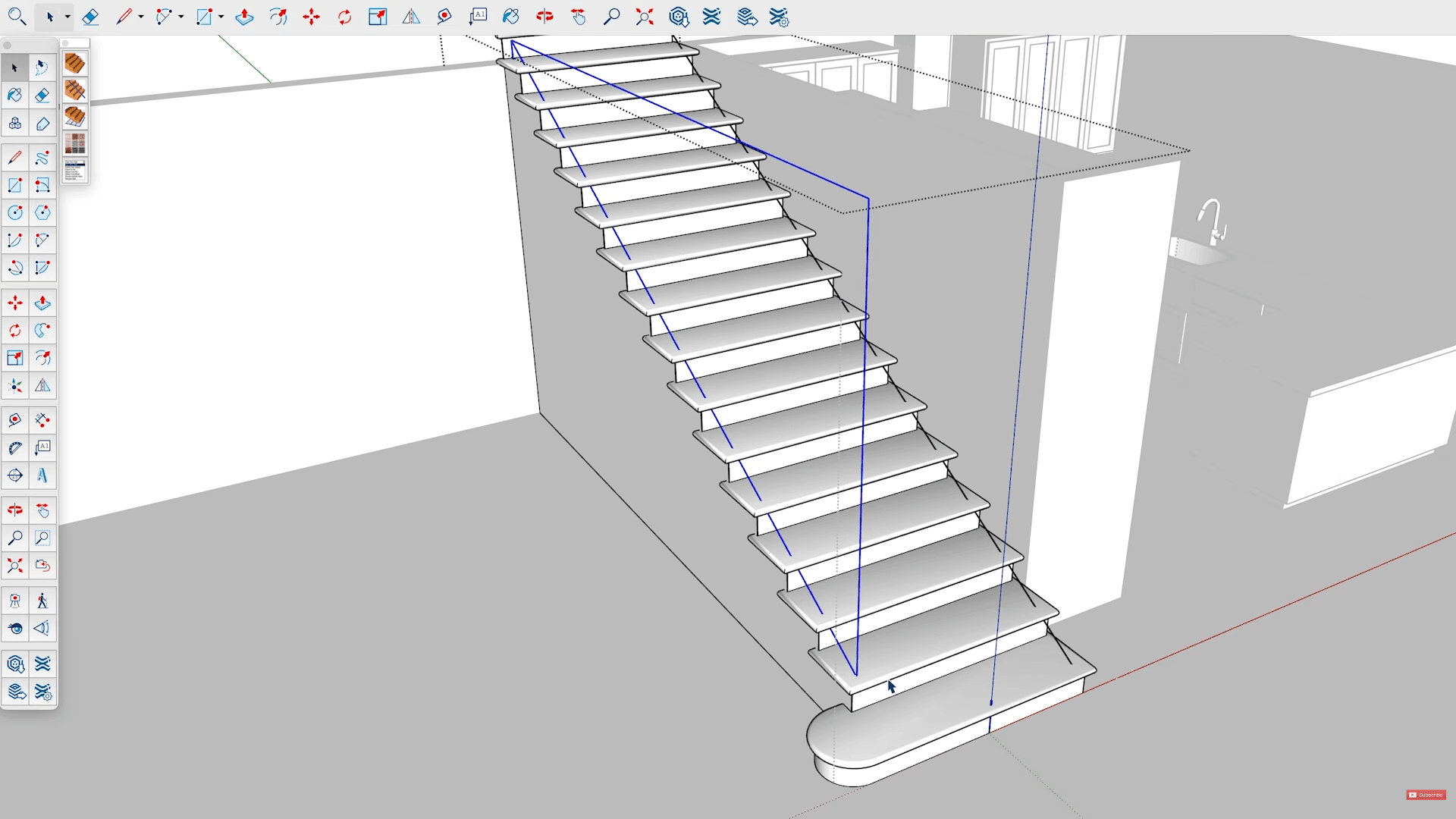
SketchUp Free is an online modeling tool for architectural, interior, and furniture concepts. Its push/pull workflow turns flat outlines into three-dimensional spaces quickly. The free plan includes 10 GB of cloud storage and lets users download SKP, STL, and watermarked PNG files, but it is limited to non-commercial use. Desktop applications, extensions, LayOut, and additional exchange formats require a paid plan.
(image source: SketchUp School)
⭐️Core Features
- Push/pull modeling: Draw a flat outline with lines and rectangles, use inference snapping and numeric input to establish alignment and dimensions, then use Push/Pull to turn the profile into a three-dimensional form.
- Groups and components: Groups keep separate structures from sticking together, while components manage repeated objects that need to remain consistent or update together.
- 3D Warehouse model library: Ready-made furniture, doors, windows, and architectural elements can be placed directly into a scene instead of being modeled from scratch.
✅Pros
- Architectural concepts take shape quickly: Once a boundary is drawn, it can be given height and volume immediately, making spatial proportions easy to explore.
- Direct geometry editing is intuitive: Faces, edges, and masses can be moved, offset, or pushed and pulled, with layout changes visible straight away.
- Scenes are quick to populate: Components and the 3D Warehouse provide plenty of reusable models for developing architectural and interior scenes.
❌Cons
- The free version is limited to non-commercial use: SketchUp Free cannot be used commercially and does not include LayOut or some model-exchange formats.
- The web version does not support extensions: Some advanced modeling capabilities depend on extensions, which cannot be installed in the free browser version.
- Model structure requires active organization: Failing to create groups and components early can cause geometry to stick together, while too many high-detail models can reduce performance.
👍🏻Best For
SketchUp Free is best for individuals who want an intuitive way to communicate architectural, interior, or furniture ideas, especially in non-commercial concept work involving massing and spatial proportions. A lighter interior-planning tool is more direct when the main task is arranging furniture and comparing layouts.
Sweet Home 3D (Online and Desktop Floor Planning and Furniture Layout)
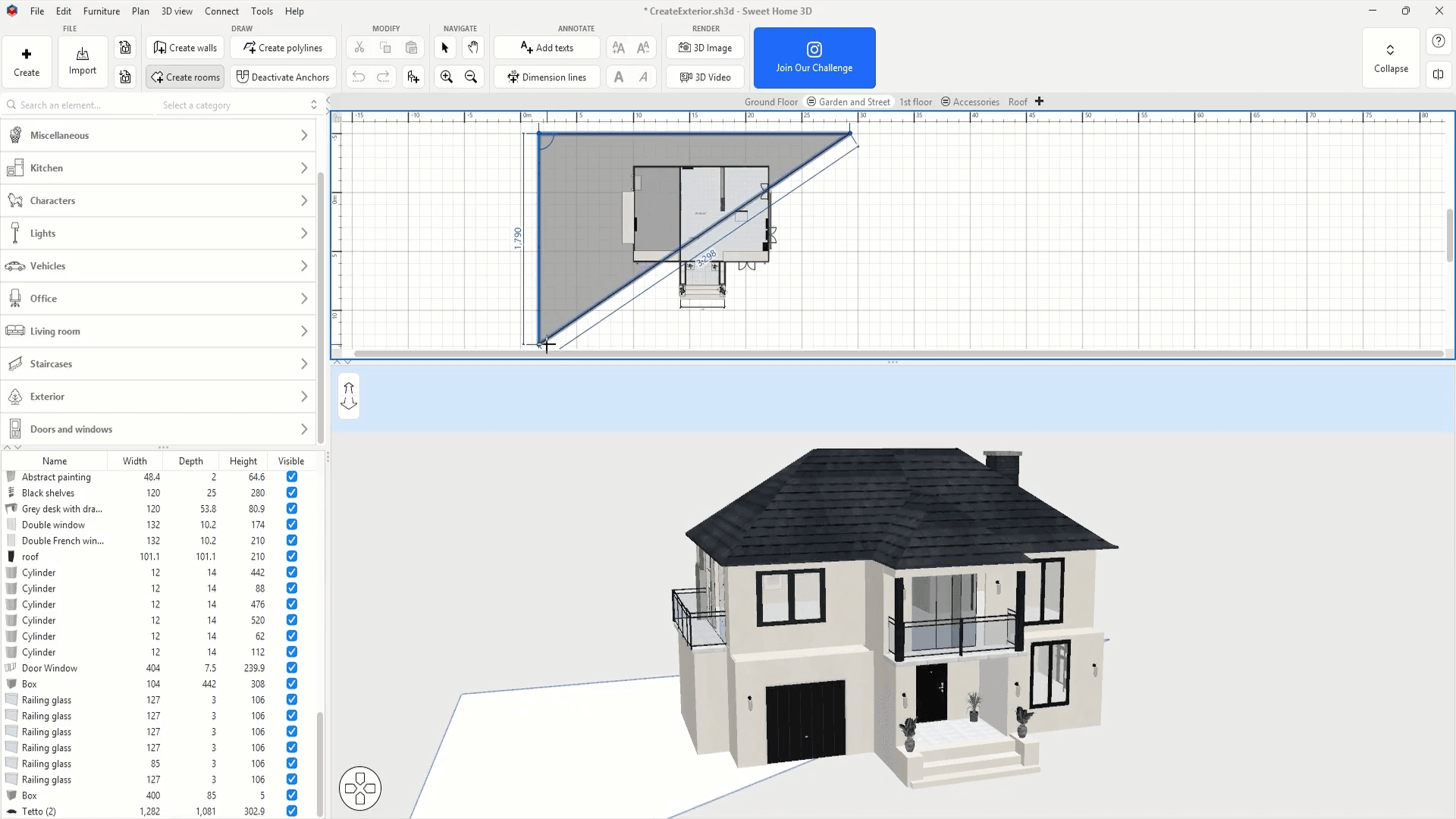
Sweet Home 3D is an interior planner for drawing rooms, arranging furniture, and reviewing the layout in a synchronized 3D view. The free, open-source desktop version supports commercial use. Paid Store versions add more preinstalled furniture and textures, along with automatic updates.
(image source: Sweet Home 3D official)
⭐️Core Features
- Create floor plans at real dimensions: Import an existing floor plan as a reference, calibrate its scale, and draw walls, rooms, doors, and windows to establish accurate boundaries for furniture placement.
- Place furniture and adjust the layout: Drag furniture from the catalog and change its dimensions, position, and orientation. The desktop version can also import additional models into the furniture library.
- Review and present the plan in linked views: Edit the layout in 2D while evaluating the result in a 3D view or virtual visit. The desktop application can also generate images and videos, print floor plans, or export an OBJ scene.
✅Pros
- The workflow follows the logic of interior planning: Floor-plan creation and furniture placement map directly to the task, so the layout develops in a natural sequence.
- 2D and 3D views complement each other: The plan view makes positions and footprints easy to check, while the 3D preview shows height and spatial relationships more clearly.
- The free desktop version covers the full workflow: Floor-plan creation, furniture placement, file saving, and presentation output are all available for free, with editable source files stored locally.
❌Cons
- Custom forms depend on external models: Furniture can be resized and restyled, but unusual cabinetry, nonstandard furniture, and complex architectural forms usually need to be created in another modeling tool.
- Library models still need to be checked: Furniture from the catalog may not match the real product exactly, so its dimensions and orientation should be verified. Highly detailed models can also place unnecessary load on a scene.
- The web version has fewer features: Model import, scene export, and some image and video tools are concentrated in the desktop application, which is the better choice when you need to expand the furniture library or continue processing a scene.
👍🏻Best For
Sweet Home 3D is best for individuals preparing to renovate, move, or rearrange a room, as well as anyone who needs to communicate an interior layout quickly. It is especially useful for checking furniture dimensions and spatial relationships. Creating custom furniture or architectural geometry calls for a more flexible modeling application.
Game Models and Character Creation
These tools place more emphasis on visual style, textures, animation, and character structure. They are designed for game models, avatars, and other stylized 3D work.Beyond the tools covered below, you can also find some AI tools for creating game models.
Blockbench (Low-Poly and Minecraft Model Editor)
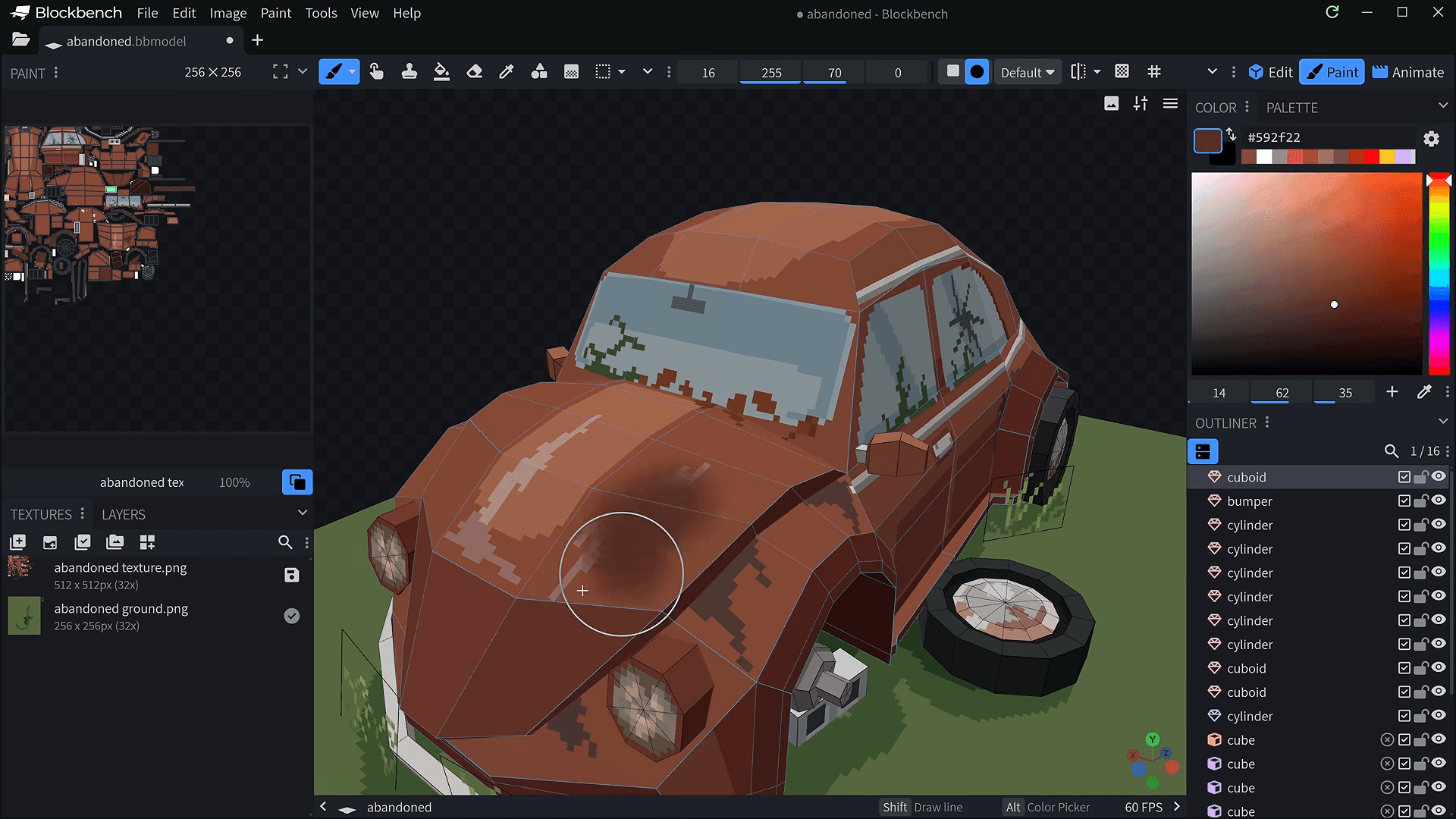
Blockbench is an editor for low-poly models and pixel textures, with modeling, texture painting, and animation brought together in one workspace. It is particularly well suited to Minecraft and retro-style game content. Both the web and desktop versions are free, and original work can be used commercially.
(image source: Blockbench official)
⭐️Core Features
- Format-specific workflows: The selected format determines the available geometry, animation, and export features, helping models conform to targets such as Minecraft.
- Low-poly modeling and pixel texturing: Shape a model with cubes or free-form meshes, edit UVs, paint pixel textures, and inspect the result in 3D within the same workspace.
- Bones and keyframe animation: Create movement with bones and keyframes; some formats also support weight painting and mesh deformation.
✅Pros
- Modeling and texturing are closely connected: Geometry and surface patterns can be revised together, which works particularly well for models that rely on silhouette and hand-painted textures for detail.
- Built around Minecraft workflows: Dedicated formats organize tools around the structure and export requirements of different Minecraft models, reducing manual conversion and adjustment.
- Original designs are not tied to a template: Geometry and textures can be built from scratch for characters, props, and scene objects.
❌Cons
- The selected format determines which features are available: Supported geometry, rotations, animation, and export options vary between formats. Choosing the wrong one can require format conversion or structural changes to the model.
- Complex production needs a broader toolset: Detailed sculpting, realistic materials, and full-scene rendering fall outside Blockbench's main scope and are better handled in a comprehensive 3D suite.
- The editor preview is not the final result: After a model enters a game or engine, its bone hierarchy, texture filtering, transparent materials, and animation settings still need to be checked.
👍🏻Best For
Blockbench is best for Minecraft creators and independent game developers producing low-poly, blocky, or pixel-textured models. It is particularly useful when modeling, texturing, and basic animation need to happen in one workspace. Realistic sculpting, complex materials, and complete scenes call for a more comprehensive 3D application.
MagicaVoxel (Free Desktop Editor for Voxel Scenes and Artwork)
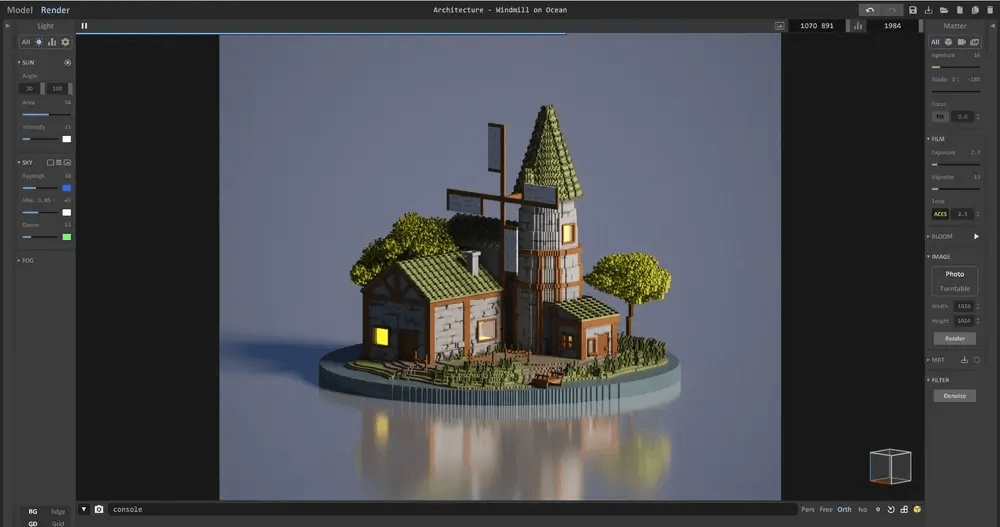
MagicaVoxel is a free voxel-art editor for building 3D forms by adding, removing, and coloring small cubes. It is well suited to voxel-style buildings, props, and scenes, and its materials, lighting, and path-traced renderer can take them through to finished artwork. The software is free but not open source, and original work can be used commercially.
(image source: MagicaVoxel Wiki)
⭐️Core Features
- Voxel modeling and coloring: Add, remove, mirror, and color voxels, developing the silhouette and basic palette at the same time.
- Object composition and scene building: Models can remain separate objects that are easy to copy and position, allowing a scene to grow through the reuse of existing work.
- Materials, lighting, and rendering: Assign metal, glass, emissive, and other effects to different areas, then combine cameras, lighting, and path tracing to create presentation images.
✅Pros
- Creative feedback is immediate: Changes to shape and color appear directly on the model, making it easy to judge form and palette while you work.
- A consistent visual style is easy to maintain: A shared palette and consistent voxel scale help separate models feel as though they belong in the same scene.
- Voxel illustrations can be finished in the same application: Materials, composition, and lighting can all be developed after modeling to produce scene images ready for presentation.
❌Cons
- Fine detail and large scenes raise the workload: Curves and small structures require more voxels, while large environments often need to be split into several objects, increasing editing and rendering overhead.
- Meshes and materials need to be rechecked after export: Converting voxels to polygons can produce dense geometry, and metal, transparency, or emissive effects may not transfer completely.
- Platform support is limited: MagicaVoxel currently provides desktop versions for Windows and macOS, with no Linux release.
👍🏻Best For
MagicaVoxel is best for voxel artists and independent game developers creating voxel-style game models or miniature scenes. It can carry a model through to a finished presentation image, while smooth forms, complex characters, and full animation are better handled in Blender or another comprehensive 3D application.
VRoid Studio (Free Desktop Tool for Custom Anime-Style Humanoid Characters)
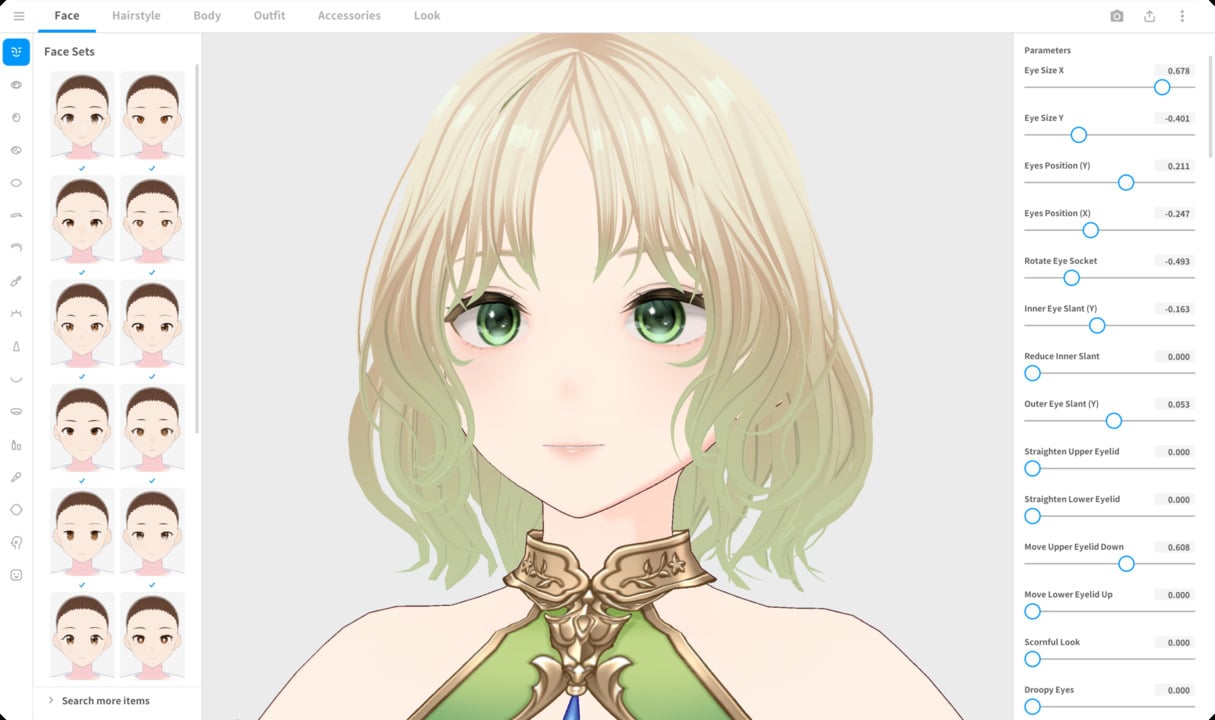
VRoid Studio is a free desktop application for creating anime-style humanoid characters with presets, parameter sliders, and texture painting. A base body, rig, and expression system are already included, giving users a ready-made foundation for an avatar. Characters can be created, saved, and exported for free, and original work can be used commercially; external content remains subject to its own license terms.
(image source: VRoid Studio official)
⭐️Core Features
- Build characters from a humanoid preset: Start with a base model, then adjust facial features and body proportions to define the character's silhouette and overall style.
- Customize hairstyles and clothing: Design hair with strand tools, adjust clothing templates, and paint textures to develop the final appearance.
- Set expressions and export the character: Adjust facial expressions and hair dynamics, preview the result, then export in VRM format for compatible avatar, animation, or game tools.
✅Pros
- Provides a complete humanoid foundation: The base body, rig, and expression system are already included, so users can move directly into visual customization.
- Texture painting can transform the design: Hand-painted face, clothing, and hair textures can substantially change the character's appearance, making VRoid Studio a good fit for creators with 2D art skills.
- Connects easily to avatar applications: VRM packages the model, rig, expressions, and related data for use across compatible software.
❌Cons
- Unusual body types and clothing can exceed the templates: The parameters and templates center on a predefined humanoid structure, so distinctive anatomy, custom clothing geometry, and non-humanoid characters require another modeling tool.
- Distinctive characters require artistic input: Default presets can produce similar-looking results, and a recognizable design usually takes additional work on textures, hair, and clothing.
- Exported files do not retain every customization parameter: A VRM file can be used in other applications, but it cannot be restored to a .vroid file with all of its character-creation settings intact. Keep the original editable file.
👍🏻Best For
VRoid Studio is best for VTubers, original-character artists, and independent developers creating anime-style avatars. It provides a fast route to a rigged humanoid character with expressions. Fully custom anatomy, complex garments, and realistic characters require a comprehensive modeling suite.
In Shorts
The best free 3D modeling software is the one that fits your workflow, project type, and usage needs. Before choosing, check commercial-use rights, privacy, usage limits, and export options to make sure the free plan supports your full workflow. For users who want a faster starting point, Triverse AI can turn an image or text prompt into a 3D model ready for further editing.
Frequently Asked Questions about Free 3D Modeling Software
How Can I Start 3D Modeling for Free?
The best free 3D modeling software is the one that fits your workflow, project type, and usage needs. Before choosing, check commercial-use rights, privacy, usage limits, and export options to make sure the free plan supports your full workflow. For users who want a faster starting point, Triverse AI can turn an image or text prompt into a 3D model ready for further editing.
What Is the Best Free 3D Modeling Software?
No single tool is best for every task. Blender covers a complete 3D production workflow, FreeCAD is stronger for parametric parts, Tinkercad suits simple models, and Triverse AI can quickly turn an image or text prompt into a starter model.
Can Free 3D Modeling Software Be Used Commercially?
It depends on the license. Blender, FreeCAD, Triverse AI, and Blockbench allow commercial use of original work. SketchUp Free and Onshape Free are limited to non-commercial use, while Tinkercad's overall commercial-use terms are less explicit.
Which Free Software Is Best for 3D Printing?
Tinkercad works well for simple printable parts, FreeCAD is better for dimensionally precise components that need repeated revisions, and Blender is more suitable for organic forms and model refinement.
Are There Any Online 3D Modeling Tools That Require No Download?
Yes. Triverse AI all run in a web browser, although their free options differ in credits, file visibility, and commercial-use conditions.
Is FreeCAD Really Completely Free?
Yes. FreeCAD is fully free and open source, supports private local file storage, and allows user-created designs to be used commercially.
Is SketchUp Still Free?
Yes. SketchUp Free is available in a web browser, but it is limited to non-commercial use. The desktop application, extensions, LayOut, and commercial licensing require a paid plan.